Apple Pay Subscriptions Explained for Shopify Stores
Learn how Apple Pay subscriptions work, from merchant tokens to Shopify limits, plus UX and setup tips for RecurX merchants.
Learn how Apple Pay subscriptions work, from merchant tokens to Shopify limits, plus UX and setup tips for RecurX merchants.
A shopper lands on your product page, chooses Subscribe & Save, taps the Apple Pay button, and assumes the whole subscription is now “inside Apple.” That assumption feels natural. The checkout was fast, the wallet looked familiar, and there was no long card form to fill out.
Then support tickets start. A customer cancels something in iPhone settings but keeps getting billed. Another replaces their phone and worries the renewal will fail. A third asks whether Apple or your store controls the subscription. These are the moments when Apple Pay subscriptions stop being a checkout button question and become an operations question.
For Shopify merchants, that distinction matters more than most guides admit. Apple Pay can support recurring payments natively, but that doesn't mean Apple becomes the merchant, the subscription app, or the cancellation owner. If you sell subscriptions for coffee, supplements, skincare, or pet products, you need to know what Apple Pay is doing in the background and where Shopify's own subscription rules shape the customer experience.
Table of Contents
- Introduction to Apple Pay Subscriptions for Modern Shoppers
- What Apple Pay Subscriptions Really Mean
- How Merchant Tokens and Recurring Payment Flows Work
- Apple Pay Subscriptions Versus Apple Billed Subscriptions
- Shopify and RecurX Realities for Apple Pay Recurring Payments
- Implementing Apple Pay Subscriptions With Better UX and Fewer Failures
- Choosing the Right Payment Mix and Next Steps for Your Store
Introduction to Apple Pay Subscriptions for Modern Shoppers
The customer experience often looks simple. Tap Apple Pay once. Approve with Face ID or Touch ID. Receive the first order. Expect future renewals to happen.
The merchant side is less obvious. The first Apple Pay approval can authorize a recurring relationship, but the subscription still needs a billing system, renewal rules, order creation, payment recovery, and a place where the customer can manage changes. Apple Pay is one part of that stack.
The checkout moment shoppers think they understand
A customer buying a monthly coffee refill might believe Apple Pay itself is the subscription. That's not quite right. Apple Pay is the payment method and authorization layer, while your subscription setup decides when renewals happen, what products ship, and how skips, pauses, and swaps work.
That gap explains why generic support articles often leave merchants stuck. They show customers where to look in Wallet or iPhone settings, but they don't explain who owns the billing relationship.
Customers usually care about one thing: “If I want this to stop, where do I cancel?” If your store doesn't answer that clearly, trust drops fast.
Why this matters on Shopify
Shopify merchants have to think about more than wallet convenience. You also have to think about:
- Checkout ownership: Shopify controls key parts of checkout behavior, so Apple Pay has to fit into Shopify's allowed payment and subscription flows.
- Renewal reliability: A smooth first payment doesn't guarantee smooth off-session renewals later.
- Support clarity: Your help center needs to explain whether the subscription is merchant-billed or Apple-billed.
- Retention workflows: Failed renewal recovery, payment updates, and customer self-service still sit with your stack, not with Apple Pay alone.
Where confusion usually starts
Most confusion comes from one sentence people never hear plainly enough: paying with Apple Pay is not the same thing as subscribing through Apple's own billing system.
That single distinction affects cancellation instructions, token handling, and support scripts. If you get it right early, customers understand what they approved. If you get it wrong, they assume Apple owns a subscription your store controls.
What Apple Pay Subscriptions Really Mean
Apple Pay works best as a mental model when you treat it like a secure keychain, not a subscription manager. It stores and presents payment credentials safely. Your store and subscription system handle the recurring relationship.
Apple's merchant documentation says Apple Pay supports recurring payments natively, including subscriptions with monthly or annual intervals, trial billing cycles, and merchant-managed recurring payment requests in its Apple Pay merchant integration guide. That matters because recurring billing isn't a workaround. It's a built-in payment type.
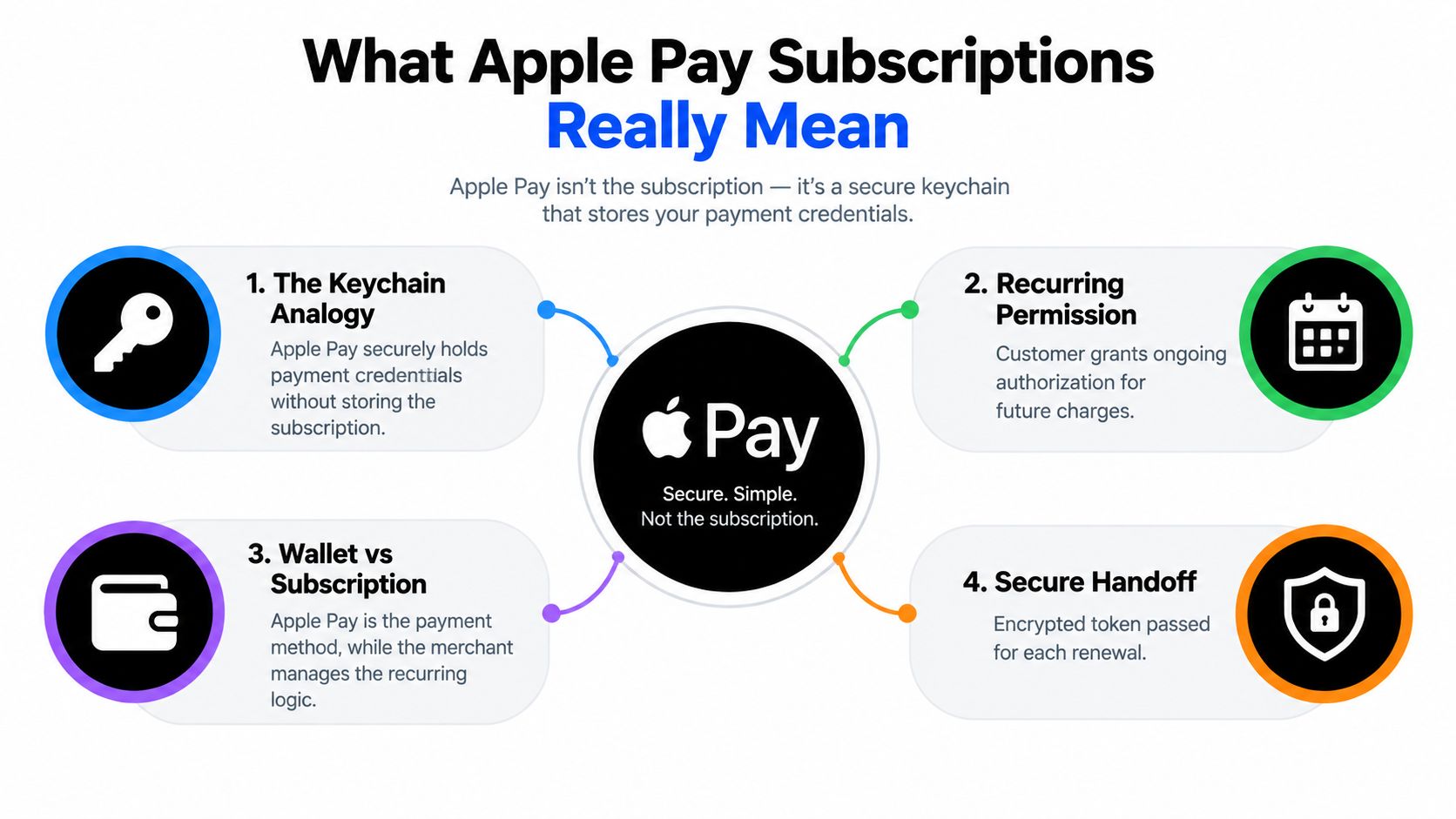
Apple Pay is the key, not the lock
Think of a front door. The subscription is the ongoing agreement that says your customer should receive a product every month. Apple Pay is the secure key used for payment approval.
Those aren't the same thing.
If a customer starts a weekly supplement plan and chooses Apple Pay, several things are happening at once:
- The customer approves the initial payment.
- The checkout signals that future recurring charges are part of the agreement.
- Your billing system records the subscription terms.
- Future charges follow the recurring setup created at the start.
Apple Pay helps with the payment authorization. It doesn't decide shipment frequency, reorder logic, or customer portal rules.
Why this changes how merchants should explain it
Many merchants describe Apple Pay as if it were only useful for one-time mobile wallet checkout. That undersells it. Apple has supported recurring billing patterns for years, including trial cycles and merchant-managed recurring requests, so Apple Pay subscriptions belong in the same strategic conversation as saved cards.
What you should tell your team is simpler:
- Apple Pay starts the recurring billing permission
- Your store remains the biller
- Your subscription system runs the schedule
- Your support team still handles plan changes and cancellations
Practical rule: If your customer bought a subscription on your storefront using Apple Pay, don't assume Apple owns the subscription. In many cases, your store does.
What this means for customer expectations
Customers often see the Apple Pay button and expect “one tap forever.” The first part is true. The second part depends on setup, token handling, network support, and your renewal flow.
That's why the cleanest education line is this: Apple Pay can power recurring payments, but it doesn't replace subscription infrastructure. It works with it.
How Merchant Tokens and Recurring Payment Flows Work
The hard part of Apple Pay subscriptions isn't the first charge. It's everything that happens after the customer leaves checkout.
Apple says recurring Apple Pay payments use merchant tokens, also called MPANs, which are non-device-specific tokens for recurring and merchant-initiated payments in its merchant token documentation. These tokens can continue working across device changes and even after the physical card expires. That's the main reason merchants care about them.
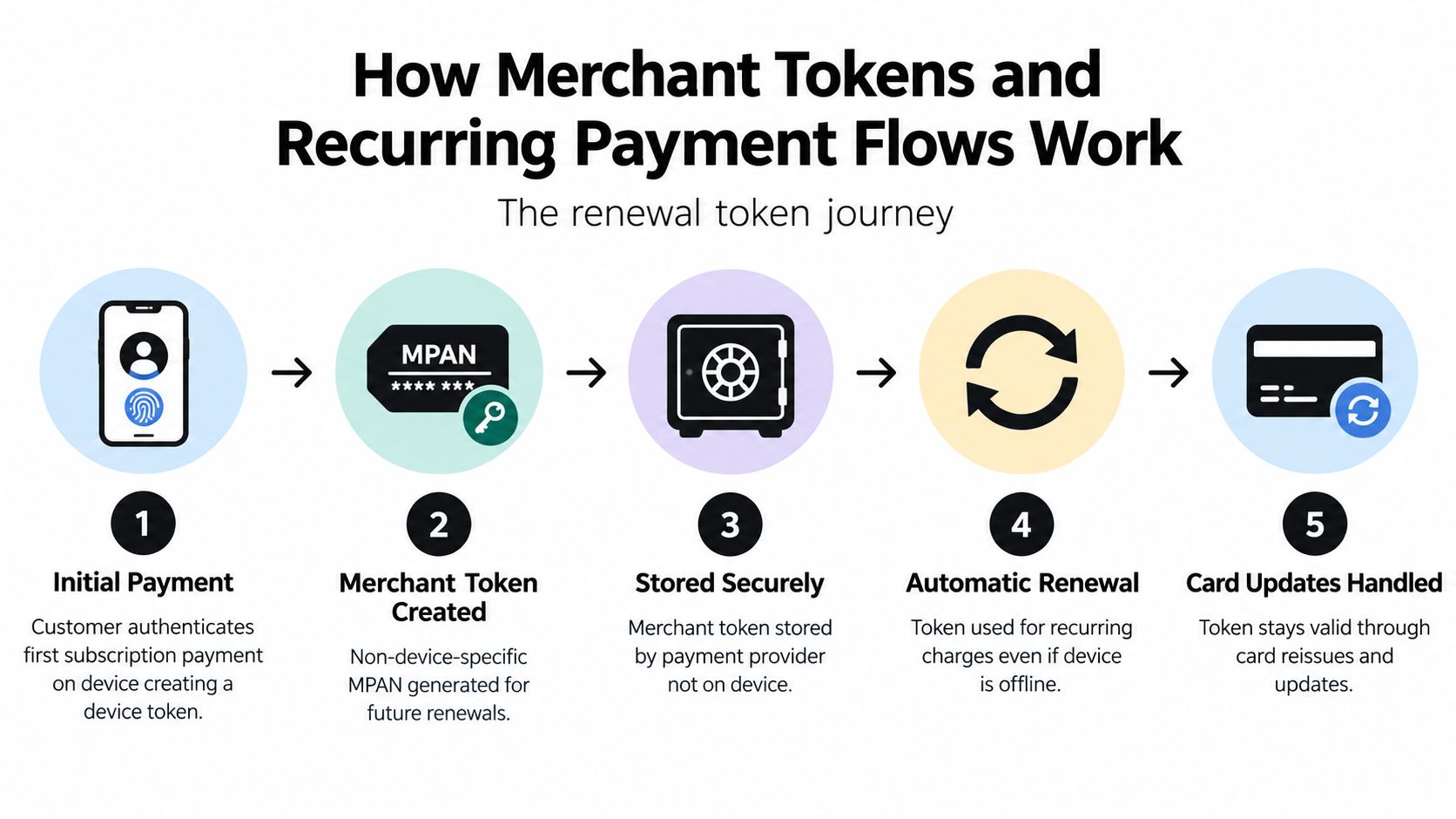
The easiest way to picture a merchant token
A device token is tied closely to the customer's current device session. A merchant token is more like a durable permission slip that the merchant can use for future recurring charges.
That difference matters when real life happens:
- New phone: The customer upgrades devices.
- Reissued card: The bank replaces the plastic after expiry or fraud.
- Off-session renewal: The next order runs while the customer is asleep, at work, or nowhere near the original device.
With the right recurring setup, the subscription doesn't have to behave like a brand-new checkout every month.
Where the first payment does most of the work
The initial Apple Pay session is where the merchant needs to declare the recurring terms correctly. That session is not just about collecting money for order one. It's where the recurring relationship gets framed for later charges.
Here's the basic flow in plain language:
- Customer authorizes the first payment
- The recurring details are included in that first setup
- The payment network may return a merchant token
- The merchant or payment stack stores the token
- Later renewals use the stored token for off-session billing
This is also why developer and operations teams have to coordinate. A glossy checkout button won't fix a weak renewal architecture. If your team is mapping that handoff inside Shopify, this guide on Shopify integrations and API workflows is a useful technical companion.
Later in the flow, the recurring charge no longer looks like a customer tapping a phone. It looks like a merchant-initiated renewal request using the stored credential path established during the original checkout.
Why renewals sometimes break
Merchant tokens improve continuity, but not every payment path is equally durable. Renewal success depends on whether the network supports the merchant-token flow and whether the initial recurring setup was done correctly.
Three failure points show up often:
- Missing recurring context: The first session was processed too much like a one-time payment.
- Fallback behavior: The network doesn't return the merchant token path you expected.
- Weak off-session handling: The later renewal process doesn't use the stored credential information cleanly.
A fast Apple Pay checkout can hide a fragile backend. The subscription only feels simple when the token flow is simple too.
Apple Pay Subscriptions Versus Apple Billed Subscriptions
This is the point most merchants need to explain better than competitors do. A subscription paid with Apple Pay on your storefront is not automatically the same as a subscription billed by Apple.
Apple says users can view and manage recurring and deferred Apple Pay charges such as subscriptions, monthly bills, and automatic reloads, and can revoke authorization in Wallet if needed, according to Apple Pay support documentation. That can mislead shoppers into thinking Wallet management always equals full subscription cancellation. It doesn't.
Two systems that look similar to customers
From the customer's perspective, both experiences involve Apple branding, familiar interfaces, and recurring charges. That visual similarity creates support confusion.
From the merchant's perspective, these are different billing models:
- Merchant billed via Apple Pay: Your store charges the customer using Apple Pay as the payment method.
- Apple billed subscription: Apple is the billing party inside Apple's own subscription ecosystem.
If your customer subscribed on your Shopify storefront, the cancellation path usually lives with the merchant experience, not with Apple's own subscriptions screen.
Merchant Billed vs Apple Billed Recurring Charges
| Aspect | Merchant Billed via Apple Pay | Apple Billed Subscription |
|---|---|---|
| Billing owner | The merchant | Apple |
| Where subscription logic lives | Merchant subscription system | Apple's subscription system |
| Payment method role | Apple Pay is the checkout and payment credential layer | Apple handles billing inside its own ecosystem |
| Where customers often need to cancel | Merchant site or customer portal | Apple subscription management |
| Wallet visibility | Customer may see recurring authorization or related charge details | May appear within Apple-managed billing context |
| Support responsibility | Merchant support team | Apple-managed subscription support path |
What to tell customers clearly
Support teams need wording that removes ambiguity. Something like this works:
If you started the subscription on our store and paid with Apple Pay, Apple Pay was the payment method. Your subscription is still managed by our store unless Apple is listed as the billing provider.
That one sentence can prevent a lot of friction.
For merchants comparing native options with app-based subscription management on Shopify, this breakdown of Shopify native subscriptions vs apps helps frame where recurring logic lives.
Where cancellation confusion turns into disputes
Customers often assume one of three things:
- Removing a card from Wallet cancels the subscription.
- Canceling something in Apple settings always stops future merchant billing.
- Any recurring charge associated with Apple branding must be owned by Apple.
Those assumptions are risky. The better merchant experience explains authorization, billing ownership, and the exact cancellation path before the customer ever needs support.
Shopify and RecurX Realities for Apple Pay Recurring Payments
A shopper taps Apple Pay at checkout, sees the familiar Apple interface, and later assumes Apple now manages the subscription. On Shopify, that assumption often causes the trouble.
For merchant-billed subscriptions, Apple Pay is usually the front-door payment method, not the billing owner. Shopify still controls the checkout environment, the subscription app still controls the recurring schedule, and your team still needs a clear place for customers to update or cancel. Apple's broad payment reach matters, but it does not change those platform boundaries.
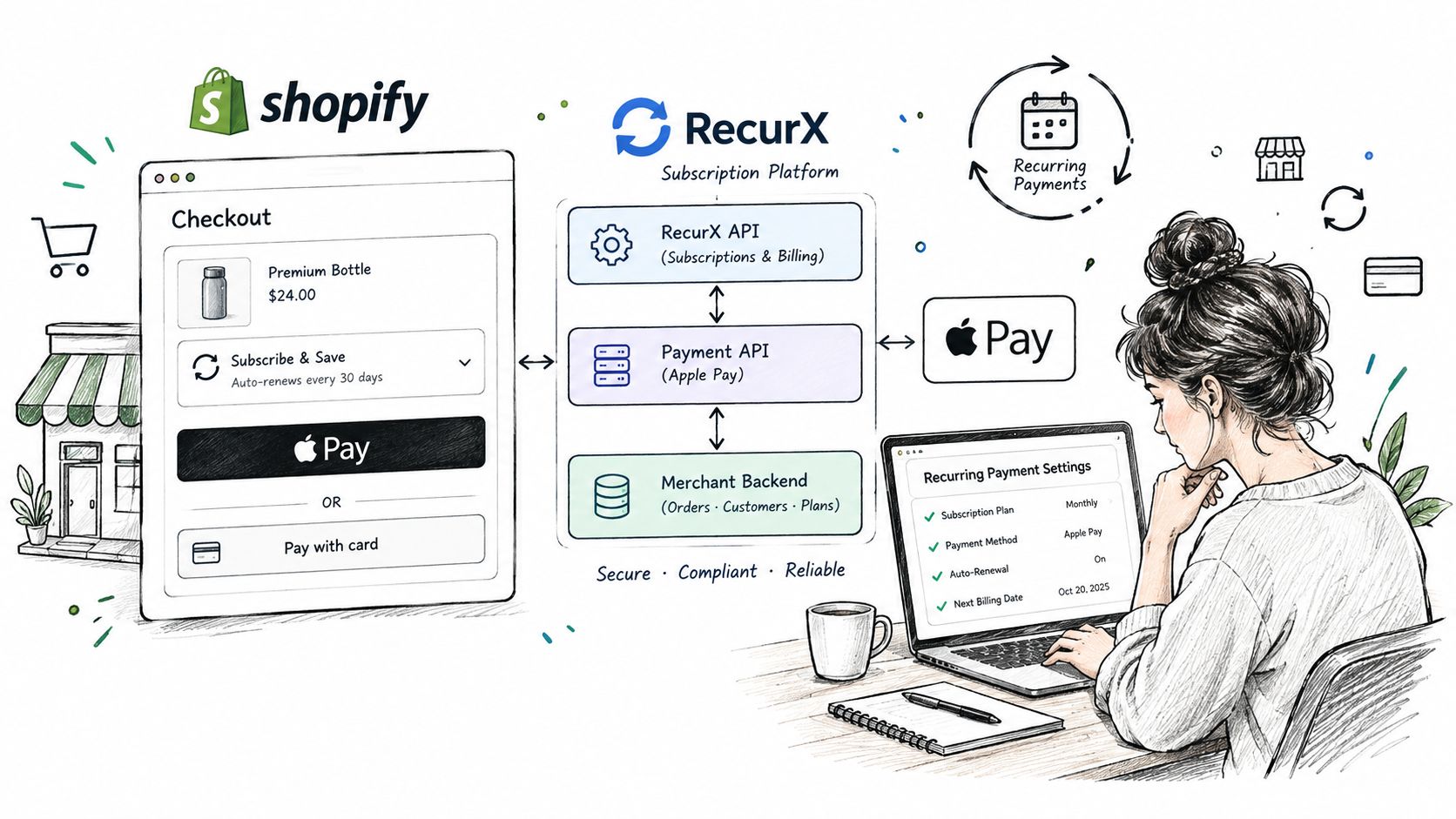
What Shopify merchants should expect
Shopify merchants need to treat Apple Pay recurring payments as part of a larger subscription system.
The first charge happens through Shopify-supported checkout options. After that, the recurring relationship depends on whether your subscription setup can store and reuse the payment credential path correctly. In plain terms, the first tap is only the start. The subscription app, customer account tools, and payment recovery flow all have to keep working after the initial order is placed.
That creates a few practical requirements:
- Checkout support: Apple Pay has to appear in the parts of Shopify checkout where it is supported.
- Subscription compatibility: Your recurring billing logic must run through a Shopify-compatible subscription setup, not a disconnected workaround.
- Customer self-service: Subscribers need a reliable place to pause, skip, swap, cancel, or update payment details.
- Operations and reporting: Renewal orders need to flow into fulfillment, support, and analytics without manual patchwork.
A good test is simple. If a customer asks, “Where do I cancel this?”, your store should have one clear answer.
Where RecurX fits
RecurX is a Shopify-native subscription app, so it works inside Shopify's checkout and admin structure rather than around it. That matters for Apple Pay because recurring billing is never just a wallet button. You also need subscription rules, customer account management, failed-payment handling, and reporting that match Shopify's actual workflow.
For example, a shopper might start a subscription with Apple Pay on day one, skip next month's order from their portal, then update payment details after a failed renewal. Those moments belong to the merchant subscription system. RecurX covers customer self-service, dunning, subscription analytics, and account-based plan management inside that flow.
If your team also needs better attribution after the order is placed, it helps to understand how tracks Shopify orders so acquisition and retention reporting can connect back to subscription revenue.
The operational reality behind the storefront
The confusing part competitors often skip is cancellation ownership.
If the subscription began on your Shopify store and Apple is not the billing provider, removing a card from Apple Wallet does not reliably cancel the subscription in your merchant system. The customer usually needs to cancel through your store's portal or support path. That is why support scripts, account pages, and order emails need to say who bills the subscription and where changes happen.
Merchants should prepare for four recurring jobs:
- Offer payment choice: Some subscribers will prefer Apple Pay, while others will stay with cards.
- Handle failed renewals: Declines still require retries, reminders, and a path to update payment details.
- Maintain a working portal: Subscribers need one place to manage the subscription relationship.
- Train support teams: Agents need clear answers for customers who say they “canceled in Apple.”
Stores that get this right reduce confusion before it turns into tickets or disputes. The goal is not just letting customers pay with Apple Pay. The goal is making it obvious who manages the subscription after that first tap.
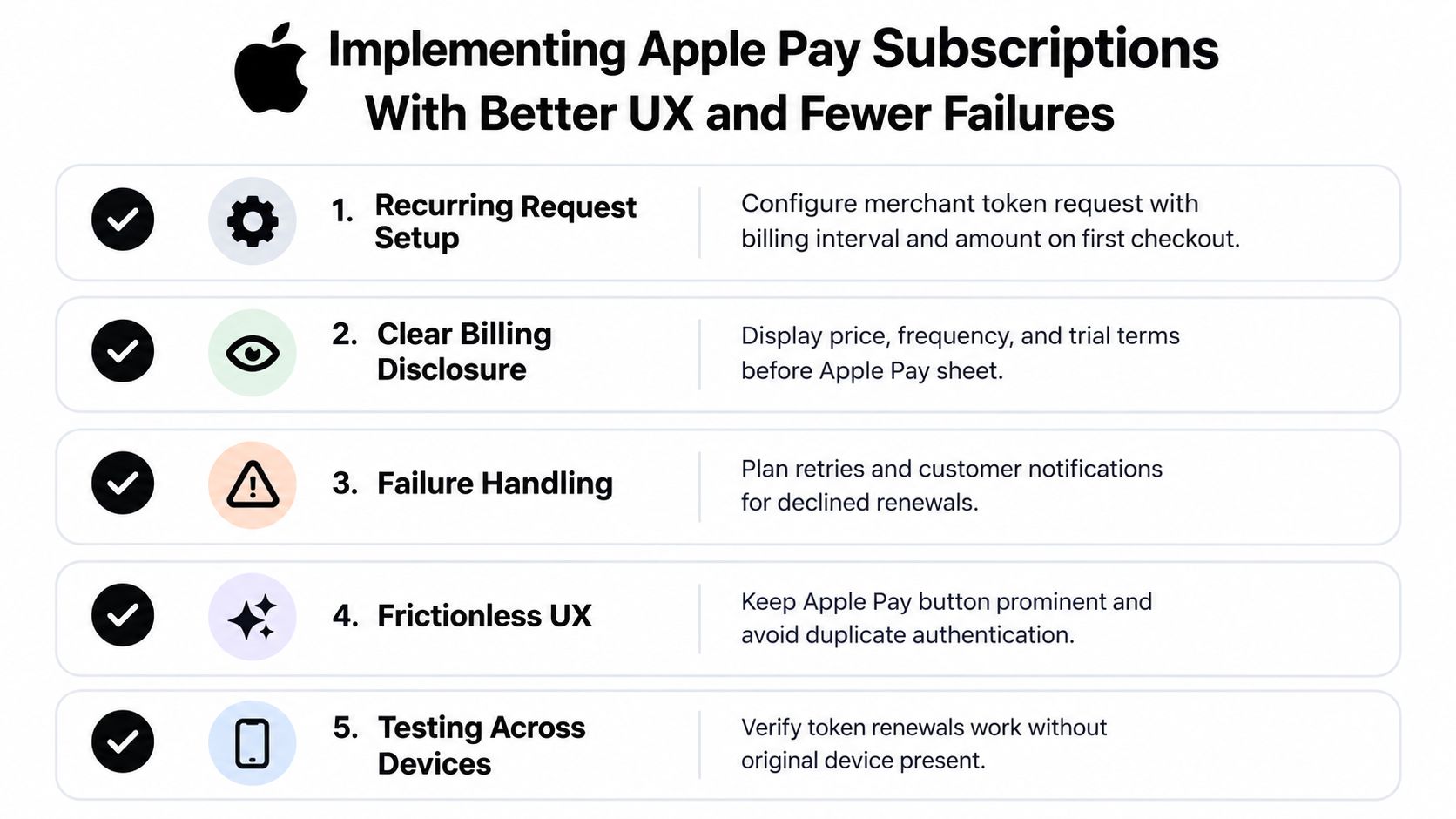
Implementing Apple Pay Subscriptions With Better UX and Fewer Failures
The strongest Apple Pay subscription flows feel obvious to customers because the merchant did the technical and UX work upfront.
Apple's web and iOS documentation says recurring flows use a dedicated recurring payment request object, and that merchant-token availability depends on payment network support, with fallback behavior when merchant tokens aren't returned, as described in Apple Pay recurring payment requests. That means implementation quality affects reliability from day one.
What to get right before launch
Most subscription problems start long before the first failed renewal. They start when the first checkout is vague.
Use this pre-launch checklist:
- Show the billing terms clearly: Display price, interval, and any trial terms before the Apple Pay sheet opens.
- Pass recurring details correctly: Make sure the first payment session is configured as a recurring relationship, not a disguised one-time payment.
- Store the right credential path: Your payment stack needs to retain the token and related references needed for later charges.
- Plan for fallback behavior: Some payment networks won't behave the same way, so test the scenarios your processor supports.
- Prepare off-session handling: Renewals need their own logic, not just a copy of initial checkout logic.
UX copy that reduces confusion
The best UX work here is plain language. Customers shouldn't have to guess what they approved.
Add visible messaging such as:
- “Today you'll pay for your first order.”
- “Future orders will renew automatically until you cancel.”
- “Manage your subscription in your account portal.”
That copy does more than improve clarity. It also reduces the chance that a shopper later thinks Apple settings are the only place to stop billing.
Support shortcut: Put cancellation instructions in the order confirmation and subscription welcome emails, not just in your FAQ.
Testing scenarios merchants often skip
Teams usually test successful checkout. They often skip renewal edge cases.
Run practical tests for:
- Device independence: Confirm renewals can continue without the original phone present.
- Customer account changes: Test payment update paths and portal visibility.
- Decline recovery: Make sure failed renewals trigger customer-friendly recovery actions.
- Checkout presentation: Check that Apple Pay appears cleanly without competing messages or duplicated calls to action.
If your team is refining this inside Shopify, this guide to Shopify checkout customization is a helpful next read for aligning payment UX with subscription conversion.
Choosing the Right Payment Mix and Next Steps for Your Store
Apple Pay deserves a place in many subscription strategies, but it usually works best as part of a broader payment mix rather than as the only path.
Apple reported more than 1 billion paid subscriptions across its services in 2024, up from 935 million in early 2023, with later reporting citing 1.5 billion paid subscriptions by mid-2026, and said in January 2026 that Apple Pay had eliminated well over $1 billion in fraud globally and generated more than $100 billion in incremental merchant sales globally, according to Apple's 2025 record-breaking year for Services announcement. The same reporting also points to a very large Apple Pay user base, which is why the payment method matters commercially for merchants.
When Apple Pay should be prominent
Apple Pay is a strong fit when your store serves shoppers who already expect fast wallet checkout and when your subscription offer is simple enough to explain clearly at the point of purchase.
Promote it more aggressively when:
- Mobile traffic is strong: Wallet-first behavior tends to matter most on phones.
- The subscription offer is straightforward: Monthly or annual plans are easier to message clearly.
- Your support team is ready: Customers need accurate answers about billing ownership and cancellation.
When cards on file still matter
Apple Pay doesn't replace every recurring payment need. Standard saved cards still matter when wallet support varies, when some customer segments prefer traditional checkout, or when your payment stack handles certain renewal scenarios more predictably through card-first flows.
A practical approach is to keep both available, then compare outcomes using your own subscription metrics:
- MRR trends
- Churn by reason
- Payment recovery performance
- Customer support themes tied to cancellation or billing confusion
The next actions that actually help
If you're evaluating Apple Pay subscriptions for Shopify, start with three concrete moves:
- Audit your checkout messaging so customers know who bills the subscription.
- Test your recurring flow across the payment paths your stack supports.
- Make sure your customer portal and support scripts explain cancellation in plain language.
Merchants don't need more vague “wallet optimization” advice. They need a recurring billing setup that customers understand and a renewal system that keeps working after the first tap.
If you want that recurring layer to live cleanly inside Shopify, RecurX gives merchants tools to run subscriptions, customer self-service, payment recovery, and analytics in one Shopify-native workflow. It's a practical fit when you want Apple Pay to be one payment option inside a clearer subscription system, not a source of customer confusion.
apple pay subscriptions · Shopify subscriptions · recurring payments · Apple Pay checkout · RecurX
Keep reading
- How to Set Up Recurring Payments on ShopifyLearn how to set up recurring payments on Shopify the right way. Covers gateways, tokenization, dunning, retries, and monitoring MRR and churn.
- Shopify Subscription Theme Explained and How to ChooseLearn what a Shopify subscription theme is, how it works with apps like RecurX, and how to choose a Shopify subscription theme that converts.
- Shopify Subscription Template Setup Made SimpleLearn how to implement and customize your Shopify subscription template with RecurX widgets, theme matching, and QA tips for higher conversions.
Start growing recurring revenue on Shopify
RecurX has a free-forever plan and zero transaction fees on every tier. Install in minutes.
Install RecurX free →