Shopify Integrations API Reference Guide
Master the Shopify integrations API with this reference guide. Explore GraphQL architecture, webhooks, auth, and subscription migration strategies.
Master the Shopify integrations API with this reference guide. Explore GraphQL architecture, webhooks, auth, and subscription migration strategies.
The popular advice is simple: connect your app to Shopify, authenticate it, subscribe to a few webhooks, and move on. That approach works for a prototype, but it fails subscription businesses that need checkout, customer accounts, billing recovery, catalog data, and analytics to remain dependable while Shopify changes the platform beneath them.
A durable Shopify integrations API strategy treats integration as an operating discipline. Your team needs version control, query-cost management, authenticated event handling, deletion workflows, migration plans, and an explicit decision about which subscription capabilities should remain native to Shopify. The hard problem isn't making the first API call. It's keeping that call, and every workflow around it, safe through deprecations and platform evolution.
Table of Contents
- The Reality of Modern Shopify API Maintenance
- GraphQL Architecture and Versioned Endpoints
- Session Token Authentication for Embedded Apps
- Navigating GraphQL Rate Limits and Query Costs
- Webhook Subscriptions and HMAC Validation
- GDPR Compliance and Data Deletion Endpoints
- Architecting Native Subscription Workflows
- Migration Strategies for Subscription Apps
- Quick Reference for API Health and Stability
The Reality of Modern Shopify API Maintenance
Shopify integration reliability has become a maintenance problem, not a setup task. Shopify has continued moving developers toward the GraphQL Admin API and away from legacy paths, while its developer documentation records active version changes and breaking platform updates involving checkout APIs and webhook behavior in 2025 and 2026. Those changes matter more to a subscription brand than a routine schema adjustment, because a failed update can affect renewals, customer self-service, payment recovery, or fulfillment synchronization. Shopify's API documentation is the right place to track those changes, but reading it only after production behavior changes is already too late.
A team that builds a Shopify app should assume that platform maintenance is part of the product. That means assigning ownership for API versions, recording the fields and mutations each workflow depends on, testing upgrade candidates before adoption, and maintaining a rollback path. The same discipline applies to a merchant connecting Shopify with a CRM, warehouse, subscription platform, or analytics system. A point-to-point connection can move data today while still creating an operational liability tomorrow.
Practical rule: Treat every Shopify API version as a planned release dependency, not an invisible implementation detail.
The maintenance burden is especially visible in subscriptions. A subscription flow can involve product and variant data before checkout, contract state after purchase, customer-account actions during self-service, and webhooks that notify downstream systems about changes. If those pieces use different assumptions about identifiers, ownership, or timing, support teams end up reconciling records manually.
For a basic introduction to request structure and the older REST model, RapidNative's Shopify API walkthrough can help developers orient themselves. Use that kind of walkthrough as a starting point, not as the final architecture. Modern teams need a GraphQL-first design, pinned versions, observable event processing, and an upgrade calendar.
GraphQL Architecture and Versioned Endpoints
The architectural shift is official. Shopify labels the REST Admin API as a legacy API as of October 1, 2024, while the GraphQL Admin API remains the active path for modern app integrations. Shopify documents versioned GraphQL endpoints including 2025-10 and 2026-07, which shows that teams must plan around a continuing release cadence rather than build against an unchanging endpoint. Shopify's REST Admin API documentation records the legacy status and the current direction.
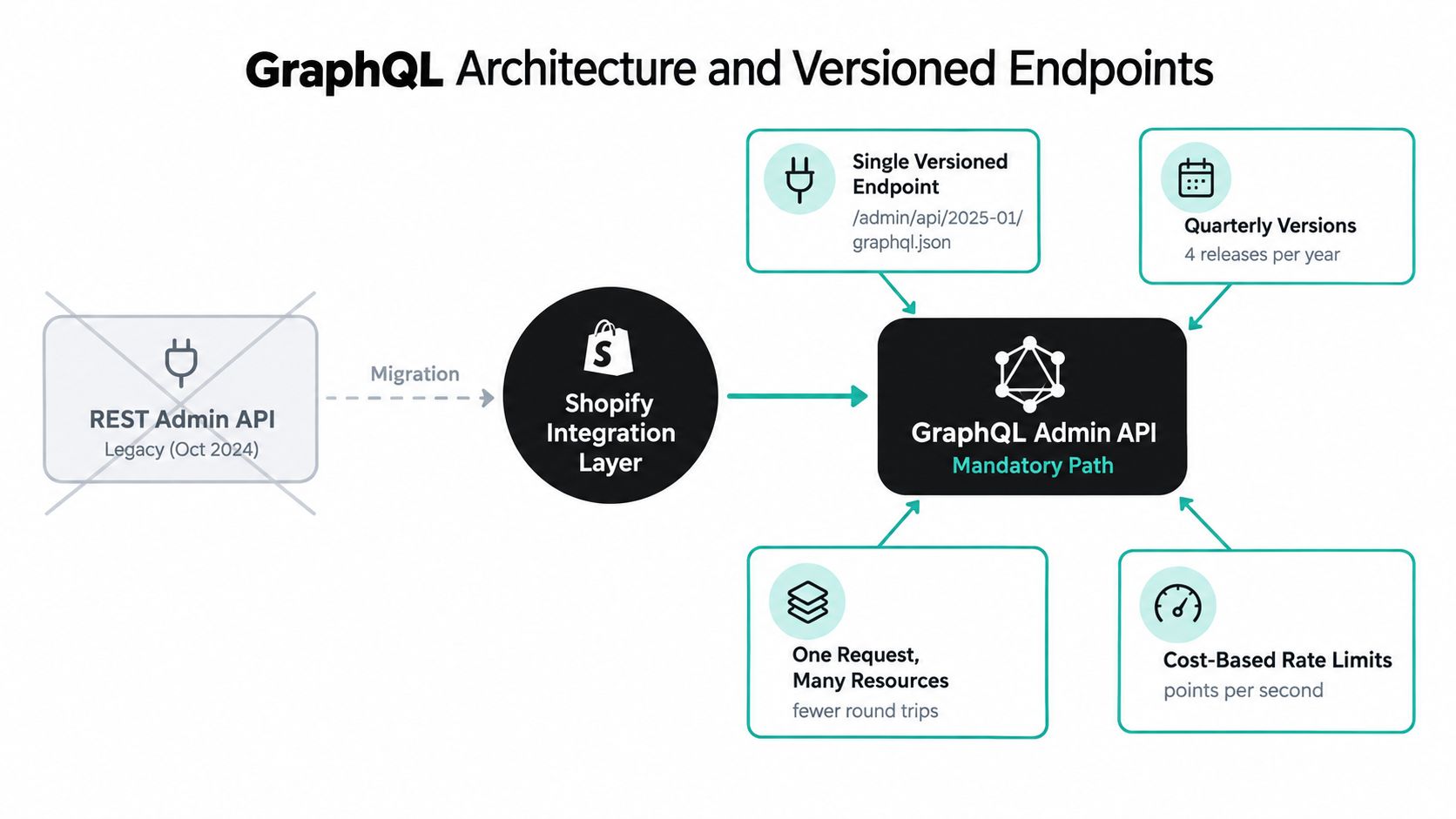
GraphQL changes how an integration designer thinks about data access. Instead of treating products, orders, customers, and subscriptions as isolated resource endpoints, the client requests a shaped selection of fields and relationships. That can reduce overfetching and round trips, especially when a workflow needs nested information such as an order's line items and associated product details. The trade-off is that query design becomes an architectural concern. A broad query may be convenient to write but expensive to execute and difficult to tune later.
Pin versions and own the upgrade cycle
Use a specific versioned endpoint in production. Don't let an application inherit changes from an unreviewed default. Store the chosen version in configuration, expose it in service metadata, and make the version visible in logs so an incident responder can identify the API contract involved.
A useful upgrade process includes:
- Inventory dependencies. Record every query, mutation, webhook topic, scope, and field used by each integration module.
- Review release changes. Compare the current version with the candidate version and identify removed, deprecated, or behaviorally changed operations.
- Run contract tests. Test representative product, order, customer, and subscription states, including empty and partial responses.
- Deploy progressively. Keep the old path available long enough to compare results and reverse the change if a downstream system behaves unexpectedly.
GraphQL isn't automatically safer than REST. It gives you a more structured access model, but your team still needs narrow selections, explicit error handling, and version governance. The durable pattern is GraphQL-first integration, version pinning, and scheduled upgrades, not a rushed rewrite followed by years of neglect.
Session Token Authentication for Embedded Apps
Embedded apps need an authentication flow that fits the browser environment and protects the backend from forged requests. Shopify documents short-lived JWT session tokens issued by App Bridge. The embedded frontend should attach the token to requests sent to your backend, where the server verifies it before using the authenticated context to obtain Admin API access. Shopify's App Bridge authentication guidance describes this model and its relationship to modern browser privacy behavior.
The implementation should separate browser session identity from Admin API authorization. The browser proves that the request comes from the embedded Shopify context. Your server validates that proof and then makes the privileged GraphQL request. Don't pass an Admin API access token into browser JavaScript, and don't treat a frontend token as sufficient authorization for sensitive operations.
A secure request sequence
- Initialize App Bridge in the embedded app. Let App Bridge obtain a short-lived session token for the current embedded context.
- Attach the token to backend requests. The frontend sends the token with the request that asks your server to perform an operation.
- Verify server-side. Validate the JWT signature and claims on the backend, including the expected shop and token validity. Reject invalid or expired tokens before any data access.
- Resolve Admin API access. After validation, use the server-side authorization flow to obtain or select the Admin API access token associated with the shop and app installation.
- Call GraphQL with the documented header. Subsequent Admin API calls use
X-Shopify-Access-Token, with the GraphQL request sent from your backend. - Authorize the action separately. Authentication confirms identity. It doesn't automatically mean the user can perform every business operation your app exposes.
This separation also makes customer-account experiences easier to reason about. A customer portal may need to display subscription state or accept a payment-method update, but those actions should pass through a backend policy layer that checks the shop, customer, contract, and requested operation. For practical context on designing a customer portal login experience, see this guide to customer portal login.
Don't build new embedded flows around assumptions from cookie-based sessions. Shopify positions session tokens as more compatible with modern browsers, and the server remains the correct place for token verification, scope enforcement, audit logging, and error translation. Authentication errors should produce a clear application response and an actionable server log, not a generic storefront failure.
Navigating GraphQL Rate Limits and Query Costs
GraphQL Admin API capacity depends on calculated query cost, not a simple request count. Shopify documents restore rates of 100 points per second on Standard, 200 on Advanced Shopify, 1,000 on Shopify Plus, and 2,000 on Commerce Components enterprise accounts. A single query can cost no more than 1,000 points. These limits are outlined in Shopify's GraphQL Admin API reference. They should influence queue capacity, synchronization frequency, and field selection from the first design review.
| Merchant Plan | Restore Rate (Points/Sec) | Max Query Cost | Catalog Throttling Threshold |
|---|---|---|---|
| Standard | 100 | 1,000 | 500,000 product variants, then no more than 10,000 new variants per day |
| Advanced Shopify | 200 | 1,000 | 500,000 product variants, then no more than 10,000 new variants per day |
| Shopify Plus | 1,000 | 1,000 | 500,000 product variants, then no more than 10,000 new variants per day |
| Commerce Components | 2,000 | 1,000 | 500,000 product variants, then no more than 10,000 new variants per day |
The restore rate is a budget, not a target. A broad catalog query that requests fields no workflow uses can consume capacity without improving the result. Repeated polling can also compete with order, customer, inventory, and subscription work. Treat query cost as operational telemetry. Record the operation, actual cost, shop, response time, and throttle state so the team can separate a slow downstream dependency from Shopify capacity pressure.
Design for predictable consumption
Select only the fields required by each workflow. Separate interactive requests from bulk synchronization so a catalog backfill cannot delay a customer-facing subscription action. Queue bulk work, batch compatible operations where the schema allows it, and reduce worker concurrency as the available budget falls.
For large catalog operations, plan around the documented boundary at 500,000 product variants. After a store reaches that threshold, Shopify applies additional throttling and permits no more than 10,000 new variants per day. The API reference documents these limits as well. They belong in capacity planning and merchant onboarding, not in the incident review after a seasonal catalog launch.
A worker should:
- Read cost metadata. Use response throttle information to adjust concurrency rather than relying on a fixed request pace.
- Back off deliberately. Delay retries after throttling and prevent synchronized workers from creating another burst.
- Separate priorities. Give renewal-critical mutations and customer actions higher priority than reporting backfills.
- Make writes idempotent. A retried mutation must not create duplicate records or repeat the same state transition.
- Alert before failure. Track sustained budget pressure, not only rejected requests.
Stable subscription integrations depend on this discipline. Shopify's GraphQL and checkout capabilities continue to change, so a connector that works at launch can become unreliable when query shape, traffic, or workflow volume changes. Efficient GraphQL design belongs in the subscription product's reliability model, alongside retry behavior, queue isolation, and monitoring.
Webhook Subscriptions and HMAC Validation
Polling creates avoidable delay and load in subscription workflows. Webhooks notify your integration when an order, customer, product, or subscription event needs attention, while the Admin API provides the authoritative data for processing. Shopify supports app-specific subscriptions declared in the app configuration file and shop-specific subscriptions created at runtime through the webhookSubscriptionCreate mutation. Each delivery includes an X-Shopify-Hmac-Sha256 signature that the receiving server must verify. Shopify's webhook documentation defines the registration and validation mechanisms.
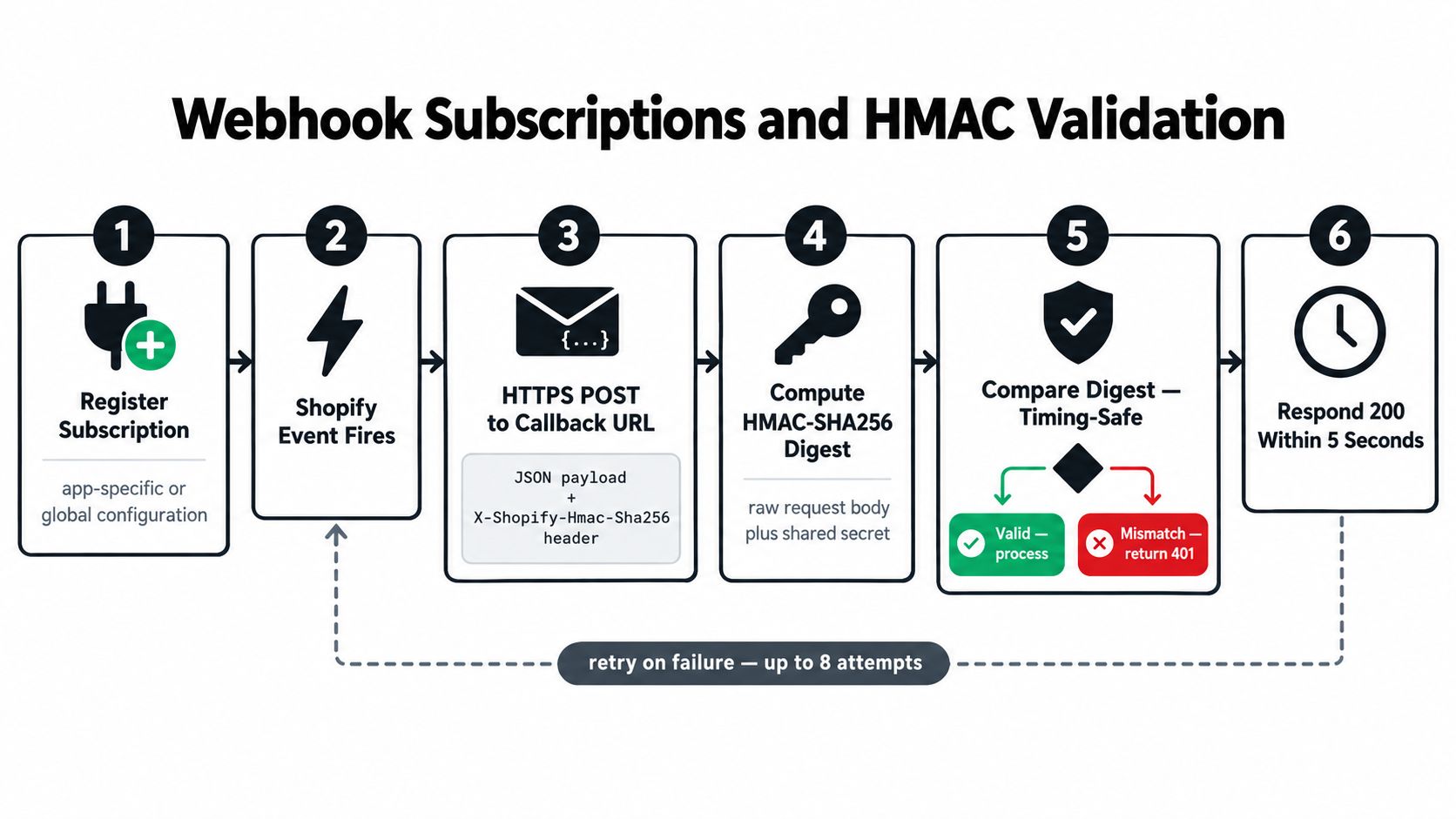
Choose the registration model according to ownership. App-specific subscriptions fit installations that share the same topic and callback behavior. Shop-specific subscriptions suit merchant-selected features, topics, or destinations. Store registration state in your database. Reinstallations and configuration changes should reconcile existing subscriptions rather than create duplicate processing paths.
Verify before you process
Preserve the raw request body, calculate the HMAC-SHA256 digest with the app's shared secret, and compare it with the X-Shopify-Hmac-Sha256 header using a timing-safe method. Reject mismatches before parsing the payload into a business event. A valid signature establishes authenticity only. Schema validation, shop lookup, authorization checks, and idempotency still protect the processing path.
A production handler should use this order:
- Receive the HTTPS POST.
- Read the raw body and HMAC header.
- Validate the signature.
- Confirm that the shop and topic are recognized.
- Store an event envelope or queue message.
- Return a fast success response.
- Process the business action asynchronously.
The queue isolates the callback from downstream work. One subscription event may update a customer portal, notify a CRM, and recalculate retention data. Store a durable event record, assign an idempotency key from delivery and business identifiers, and send failures through retries or a dead-letter queue.
Return success only after the event is safely accepted for processing. Log rejected signatures, unknown topics, parsing failures, and downstream errors with enough context for investigation, while excluding customer data from logs. A forged event can corrupt subscription state, and a dropped legitimate event can leave it stale, even when every GraphQL request succeeds. Webhook reliability therefore belongs in the integration's operational design, not only in its API configuration.
GDPR Compliance and Data Deletion Endpoints
Privacy handling belongs in the data workflow from the first design review, not at the end as a standalone endpoint. Shopify defines GDPR topics such as customers/redact and shop/redact, along with customer data request handling. The relevant webhook and privacy requirements are covered in Shopify's GDPR webhook documentation, which should be treated as an implementation reference rather than a compliance checkbox.
A deletion request can affect every system that receives or derives customer information. Subscription contracts, portal profiles, event logs, support records, analytics identifiers, message-provider contacts, and exported files may all contain data connected to the customer or shop. Build an inventory that names each system, its stored identifier, the retention rule, and the required deletion action.
Build a controlled deletion workflow
- Receive and authenticate the event. Apply the webhook authenticity checks used for operational topics.
- Resolve the subject. Map the Shopify customer or shop identifier to internal records. Do not rely only on an email address.
- Fan out deletion tasks. Send work to each connected service through an auditable queue.
- Remove or anonymize data. Delete data where required. Apply documented anonymization when a legitimate operational record must remain.
- Handle retries safely. Each completed deletion task must be idempotent. A repeated task should not recreate or damage unrelated records.
- Record completion evidence. Retain a minimal audit record showing what was processed, without keeping the personal data the request targeted.
Payment references need separate ownership checks. Deleting an app's customer profile does not necessarily remove every token or third-party representation. Identify the payment references your system stores, confirm which provider owns the underlying credential, and call that provider's documented removal process.
Analytics pipelines must follow the same deletion model. A warehouse export, customer-support integration, or messaging connector can preserve personal data after the application database is clean. Assign privacy ownership across the full integration graph, monitor failed deletion jobs, and define an escalation path for records that cannot be removed automatically.
Architecting Native Subscription Workflows
Subscription architecture now involves more choices than selecting a billing engine. Shopify's platform updates point to customer-account and subscription-contract capabilities, cart API support for subscriptions, and checkout API deprecation deadlines, which creates a practical design question: should each action live in the cart, checkout, customer account, or an external service? Shopify's API integration strategy guidance provides the platform context, but the right choice depends on how much custom control the business needs.
Cart and checkout
Cart-based flows are useful when the buyer needs to select a subscription plan, bundle, or selling-plan option before checkout. They keep product selection close to the storefront and can support a native purchase path. Their weakness appears when teams push too much post-purchase logic into cart state. Subscription pauses, skips, product swaps, and payment recovery are account-management actions, not merely cart operations.
Checkout extensibility can preserve a native buying experience while allowing a brand to add supported presentation and merchandising behavior. It shouldn't become a hiding place for a custom billing engine. If your implementation depends on a checkout API that Shopify has scheduled for shutdown or migration, the engineering cost will include the replacement build and the operational risk during the transition.
Customer-account surfaces
Post-purchase subscription management belongs naturally in the customer-account experience. Customers can inspect their subscription, change eligible details, update payment information, and receive clear feedback without rebuilding the entire storefront. This approach also gives support teams a consistent place to direct customers when a renewal needs attention.
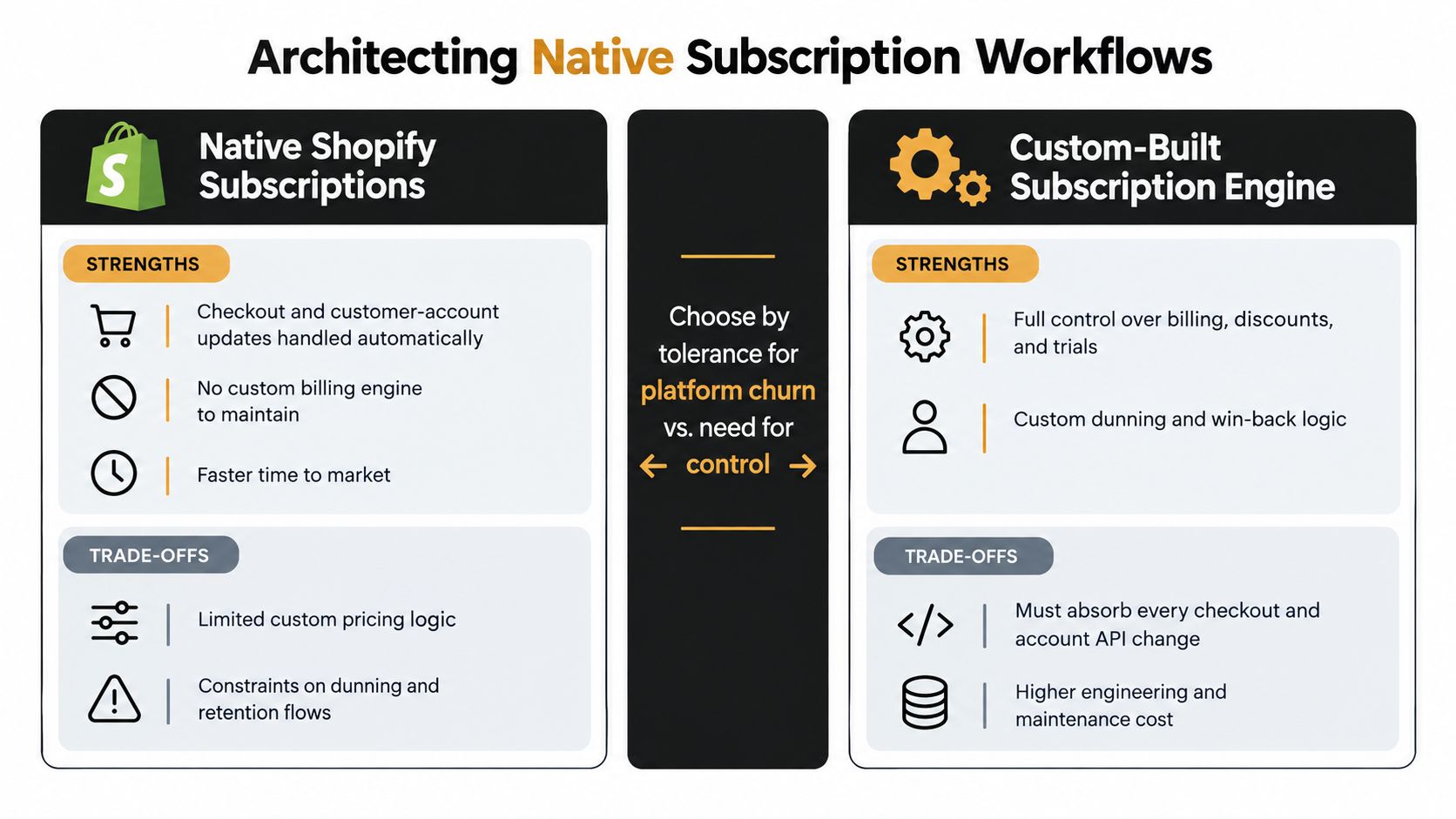
A native model usually reduces the amount of billing state your team must own, but it can constrain unusual pricing, specialized dunning, or complex contract rules. A custom engine gives more control over billing and retention logic, yet your team must absorb every relevant checkout, account, and API change.
For a deeper decision framework, compare native Shopify subscriptions with subscription apps. RecurX supports Shopify-native subscription management, customer-account portal actions, payment recovery, loyalty features, and bundle workflows. The architectural decision should follow the business's tolerance for platform churn and its need for custom control, not a preference for building everything internally.
Architecture decision: Keep the system of record for each subscription state explicit. Shopify-native contracts, your application database, and external messaging tools shouldn't all claim ownership of the same transition.
Migration Strategies for Subscription Apps
Migration from Recharge, Bold, Skio, Loop, or another legacy subscription platform is a data-contract exercise disguised as an import. The visible records are plans and customers, but the operational state includes billing schedules, product mappings, payment references, discounts, loyalty status, failed-payment state, and portal permissions. A migration can appear complete while still leaving the next renewal, retry, or customer edit pointed at the old system.
Start with a source inventory and a target model. Define how the old platform's subscription, customer, product, variant, address, payment, and status fields map to Shopify's native primitives or the selected app's data model. Separate records that can be transferred from credentials that require a supported token-migration process. Never export or handle payment credentials outside an authorized migration path.
A migration runbook that protects renewals
- Freeze the mapping. Create a field-level mapping document and decide which system owns each value after cutover.
- Clean the source. Resolve duplicate customers, inactive contracts, missing variants, invalid dates, and inconsistent cancellation reasons before import.
- Select the transfer route. Use a direct connector when the source and destination support it, or use a universal CSV import for data that can be represented safely in the target schema.
- Migrate product references first. Match source product and variant identifiers to Shopify identifiers, then reject unmatched records rather than creating silent substitutions.
- Transfer subscription contracts and schedules. Preserve cadence, next-charge intent, plan status, quantities, discounts, and customer associations.
- Handle tokens separately. Migrate payment tokens only where the provider and platforms support an authorized transfer. Otherwise, design a controlled payment-method update journey.
- Rebuild downstream links. Reconnect email, SMS, CRM, loyalty, analytics, and support workflows to the new subscription identifiers.
- Validate before cutover. Compare counts, statuses, next-charge fields, products, customer access, and portal actions across source and target.
- Monitor the first renewal cycle. Look for failed payments, duplicate charges, missing notifications, incorrect rewards, and customer-account errors.
Don't test only the happy path. Exercise pause, skip, swap, cancellation, address change, payment failure, retry, refund, and reactivation behavior. Keep the legacy platform available in read-only mode for reconciliation, and document the exact point at which writes move to the new system.
A successful migration is not the moment the import finishes. It's the point at which customers can manage their subscriptions, merchants can reconcile billing, and downstream systems receive the right events without manual repair.
Quick Reference for API Health and Stability
Production health comes from several small controls working together. A pinned GraphQL version won't protect an app that ignores webhook authenticity. HMAC validation won't prevent data loss if the event handler has no queue or idempotency key. Rate-limit monitoring won't help if the team has no owner for query changes.
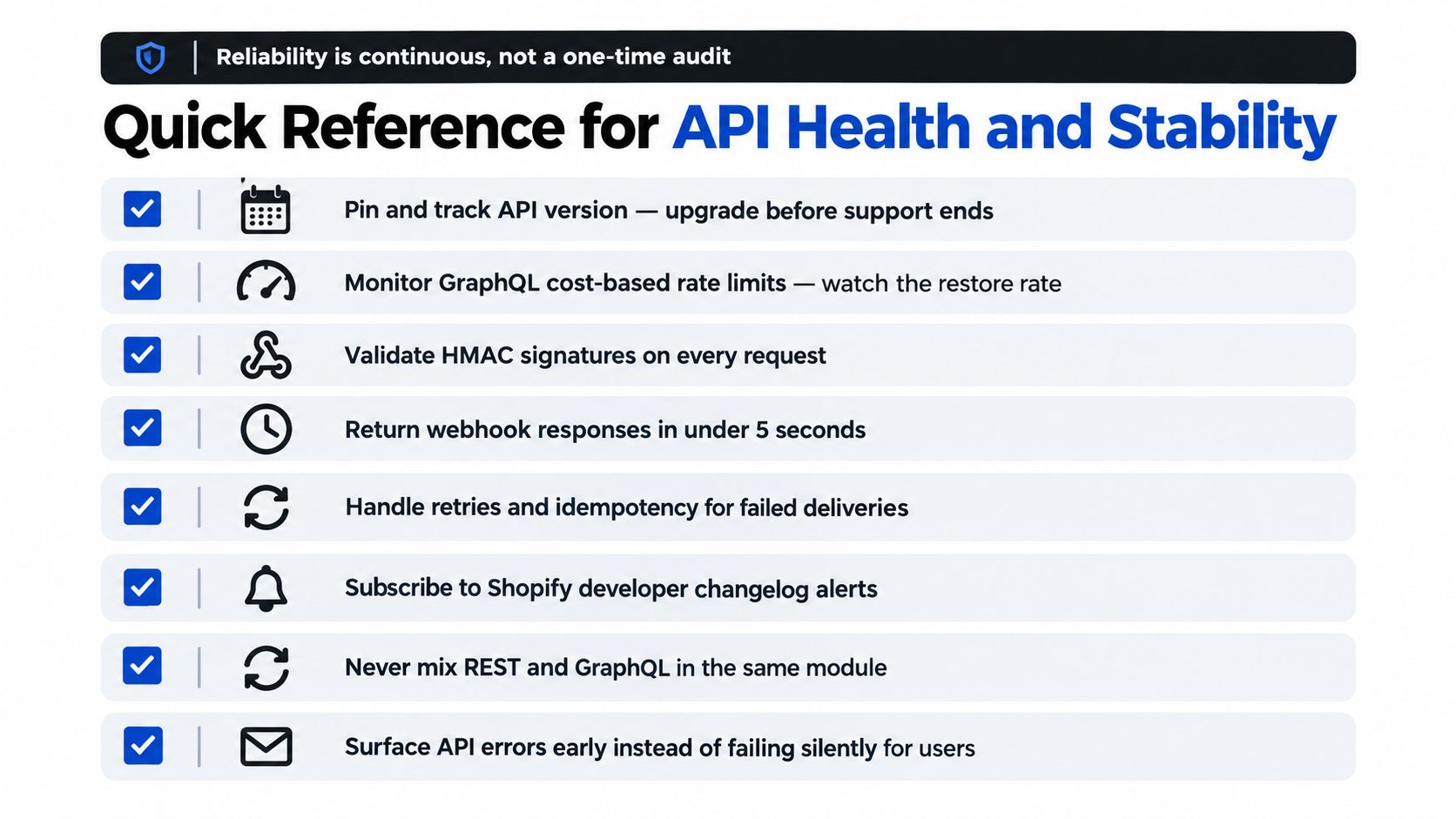
Use this checklist during design reviews, release preparation, and incident follow-up:
- Pin the API version. Record the selected GraphQL version, its dependent fields and mutations, and the planned upgrade owner.
- Measure query cost. Capture requested operations, actual cost, throttle state, latency, and rejected requests by shop.
- Protect priority workflows. Keep renewals, customer-account actions, and payment recovery ahead of bulk exports and analytics backfills.
- Validate every webhook. Check
X-Shopify-Hmac-Sha256against the raw body before parsing or dispatching the event. - Queue before processing. Accept authenticated events into durable storage, then process downstream work asynchronously.
- Make retries idempotent. Replayed deliveries and retried mutations must produce the same business result, not duplicate subscriptions or notifications.
- Test privacy workflows. Exercise
customers/redact,shop/redact, and customer data requests across primary and connected systems. - Track platform changes. Subscribe the engineering team to Shopify developer changelog alerts and review checkout, account, webhook, and API-version updates.
For subscription teams, operational metrics should connect technical health to customer outcomes. Monitor renewal processing, failed-payment recovery, portal action success, subscription event lag, customer data deletion completion, and API errors alongside business indicators. A useful reference for organizing that measurement is this guide to subscription metrics and KPIs for Shopify.
Operational standard: An integration is healthy when it remains correct during normal traffic, throttling, retries, version upgrades, privacy requests, and partial downstream failure.
The Shopify integrations API is powerful, but it rewards teams that design for change. Use GraphQL as the modern integration path, pin versions, budget query cost, verify every webhook, separate authentication from authorization, and place subscription actions where Shopify's customer-account and checkout architecture can support them safely. Teams that need a Shopify-native subscription layer can evaluate RecurX for subscription plans, customer-account management, payment recovery, loyalty, bundles, analytics, and migration support while keeping these integration controls in their own operational checklist.
shopify integrations api · shopify graphql · shopify webhooks · subscription api · shopify app dev
Keep reading
- How to Set Up Recurring Payments on ShopifyLearn how to set up recurring payments on Shopify the right way. Covers gateways, tokenization, dunning, retries, and monitoring MRR and churn.
- Shopify Subscription Theme Explained and How to ChooseLearn what a Shopify subscription theme is, how it works with apps like RecurX, and how to choose a Shopify subscription theme that converts.
- Shopify Subscription Template Setup Made SimpleLearn how to implement and customize your Shopify subscription template with RecurX widgets, theme matching, and QA tips for higher conversions.
Start growing recurring revenue on Shopify
RecurX has a free-forever plan and zero transaction fees on every tier. Install in minutes.
Install RecurX free →