How to Use Checkout Links for Subscription Growth
Learn how to use checkout links to launch subscription offers fast. Build, customize, track, and integrate pre-built URLs and QR codes across your marketing
Learn how to use checkout links to launch subscription offers fast. Build, customize, track, and integrate pre-built URLs and QR codes across your marketing
A coffee brand can spend heavily to put a subscription offer in front of a TikTok viewer, then lose the sale while that viewer searches through a product page, compares variants, and forgets why they clicked. A checkout link removes that delay. The customer lands on a prepared offer with the product and subscription terms ready to review, which makes it useful for paid social, SMS, creator campaigns, and QR codes at a café counter.
The opportunity is bigger than convenience. A well-governed link can act as a recurring-revenue channel, with a defined audience, offer, attribution path, and retention cohort. A poorly managed link can create the opposite problem, including stale pricing, unclear billing expectations, broken QR codes, and revenue that gets misclassified as direct traffic.
Table of Contents
- What Subscription Checkout Links Actually Do
- Planning, Generating, and Customizing Your First Link
- Placing Checkout Links Across Paid Social, Email, and Offline
- Tracking Performance and Attribution per Link
- Pre-launch Testing and Common Checkout Link Fixes
- Your Weekly Checkout Link Operating Checklist
What Subscription Checkout Links Actually Do
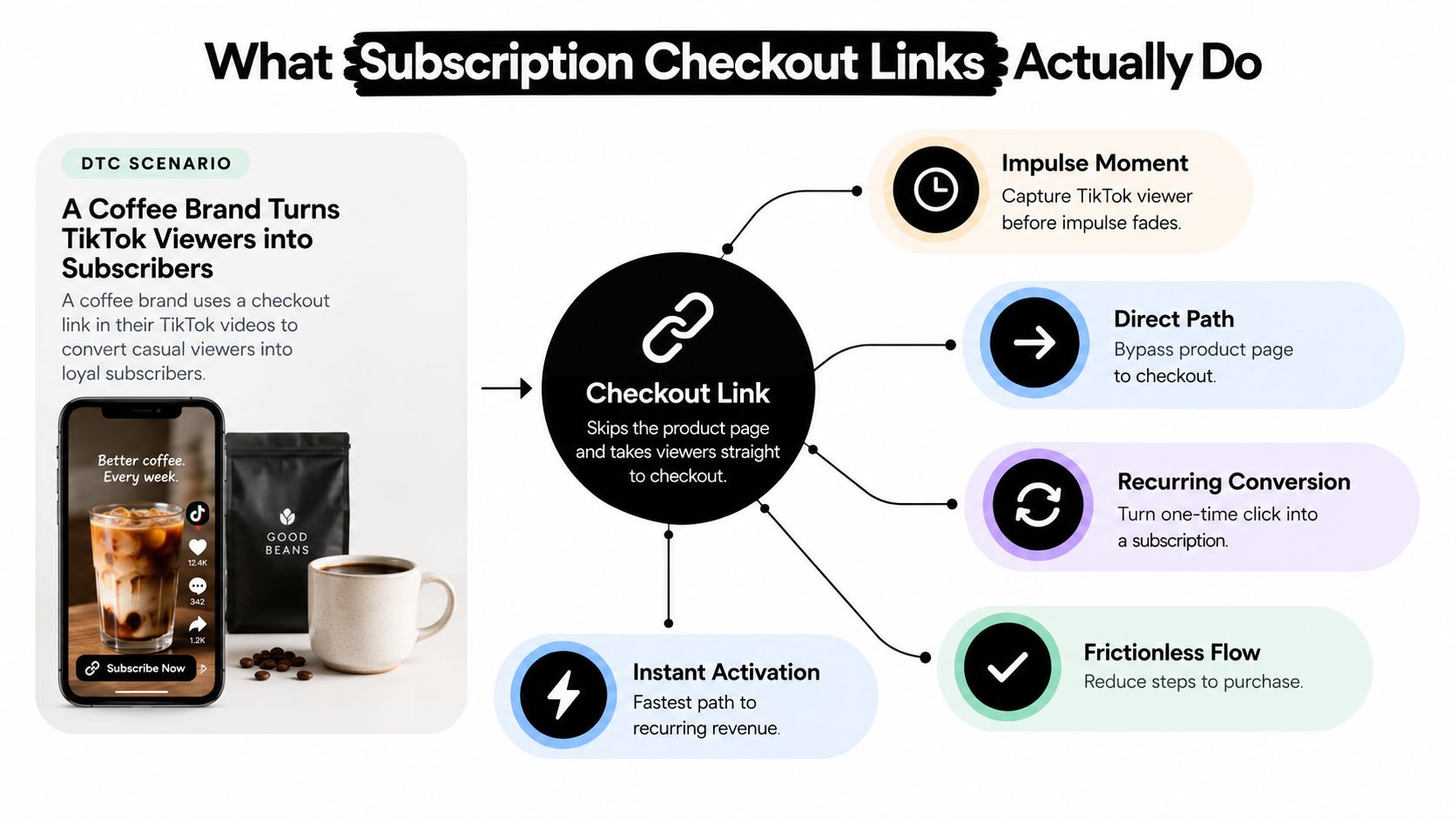
A subscription checkout link is a pre-built URL, or a QR code that resolves to one, which opens a specific subscription offer with the product, quantity, billing plan, and eligible incentive already selected. For a coffee brand promoting a recurring delivery plan on TikTok, that means the viewer can move from the video to checkout without first browsing a product detail page and rebuilding the offer manually.
The distinction matters because a standard product URL usually leaves the buyer to choose the subscription option, select a variant, and locate any discount. A generic cart link may carry the product, but it can still omit the intended selling plan, trial, promotion, or campaign context. A subscription checkout link is more deliberate. It encodes the commercial decision you want the customer to evaluate.
The link is the offer
Treat each link as an asset with its own operating rules, not as a disposable shortcut. Give it one campaign owner, one audience, and one primary subscription proposition. A creator link might promote a first-box incentive, while an email link might emphasize convenience and uninterrupted delivery. Combining both under one URL makes the result harder to interpret.
Shopify reporting separates sessions that reached checkout from checkout completion, and Shopify's behavior reporting recognizes that individual checkouts can have unique URLs. The familiar completion path, /checkout/thank_you, has also been used for analytics tracking since at least 2019, as documented in this Shopify community discussion about checkout URL tracking. That distinction prevents a common reporting mistake, counting a checkout visit as a completed subscription.
Practical rule: A click proves interest. A completed first order proves acquisition. A retained subscriber proves channel quality.
The link should also preserve the low-friction mechanics of a strong checkout. One CRO source reports that a poorly designed payment link can reduce conversion by 30% to 50%, while mobile accounts for more than 60% of payment-link clicks, with load-time targets under 1.5 seconds recommended for major-market performance. Those figures come from payment-link conversion guidance from Dodo Payments, and the practical implication is straightforward: skipping the product page only helps if the checkout remains fast, branded, and understandable.
Use checkout links to capture the buying moment, make the subscription terms explicit, measure the resulting cohort, and retire the asset when its offer or audience no longer fits. For broader principles, this checkout optimization guide is useful when reviewing the page that receives the traffic.
Planning, Generating, and Customizing Your First Link
Build the first link in three phases: plan the offer, generate the asset, and customize only the fields that affect the buying decision. Treating the process as a quick copy-and-paste exercise usually creates a link that works technically but tells you little about why customers converted.
Start with the commercial choice. Decide whether the link sells a trial, a first-box discount, a prepaid commitment, or a standard pay-as-you-go subscription. Then choose the cadence, such as monthly or another supported interval, and write down what the visitor should already understand before checkout. If the ad says “monthly coffee delivered,” the checkout should not present a different frequency or a discount that changes the perceived commitment.
Generate the base asset
Inside RecurX, create the subscription offer first. Open Checkout Links, select the relevant product and selling plan, then copy the generated checkout URL and its matching QR code. Confirm the domain before distributing either format. If you're customizing the surrounding Shopify experience, review this Shopify checkout customization guide so the destination feels consistent with the storefront and account flow.
The generated link should be tested before you add campaign complexity. Open it in a private browser window, confirm that the product and plan load, and check that the displayed terms match the offer copy.
A short demonstration can help teams understand where the link is created and how it fits into the subscription workflow:
Customize the fields that carry meaning
Keep the first version easy to audit. Customize the slug so a human can recognize it, attach the intended discount, confirm the trial length, set any ship-by date, and enable one-page checkout if that experience is supported by the configuration. Leave bundles, complicated gating, and multiple competing plans out of the first test. Every additional rule makes it harder to identify the cause of a conversion change.
Use a naming convention that survives reporting exports. Something like SK-30OFF-Q4-IG can identify the product family, incentive, period, and placement at a glance. Store the same name beside the owner, expiry, discount, selling plan, and destination in a shared link register.
Placing Checkout Links Across Paid Social, Email, and Offline
The same subscription offer needs different handling depending on where the customer encounters it. A paid social visitor is moving quickly, an email recipient already has context, and a café visitor needs to understand a QR code without a sales associate explaining it.
Paid social
For a Meta or TikTok ad, attach the discount that the creative already promises. Use a short vanity slug that can be read in a caption or creator script, and add a dynamic UTM structure that identifies the ad set rather than stopping at the campaign level. That lets you distinguish audiences and creative groups without creating a separate manual report for every click.
Keep the landing experience narrow. If the ad promotes a monthly coffee subscription, the link shouldn't open a menu of unrelated products or expose a second incentive that competes with the advertised one.
Email and SMS
Email and SMS can use the same underlying subscription logic, but the presentation should reflect the customer's existing awareness. Put the checkout link behind a CTA button near the top of the message, then repeat the offer in one concise line beside or below the button. A shortened, branded destination can support click trust, provided the redirect preserves attribution parameters.
For printed inserts inside shipped orders, add a QR code that resolves to the same campaign-specific destination. Keep the QR separate from the email URL if you need to compare the insert with the digital message. This subscription email marketing resource offers useful context for pairing the link with lifecycle messaging rather than treating it as an isolated promotion.
Café or pop-up
At a café or pop-up, place the QR code where customers can scan it without blocking the queue. Route it to a phone-optimized checkout, make the discount valid for the first order only, and capture the email address during checkout so the subscriber can receive account and delivery communications. A QR code hidden behind a register may technically work, but it won't perform if customers can't see or reach it.
Use one link per placement by default. Separate links make attribution cleaner and make it possible to revoke a damaged or outdated QR without disturbing every other channel.
| Channel | Format | Key Customization | Tracking Note |
|---|---|---|---|
| Paid social | Short URL | Attached discount, memorable slug, ad-set parameters | Separate each audience or ad-set destination |
| Email or SMS | CTA button, optional QR for inserts | Clear offer reminder, branded redirect | Preserve source, medium, and campaign tags |
| Café or pop-up | Phone-first QR code | First-order incentive, short alias | Use a dedicated offline alias |
Tracking Performance and Attribution per Link
A checkout link earns its place in the channel mix only when you can connect the visit to both the first order and the later subscription behavior. The essential measurement chain has four stages: link-attributed checkout sessions, completed first orders, subscription activations, and churn within the defined cohort window.
Checkout Links products increasingly surface clicks, orders, revenue, and conversion rate by individual link. The Checkout Links product overview describes link-level reporting across headline metrics and time windows, while broader Shopify benchmark material published in 2026 references data from 500+ merchants. A separate benchmark discussion cited there reports typical checkout completion around 45%, with top performers at 59% to 66%, and median cart-to-checkout movement around 37%. Treat those figures as directional context, not a promise for a particular subscription funnel.
Build attribution before distribution
Create a unique UTM source, medium, and campaign tag before generating each link. RecurX can surface those tags as filterable dimensions in its subscription dashboard, allowing a team to compare placements without relying on a last-click spreadsheet.
For QR campaigns, use a separate short-link alias for every physical placement. Pair the campaign tag with a matching discount code and one selling plan. That combination lets you slice revenue, redemptions, and retention by a specific placement instead of blending a creator, an email, and a counter card into one total.
The Shopify analytics app guide is a helpful reference when deciding how subscription metrics should sit alongside broader store reporting. For creator-led programs, a separate guide to ROI per creator can help structure the commercial side of partner attribution.
Read the funnel in order
Don't optimize for clicks alone. A link with high traffic but weak first-order completion may have a misleading offer, a slow checkout, or a mismatch between ad promise and billing terms. A link with acceptable acquisition but poor cohort retention may be attracting discount seekers who never intended to remain subscribed.
The channel baselines supplied for this workflow are 1.5% to 3% session-to-order for paid social, 3% to 6% for email, and 2% to 4% for in-store QR. These benchmarks are internal planning figures from the brief, not independently sourced industry standards, so use them as diagnostic starting points rather than universal targets.
| Channel | Session-to-Order Rate | Order-to-Subscription Rate | 30-Day Churn Threshold | Primary Signal in RecurX |
|---|---|---|---|---|
| Paid social | 1.5% to 3% | Set from your observed cohort | Set from your observed cohort | Ad-set session and order attribution |
| 3% to 6% | Set from your observed cohort | Set from your observed cohort | Message and segment performance | |
| In-store QR | 2% to 4% | Set from your observed cohort | Set from your observed cohort | Alias, placement, and redemption data |
Pre-launch Testing and Common Checkout Link Fixes
A checkout link should pass a QA gate before it reaches an ad, message, creator, or printed card. Test the complete customer journey in private browsing, on mobile and desktop, and across the payment methods your store displays. Expert payment-link guidance recommends checking the resolved amount, currency, product description, branding, payment methods, confirmation page, and follow-up notifications before sharing a link with customers, as described in this payment-links validation guidance.
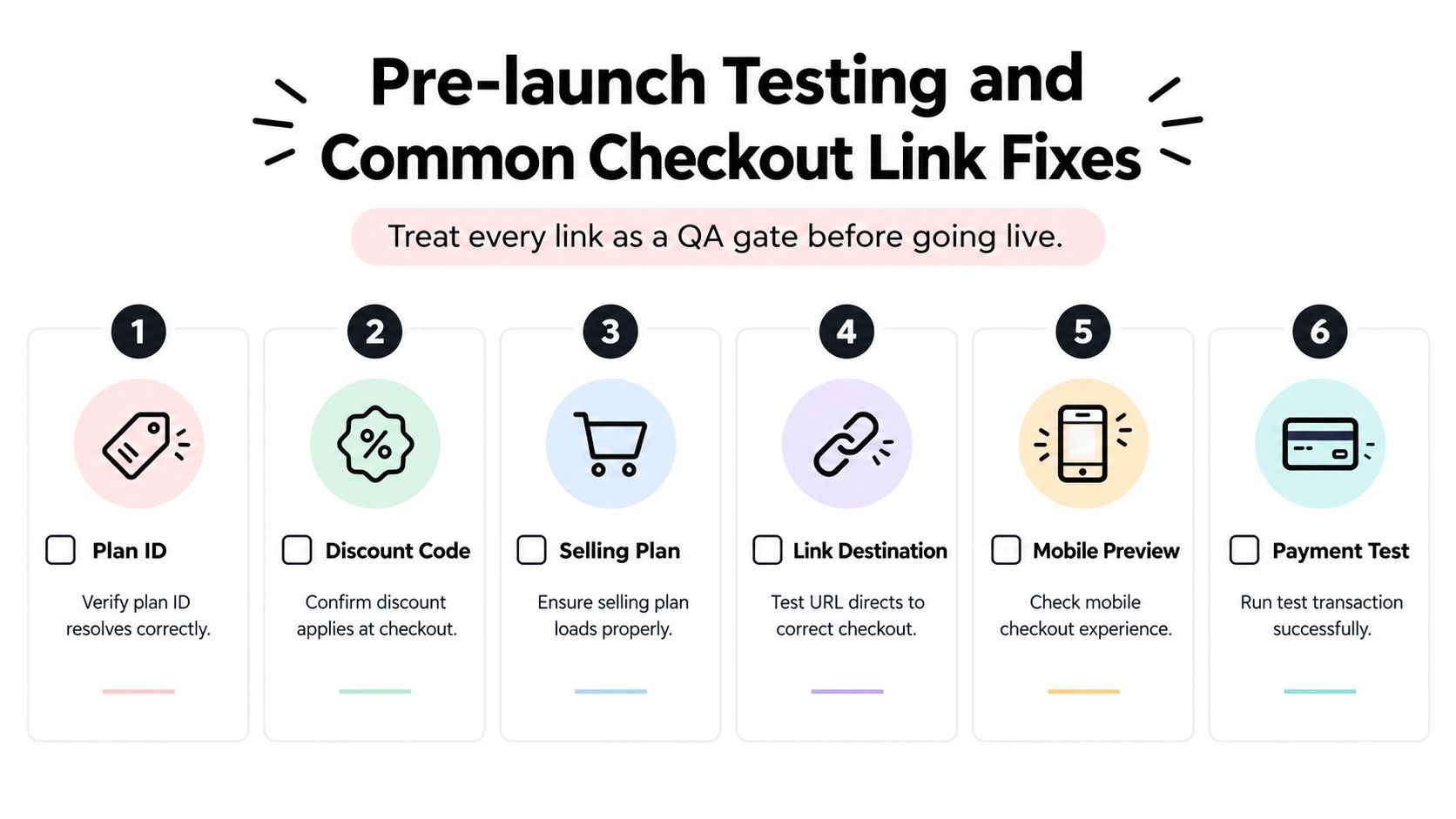
Run these checks before launch:
- Plan ID: Confirm the selected subscription plan resolves to the intended product.
- Discount code: Verify that the incentive applies exactly as the ad, email, or card promises.
- Selling schedule: Check that the cadence and billing terms render correctly.
- Trial length: Confirm that the trial appears correctly and doesn't change the first charge unexpectedly.
- Success page: Complete a test path and verify the confirmation destination and follow-up message.
- Expiry date: If the offer is time-bound, confirm that the link stops or redirects as intended.
Trace a real test on mobile data, Wi-Fi, and incognito mode. Check Apple Pay, Shop Pay, and card presentation separately, then inspect the order in Shopify and the subscription record in RecurX.
Fix the failure, not just the symptom
An expired link may return a generic Shopify error. Regenerate the link and replace every printed QR or saved campaign destination. If an ad click shows the wrong price, rebuild from the current product because the link may be inheriting a stale variant ID.
When QR scans appear as direct traffic, inspect the short-link redirect. A redirect that strips UTM tags needs a re-tagged alias, not a larger media budget. If checkout appears to charge twice, isolate the selling plan and check whether two plans have been attached to the same cart configuration.
Operational rule: Don't publish a link until a test order confirms the offer, billing schedule, payment path, confirmation page, and attribution all agree.
Your Weekly Checkout Link Operating Checklist
Subscription growth improves when checkout links become part of the weekly channel routine. The operating model is simple: plan, build, place, measure, retire, repeat. Each link should have a clear owner, a defined expiry, a matching discount, and a reason to remain active.
Review the attribution report every Monday. Tag new campaigns before they ship, compare sessions with completed orders and activations, then inspect the retention behavior of each cohort. The internal workflow calls for rotating three to five active links per channel each week and retiring links below a 1% session-to-order rate after 1,000 clicks. Those are the supplied operating thresholds for this playbook, not universal benchmarks.
Audit physical QR placements monthly. Foot traffic changes, furniture moves, and seasonal displays can leave a QR code technically live but practically invisible. Refresh the offer copy and creative on links that still attract the right audience, while protecting margin by reviewing the discount stack on strong performers before extending their run.
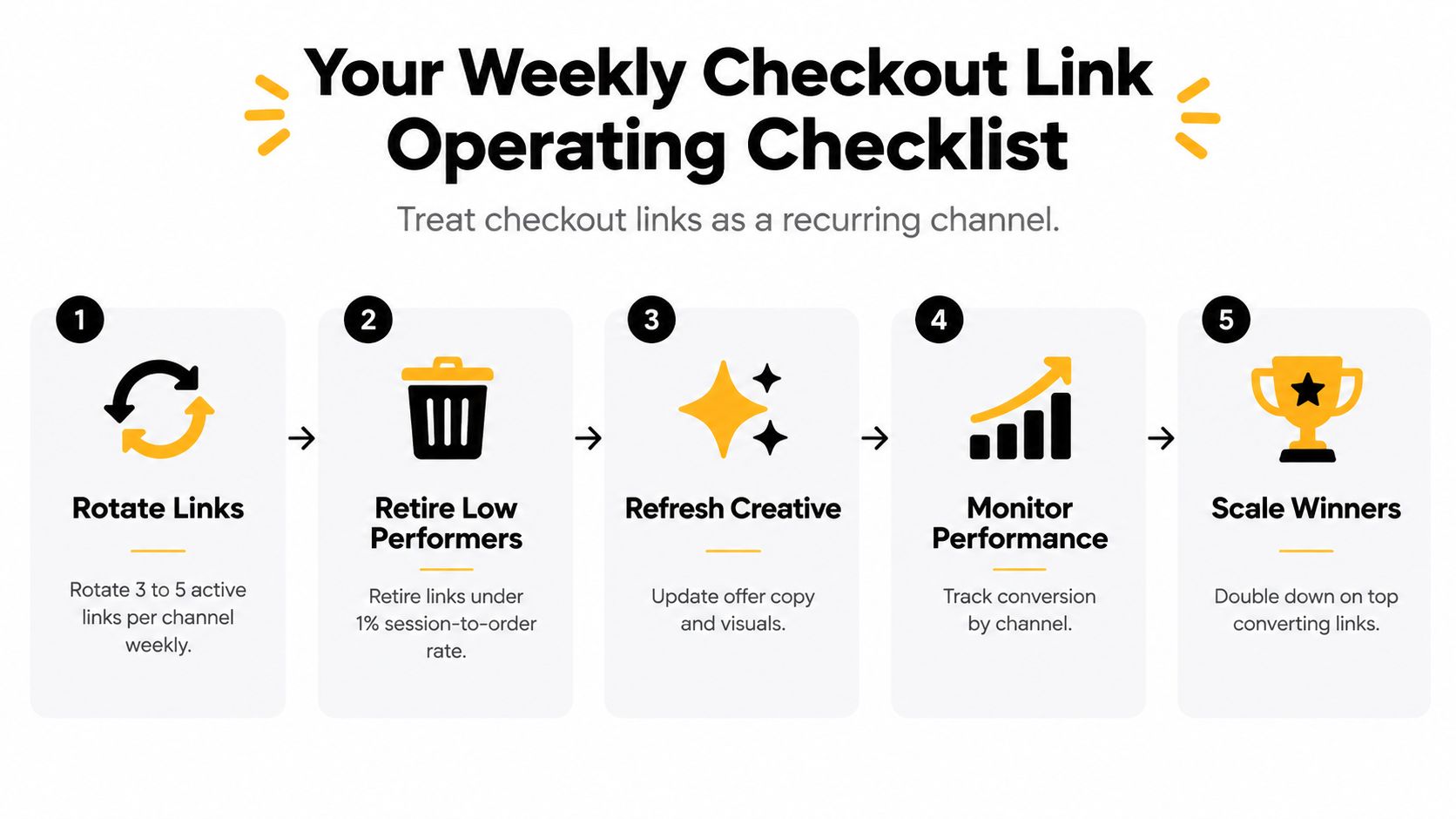
Use this short review every week:
- Rotate links: Keep channel-specific destinations current.
- Retire weak links: Remove links that fail the agreed traffic and order threshold.
- Refresh creative: Update the message when the audience or offer has changed.
- Monitor cohorts: Compare acquisition with subscription activation and retention.
- Scale winners: Give proven placements more attention, not every link more budget.
Keep a shared register of live aliases, owners, expiry dates, discounts, selling plans, and destinations. That record turns checkout links from scattered URLs into governed subscription infrastructure.
RecurX provides Shopify-native subscription tools, including pre-built subscription checkout URLs and QR codes, subscription plan management, customer self-service, payment recovery, loyalty features, and cohort analytics. Visit RecurX to connect checkout-link acquisition with the recurring-revenue and retention workflows that follow the first order.
checkout links · subscription links · QR codes · RecurX · Shopify subscriptions
Keep reading
- Reduce Involuntary Churn on Shopify: 5 Recovery StepsReduce involuntary churn on Shopify with decline routing, card-update flows, retry timing, and measurement that avoids inflated recovery numbers.
- Reporting vs Analytics: When to Use Each in SubscriptionsReporting vs analytics for subscription stores: what each answers, which metrics belong in reports, and when to analyze churn, cohorts and LTV.
- Shopify Build a Box App: Setup, Rules and Pricing GuideStep-by-step guide to choosing, installing and configuring a Shopify Build a Box App, with bundle rules, discount tiers and migration tips.
Start growing recurring revenue on Shopify
RecurX has a 14-day free trial and zero transaction fees on every plan. Install in minutes.
Start your free trial →