How to Run a 20 Off First Order Offer
Design a 20 off first order offer on Shopify: compare $20 and 20%, limit it to new buyers, and measure profit after the first shipment.
Design a 20 off first order offer on Shopify: compare $20 and 20%, limit it to new buyers, and measure profit after the first shipment.
In 2024, 70% of surveyed consumers said a 20% discount on an entire purchase would persuade them to switch from their favorite store to a competitor, according to ActiveCampaign's 2024 consumer research report. That's why a 20 off first order offer feels so powerful, and why it can wreck your margins if you build the code before you decide what it means. Is it 20% off, a flat $20 off, first shipment only, or 20% forever on a subscription you can't afford to renew at that price?
I would settle that decision on paper first. Pick the offer shape, write down the renewal price the customer will see, then open Shopify. If you reverse that order, you'll end up with a public WELCOME20 code that leaks, stacks, and follows subscribers onto renewals you never intended to discount.
Table of Contents
- Choose the Offer Shape and Renewal Rule
- How to Create the Discount in Shopify
- Stop the Code From Spreading
- Promote the Offer and Read the Numbers
- Confirm Margin Before You Publish the Code
Choose the Offer Shape and Renewal Rule
20% isn't arbitrary, but it isn't proof of profit either. An analysis of millions of coupon codes across more than 500,000 stores found that new-customer codes carried a median discount of 20%, compared with 15% for standard promotional codes, in SimplyCodes' analysis of first-order discount codes. The same analysis found first-order-restricted codes represented less than 1% of all working promotional codes. Shoppers recognize 20% as meaningful, but very few stores restrict a code to a genuine first order. That gap is where most of the cost hides.
Treat the benchmark as a starting point for recognition, not as a margin calculation. Your product margin, shipping cost, repeat purchase frequency, and expected lifetime value decide whether 20% works. A supplement with strong replenishment can recover a first-order cut differently from a low-margin pet food bag that costs a fortune to ship.
Run the Same Offer Through Three Baskets
Percentage and flat discounts behave very differently as the basket changes. Run your own average order value through both before you choose.
Say a first basket is $50. At 20% off, the customer saves $10 and pays $40 before shipping and tax. A flat $20 off on that same basket is a 40% hit, which most physical products can't absorb once you add picking, packaging, and shipping. The headline sounds identical in an ad. The contribution margin is not.
Say the basket is $80. Now 20% is $16, while $20 off is 25%. The flat offer is still deeper, but it's no longer absurd if the basket contains higher-margin items and you've set the minimum high enough.
Say the basket is $120. At 20%, you're giving away $24. The flat $20 is now gentler at about 17%, and it also caps your exposure when someone builds a large bundle. That's the practical trade-off. A percentage scales with the basket and can get expensive on bundles. A flat amount is predictable for you, but brutal on small orders unless you control the minimum.
Practical rule: If a flat $20 discount works only when shoppers spend more, make that spending threshold part of the offer itself. Don't hope they'll build a bigger basket on their own.
I would use 20% off when your typical first order sits around $40 to $80 and the goal is reducing trial risk on supplements, coffee, skincare, or pet goods. The saving feels proportional, and a customer trying an unfamiliar brand can see the benefit without you promising a fixed dollar amount on a tiny cart. I would use a flat $20 off only with a minimum order value, often $60 to $80 as a worked example, and only after checking the margin at exactly that minimum. Customers will test the threshold. Some will add the cheapest eligible item just to qualify.
Decide What Happens on Shipment Two
Subscription shoppers need a clearer answer than one-time buyers. They need to know whether 20% applies only to the initial charge, to every recurring order, to prepaid plans, to bundles, to a free trial conversion, or to shipping and already-discounted products. If your product page doesn't say, the customer will assume the price they paid first is the price they'll keep paying.
Data summarized in Seguno's 2025 unique discount code benchmarks reports that 20% is the most commonly used percentage-off level in Shopify discount-code data, used about 17% more often than 10% off. The same source summarizes customer-level research finding that customers acquired with a 35% discount had approximately half the long-term customer value of customers acquired without a promotion. Popularity doesn't establish profitability. Deeper discounts can change who buys, not just how many people buy.
Work through a renewal example. Say you sell a $40 bag of coffee or pet food on a monthly plan. At 20% off, shipment one is $32. If your product margin before shipping is only 25% in this example, that first order already has very little room left after fulfillment. If the same 20% rides onto every monthly renewal, shipping can erase what's left month after month. You haven't built a subscription offer. You've permanently repriced the product without admitting it.
For most replenishment products, I would apply the welcome cut to the first shipment only, then move the customer to full price or your normal subscribe rate. Show both prices before checkout in plain language, for example, "$32 today, then $40 every month, pause or cancel anytime." Put the same renewal price in the customer portal. Renewal shock usually isn't caused by the price itself. It's caused by the customer discovering it on a bank statement.
Set the Exclusions Before You Announce Anything
Decide these points while the offer is still a sentence in a document:
- Shipping and tax: Exclude both unless your margin model explicitly covers them. A product discount that becomes free shipping plus 20% is a different offer.
- Sale items: Exclude already-reduced SKUs by default. Stacking a welcome code on a clearance price rarely acquires the customer you want.
- Low-margin hero SKU: Exclude it or cap the eligible collection. The product with the most traffic isn't always the product that can carry acquisition cost.
- Prepaid plans: Model them separately. A discount on several months paid upfront multiplies the giveaway on day one.
- Bundles: Check the bundled price first. If the bundle already contains a built-in saving, a percentage code compounds it.
First-order offer shapes and when each one holds up
| Offer shape | Use it when | Guardrail | What happens on renewal |
|---|---|---|---|
| 20% off the first order only | Typical first basket is about $40 to $80 and trial risk is the barrier | One use per customer; exclude sale and low-margin SKUs | Full price or normal subscribe rate from order 2 |
| $20 off the first order | Baskets are larger, or you want a capped, predictable giveaway | Minimum order value; one use; no stacking with sitewide sales | Full price from order 2; the $20 does not repeat |
| 20% off the first subscription shipment only | The goal is a subscriber, not a one-time bargain | Show the renewal price before checkout; exclude prepaid plans unless modeled | Smaller ramp, loyalty points, or standard plan price after shipment 1 |
| 20% off every recurring order | Only if contribution margin and expected lifetime value still clear after the permanent cut | Cap eligible SKUs; do not combine with free shipping by default | Highest chance of renewal shock if you later remove it |
Circle one row before you open Shopify admin. If you can't explain the renewal column to a customer in one sentence, the offer isn't ready to build.
How to Create the Discount in Shopify
Build the rule you already chose. Don't let the settings screen make the strategy for you, because the easiest settings to leave on, whole catalog, no end date, combinations allowed, are usually the expensive ones.
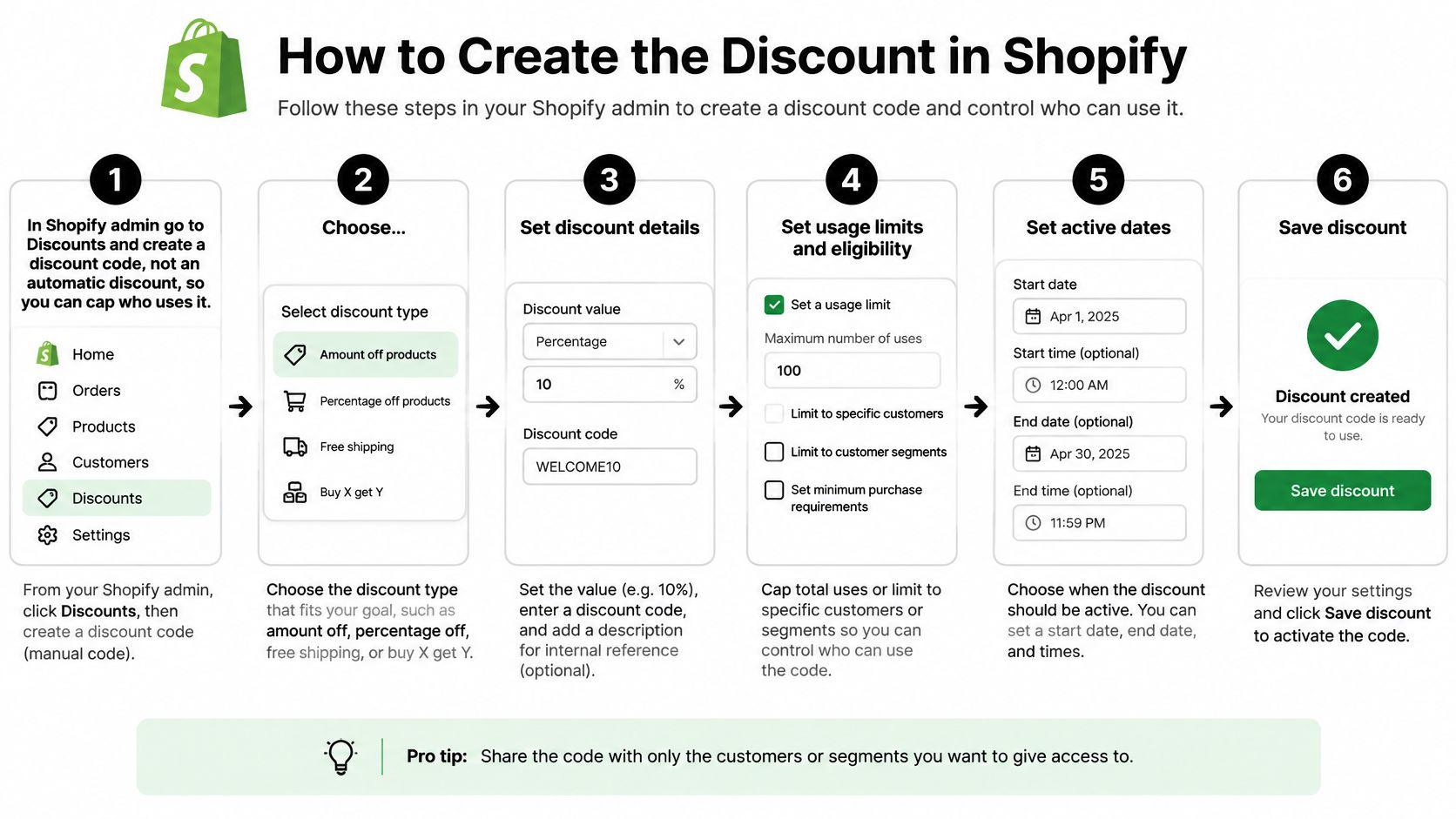
The visual below maps the admin build in the order I'd work through it.
The Numbered Build
- Go to Discounts in Shopify admin and create a discount code, not an automatic discount. A code lets you cap who uses it, when it runs, and how often. An automatic discount applies itself to qualifying carts and gives you less control over distribution.
- Choose Percentage or Fixed amount and enter 20 or 20.00. Your earlier decision matters here. Don't switch from 20% to $20 because the fixed amount looks cleaner in the form.
- Set Applies to specific collections or products when margins differ. Whole-catalog eligibility is convenient until the code lands on gift cards, wholesale items, or the one variant you sell near cost. Keep shipping as a separate decision instead of folding it into the product discount.
- Add a minimum purchase requirement if you chose $20 off. Set the dollar minimum you modeled, not a round number that merely sounds reasonable. Test a cart sitting one cent below the threshold and one sitting exactly on it.
- Set customer eligibility as tightly as your store can support. Start with a new-customer or first-order segment if you can identify those customers reliably. If you can't, use one use per customer and recognize that guest checkout will need the tighter distribution approach covered in the next part of your setup.
- Set usage limits to one use per customer and add a total cap for campaigns. A total cap stops a leaked code from running all month before anyone checks the discount report. Pick a cap that matches the campaign size, then raise it deliberately if the test is working.
- Set a start date and an end date. For a first test, 14 to 30 days is a practical example of a window that's long enough to read but short enough to stop. An open-ended welcome code becomes permanent pricing by neglect.
- Turn off combinations with product, order, and shipping discounts unless you've modeled the stack. This single setting prevents the welcome code from combining with a subscribe widget saving, a bundle price, and a free-shipping threshold in ways nobody priced.
- Preview checkout in a fresh browser profile. Test a qualifying cart, a non-qualifying cart, a sale item you meant to exclude, and a subscription product if you sell one. Read the price the customer sees, including what the subscription line says about future charges.
- Save the operational record outside Shopify. Note the exact code name, eligible collections, exclusion list, dates, and renewal rule, and keep a screenshot of the discount summary for support. When a customer asks why a code failed, your team shouldn't have to reverse-engineer the admin.
A public string like WELCOME20 is easy to remember and just as easy to republish. Treat this build as the rules engine. Distribution, who receives a usable code, is a separate choice with its own risks.
Capture Proof Before You Scale the Offer
A discount lowers the financial risk of trying you. Social proof lowers the quality risk, which matters just as much for a first-time buyer who has never tasted the coffee or tried the skincare. While you're setting up acquisition, it's worth using tools that collect testimonials from Shopify customers so the product page can answer "does this work?" at the same moment the code answers "can I afford to try it?" Don't wait until after a campaign to start gathering that material, because the first cohort acquired on the offer is exactly the group whose experience will convince the next one.
If you're also using app-based codes alongside native Shopify discounts, this guide to how Shopify app discount codes work is useful for keeping ownership of each rule clear. Write down which system controls eligibility and which controls the subscription renewal price. When two systems can both discount the same order and nobody owns the interaction, stacking is only a matter of time.
Stop the Code From Spreading
A welcome offer can reach the wrong customer as soon as its code is shared. If WELCOME20 appears on a coupon site, an existing buyer may use it on a renewal or combine it with a subscription saving. Keep the offer visible to new shoppers while limiting where and how it can be redeemed.
Public welcome code versus unique first-order codes
| Approach | Who can redeem | Main risk | What to measure |
|---|---|---|---|
| One public code such as WELCOME20 | Anyone who finds it, including existing buyers and coupon sites | Reuse, stacking, and margin loss on the wrong SKU | Redemption rate and contribution margin |
| Unique single-use code | The person who received that code, one redemption | More setup and a few support replies when a code expires | Click-through rate, AOV, and second-order rate |
| Customer-restricted discount | Logged-in customers with no prior order | Guest checkout and a second email can miss or bypass it | Eligible redemption versus support tickets |
| First-subscription rule, separate from the welcome code | New subscribers only, first shipment | Shoppers confused if both codes apply | Subscription opt-in and renewal price complaints |
Unique single-use codes take more setup than one public string, but each code can be redeemed only once. A two-week split test against a public code can show which approach improves click-through and average order value for your store. Compare results alongside contribution margin: more redemptions do not necessarily mean more profitable customers.
For an interactive email-capture pop-up, this guide explains how to turn Shopify wheel spins into email signups. Make sure the prize resolves to a code tied to that signup, rather than a string every visitor can reuse.
Eligibility Edge Cases Create the Tickets
Overly tight rules can block genuine first-time buyers. Someone who previously checked out as a guest, subscribed through a marketplace, or used a work email may appear to be a new customer when checking out with a personal address. To them, a rejected code feels like a broken promise.
Write rules support can apply consistently:
- State eligibility plainly: Say the offer is for customers who have not placed an order before, and clarify whether a past guest order counts.
- Separate the two firsts: A first one-time order and a first subscription shipment need separate rules. Do not let a new subscriber use both offers unless you have priced the combined discount.
- Name exclusions: List gift cards, wholesale products, and thin-margin variants explicitly.
- Set a minimum order value: This can protect a flat $20 offer from being used on a small cart.
- Give support an option: Reserve a small number of unique codes for legitimate customers blocked by the rules.
Check the wording in each market where you sell. Eligibility, tax display, shipping promises, and consumer-protection requirements can vary, so make the offer clear where the customer buys.
Measure first-time customer redemptions, contribution margin after discount and shipping, second-order rate, and failed-payment churn. Conversion rate alone can favor a widely shared code while hiding the cost of discounting orders from existing buyers.
Promote the Offer and Read the Numbers
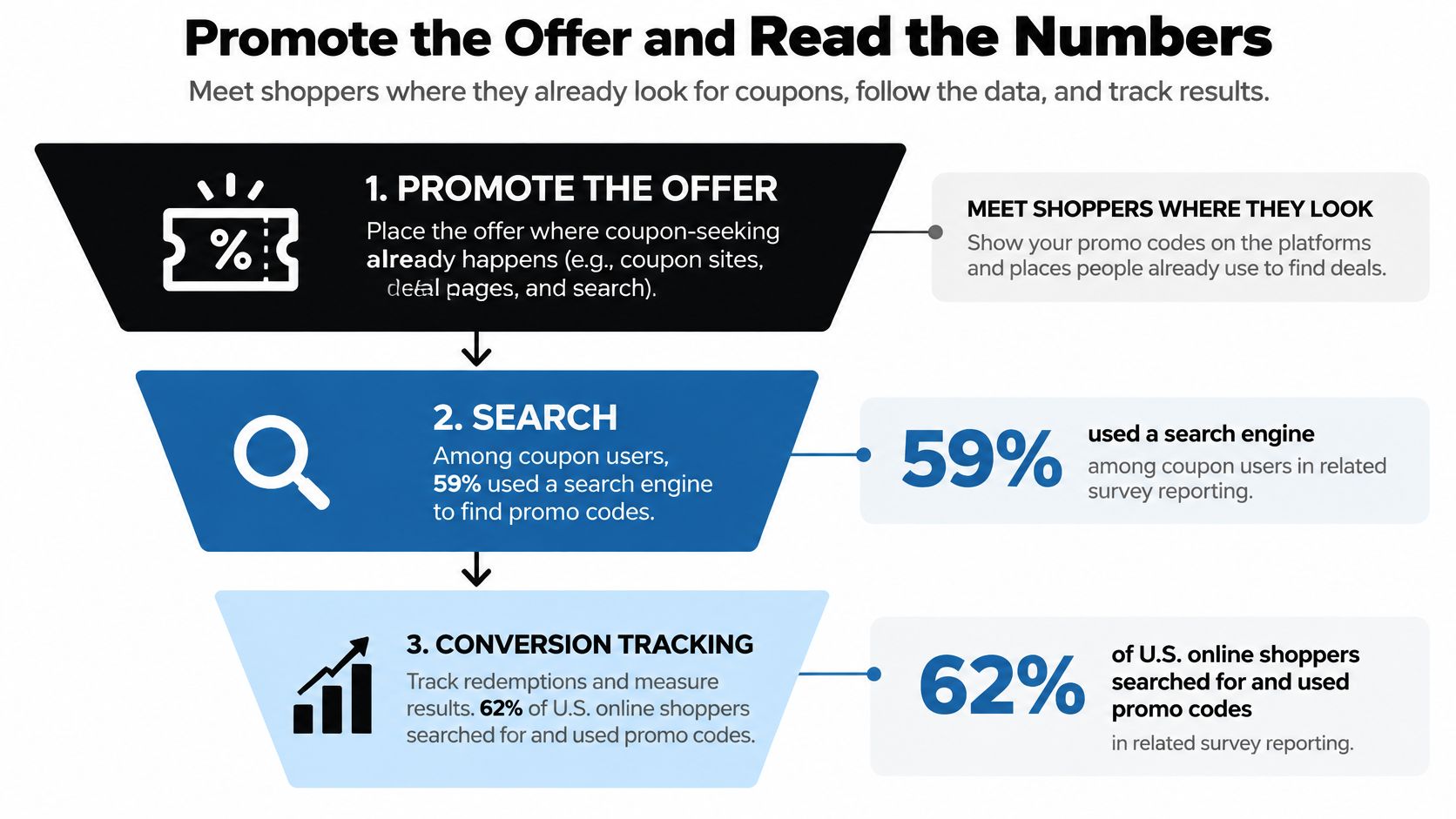
Put the offer where coupon-seeking already happens, on property you control. A 2024 U.S. consumer statistic reported in Snipp's digital coupon market infographic found that 62% of online shoppers actively search for promo codes, discounts, or coupons when shopping online, and among those shoppers, 59% used Google or another search engine, 46% used coupon websites, and 41% checked retailer apps or websites. Separate survey reporting in the same source found 94% of Americans had used a coupon at least once during the previous year and 67% had used digital coupons. If you don't state your own terms clearly, a coupon site will state a version of them for you, probably without your exclusions or your renewal price.
The funnel below shows how promotion, search behavior, and measurement connect.
Placements That Keep You in Control
Keep the list short and make each placement issue or apply a controlled code:
- Homepage or exit welcome form: Reveal a unique code after signup, and send the same code by email so it isn't lost when the tab closes.
- First email and SMS in the welcome flow: Restate the exact terms, the expiry, and what the second order will cost.
- Product page beside the subscribe widget: State the first-shipment price and the renewal price together. Never show only the discounted number.
- Campaign checkout link or QR code: Use it for an influencer placement or a printed insert so that traffic lands on the intended offer instead of hunting through your catalog.
Don't put a static public code in your footer. It trains every returning customer to expect 20% off forever and gives coupon sites a permanent listing to copy. The post-signup journey matters just as much, and this breakdown of subscription email marketing sequences covers how to structure the messages after that first order. For the broader automation layer behind those journeys, this resource on how to improve retention with automated customer journeys is worth reading alongside your welcome flow planning, since the second-order message needs to be ready before the first cohort arrives.
This video walks through the promotion and tracking side in more detail.
The Scorecard for a 14 to 30 Day Test
Read five numbers together. Redemption rate tells you the offer was found and used. First-order gross margin after discount and shipping tells you what that order contributed. Subscription opt-in rate tells you whether the offer built recurring revenue or just a cheaper one-off sale. Second-order or second-renewal retention tells you whether the customer valued the product at full price. A simple lifetime value read on the cohort ties those pieces together.
Watch customer quality, not just volume. A first-order spike that never produces a second order at or near full price means the discount bought transactions, not customers.
Pass and fail signals for a 14 to 30 day test
| Metric | Healthy result | Weak result |
|---|---|---|
| Redemption rate | Steady and limited to new buyers | Spike driven by existing customers and coupon sites |
| First-order gross margin | Positive after discount and shipping | Margin falling on the same SKUs |
| Subscription opt-in rate | Rising with the renewal price clearly shown | Opt-ins followed by quick cancellations |
| Second-order or renewal retention | Near full price on order two | Almost no return once the code ends |
A healthy result converts some new buyers and still shows a second order. A weak result is a spike in first orders, a drop in margin, and almost no one returning once the code is gone.
Confirm Margin Before You Publish the Code
Before you publish, write three numbers on one line. It takes five minutes and it's the cheapest quality control in the whole campaign.
The first number is your expected first-order margin after the 20% or $20 cut and after shipping. Use a realistic basket, not your best basket. If the number only works when shoppers buy two units, then your offer needs a minimum that produces two units. Related pricing structures like quantity price breaks on Shopify can help you think through how thresholds and per-unit pricing interact with a welcome discount, since both mechanisms change what the customer pays as the cart grows.
The second number is the exact price on shipment two, written the way the customer will see it. If shipment two still carries the full 20% and that cost isn't inside your margin math, don't publish. Fix the renewal rule first, even if that means delaying the campaign. A subscriber who feels misled about price cancels and tells support exactly why, and you'll pay for the acquisition twice.
The third number is the second-order rate the promotion needs to beat doing nothing. You don't need an advanced model. You need a threshold decided in advance, so a busy first week doesn't talk you into extending an offer that isn't producing repeat buyers. Write the kill criterion next to the target, for example, the margin floor below which you'll pause the code and review redemptions by customer type.
If you sell subscriptions, use tooling that keeps the welcome cut on the first charge and then ramps the plan to a smaller discount after a set number of orders. Our subscriptions support weekly, monthly or yearly intervals, tiered discounts that ramp after N orders, free trials, and anchor-date billing, so a 20% first-shipment price can step down to your standard plan rate instead of following the customer forever. Loyalty can then carry the long-term reward, since it includes points per renewal, tiered VIP discounts, milestone bonuses, and redemption to store credit, stacking on top of plan pricing rather than replacing your price architecture. Both the Basic and Pro plans include a 14-day free trial and zero transaction fees, which keeps the test itself from adding per-order cost on top of the discount you're evaluating.
Go or no-go: If you can't fill in first-order margin, shipment-two price, and the second-order rate you need, you don't have an offer yet. You have a code.
Book the setup work only after those three numbers exist, and run the promotion as a dated test with a named owner who checks redemptions weekly. A first-order offer should earn its place as a permanent acquisition channel. It shouldn't become one by default because nobody remembered to switch it off.
Ready to run your 20 off first order offer without discounting every renewal by accident? RecurX lets you set a 20% first-shipment price that ramps to your standard plan rate after a set number of orders, with campaign checkout links for email, ads, and QR codes. Fill in your three numbers, start the 14-day free trial with zero transaction fees, and launch the offer as a dated test you can measure.
20 off first order · Shopify discounts · first order coupon · subscription offers · welcome discount
Keep reading
- 8 Shopify Flow Examples Subscription Merchants Can Copy8 practical Shopify Flow examples for subscription stores, with triggers, conditions, and actions for tagging, dunning, churn rescue, and loyalty.
- How Do Loyalty Points Work? Rates and RedemptionsHow do loyalty points work? See earn rates, 100 points = $1 redemptions, expiry, stacking with subscription discounts, and the LTV effect.
- Customer Winback Strategies: 8 Proven Tactics for 2026Discover 8 customer winback strategies to recover lapsed subscribers, from dunning and card-update links to save flows, loyalty rewards, and SMS sequences.
Start growing recurring revenue on Shopify
RecurX has a 14-day free trial and zero transaction fees on every plan. Install in minutes.
Start your free trial →