Customer Portal Login for Shopify Merchants
Set up a branded customer portal login on your Shopify domain. Covers native account integration, security, customization, and troubleshooting.
Set up a branded customer portal login on your Shopify domain. Covers native account integration, security, customization, and troubleshooting.
A subscriber reaches the renewal date, clicks Manage subscription, and lands on a login page they've never seen before. The URL belongs to an app vendor, the branding doesn't match the storefront, and the recovery email looks unrelated to the order confirmation they trust. Some customers try again. Others abandon the session and contact support, or let the renewal fail.
That's why customer portal login deserves attention from Shopify merchants. It isn't merely an authentication screen. It controls whether subscribers can update payment details, skip a shipment, change a plan, or cancel without assistance. Login friction can create conversion loss and support demand at the exact moment a customer is deciding whether to continue.
A 2025 consumer study reported that 87% of Americans had abandoned an account sign-up or purchase because of login difficulties, while 42% had abandoned an online cart because they needed to reset a password to check out. The same coverage reported that two-thirds had stopped using a website because of login hassles, with 55% doing so after forgetting a password. The study coverage from Small Business Trends also cites a Gartner-related estimate that password resets account for 20% to 50% of help-desk calls.
Table of Contents
- Why the Customer Portal Login Lives on Your Domain
- Enabling Native Customer Accounts in Shopify
- Branding the Login and Account Pages
- Choosing the Right Login Flow for Subscribers
- Designing Recovery and Fallback Paths
- Measuring Login Performance and Support Deflection
- Troubleshooting the Most Common Login Failures
Why the Customer Portal Login Lives on Your Domain
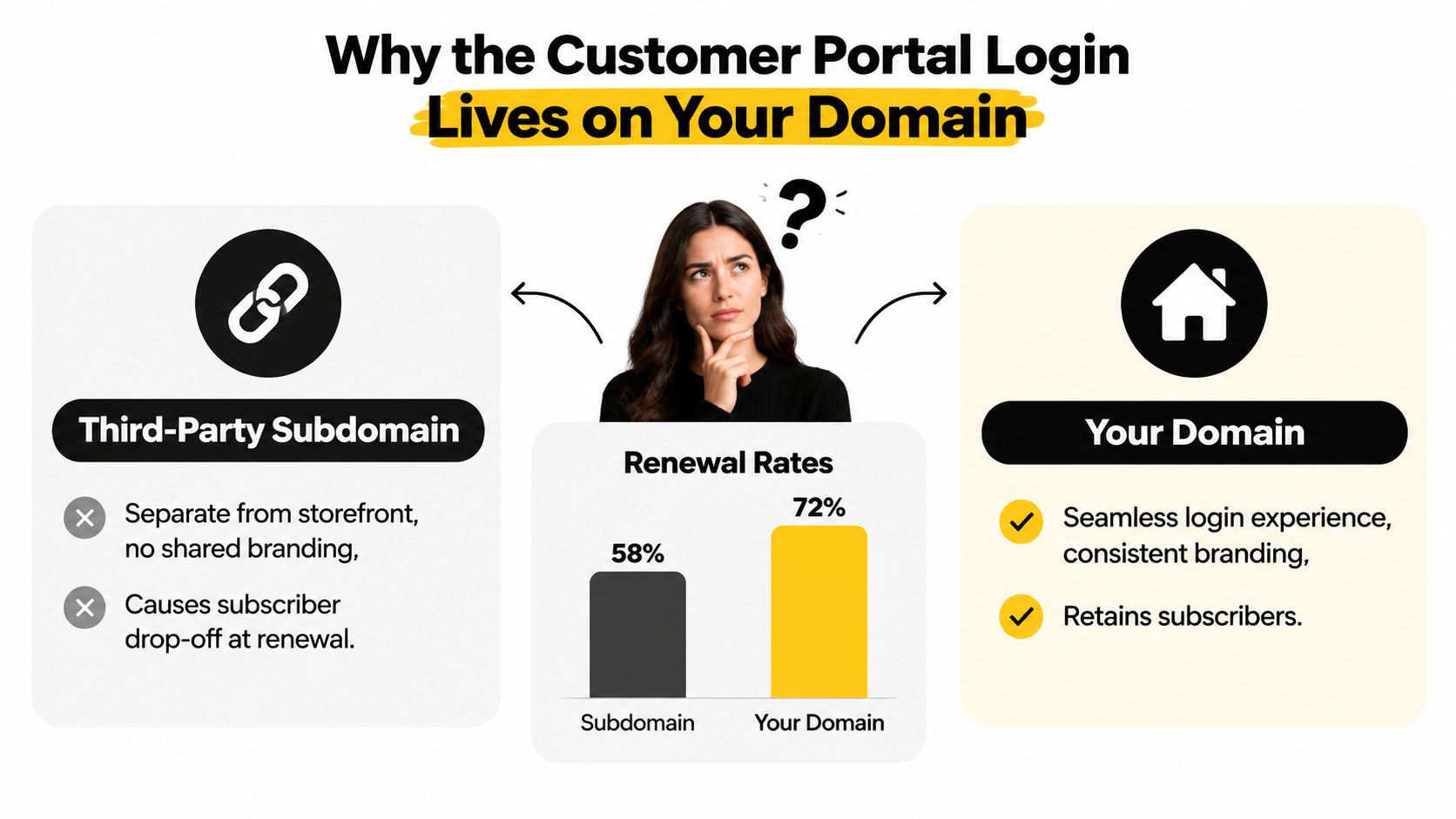
A skincare merchant once noticed a familiar pattern in subscription support tickets. Customers received renewal reminders, clicked the account link, and arrived at a third-party subdomain that looked nothing like the store. The page had different typography, unfamiliar navigation, and no obvious connection to the brand they'd just purchased from.
The merchant initially treated the issue as a design inconsistency. In production, it behaved more like a trust break. Subscribers paused when the URL changed, returned to the storefront to search for the right login, or emailed support because they weren't sure whether the page was legitimate. Every extra decision appeared at the worst possible time, close to renewal.
A Shopify-native customer portal login keeps that interaction under the merchant's domain. The account surface can inherit the storefront's branding and maintain a consistent first-party session experience instead of sending customers to an outsourced destination. For a subscriber managing a recurring order, that continuity makes the portal feel like part of the store rather than a separate service.
Treat the URL as a storefront touchpoint
The login URL belongs in the same review as the product page, checkout, and post-purchase emails. Check it from a renewal message, a mobile browser, an account menu, and a support response. If any route exposes a different host, tone, or visual system, customers experience that inconsistency before they reach subscription controls.
Native account access also reduces the number of moving parts between storefront intent and portal action. The customer arrives from the store, authenticates, and reaches an account surface that supports the same commercial relationship. That doesn't remove every authentication problem, but it removes one avoidable source of hesitation.
Merchants evaluating portal architecture can compare customer portal software for Shopify alongside other account surfaces. For reference, the MD TECH TEAM hosting login shows how a hosted membership login can function as a distinct account destination, which is useful when comparing branded access patterns.
Enabling Native Customer Accounts in Shopify
Start in Shopify admin. Open Settings, select Customer accounts, and decide whether accounts are required or optional. Required accounts create a stronger account-first model, while optional accounts preserve guest checkout for stores that still need it.
Choose New customer accounts instead of the classic experience. Shopify's newer account system uses a customer account host pattern, but merchants can connect it to the primary storefront domain through the domain controls in the same settings area. The important production test isn't whether the setting is enabled. It's whether a real subscriber follows the complete route without leaving the store's trusted account experience.
Verify the customer journey, not just the admin setting
Use a test subscriber who has an existing order and an active subscription. Sign out, open the storefront, select Manage subscription, and confirm that the destination uses the intended account path, such as /account or a branded login page, rather than the subscription app's host.
Then test the whole handshake:
- Open the account link while logged out. The redirect should preserve the intended destination after authentication.
- Complete the login on mobile Safari and Chrome. A redirect that works on desktop can lose the session inside a mobile webview.
- Open the portal from a renewal email. Confirm that the customer lands on the relevant subscription action, not a generic account home.
- Sign in from a second browser or device. Check that the account displays the same customer record and subscription data.
- Update a non-destructive setting. A frequency change or payment-detail screen is useful for validating the authenticated session without altering fulfillment unexpectedly.
If a subscription application supports a portal URL override, point it to the primary-domain account path. That keeps the login handshake aligned with Shopify's storefront session instead of creating a second authentication boundary. Keep checkout customization separate from account routing, and use Shopify checkout customization guidance when the change affects checkout rather than the portal.
A short walkthrough can help operators confirm where the account controls sit in Shopify admin.
Branding the Login and Account Pages
A customer portal login shouldn't look like a utility page that escaped from the admin system. Subscribers already recognize the storefront through its logo, color hierarchy, typography, and writing style. The account pages should reinforce those signals, especially when the customer arrives from a renewal email or a payment-recovery message.
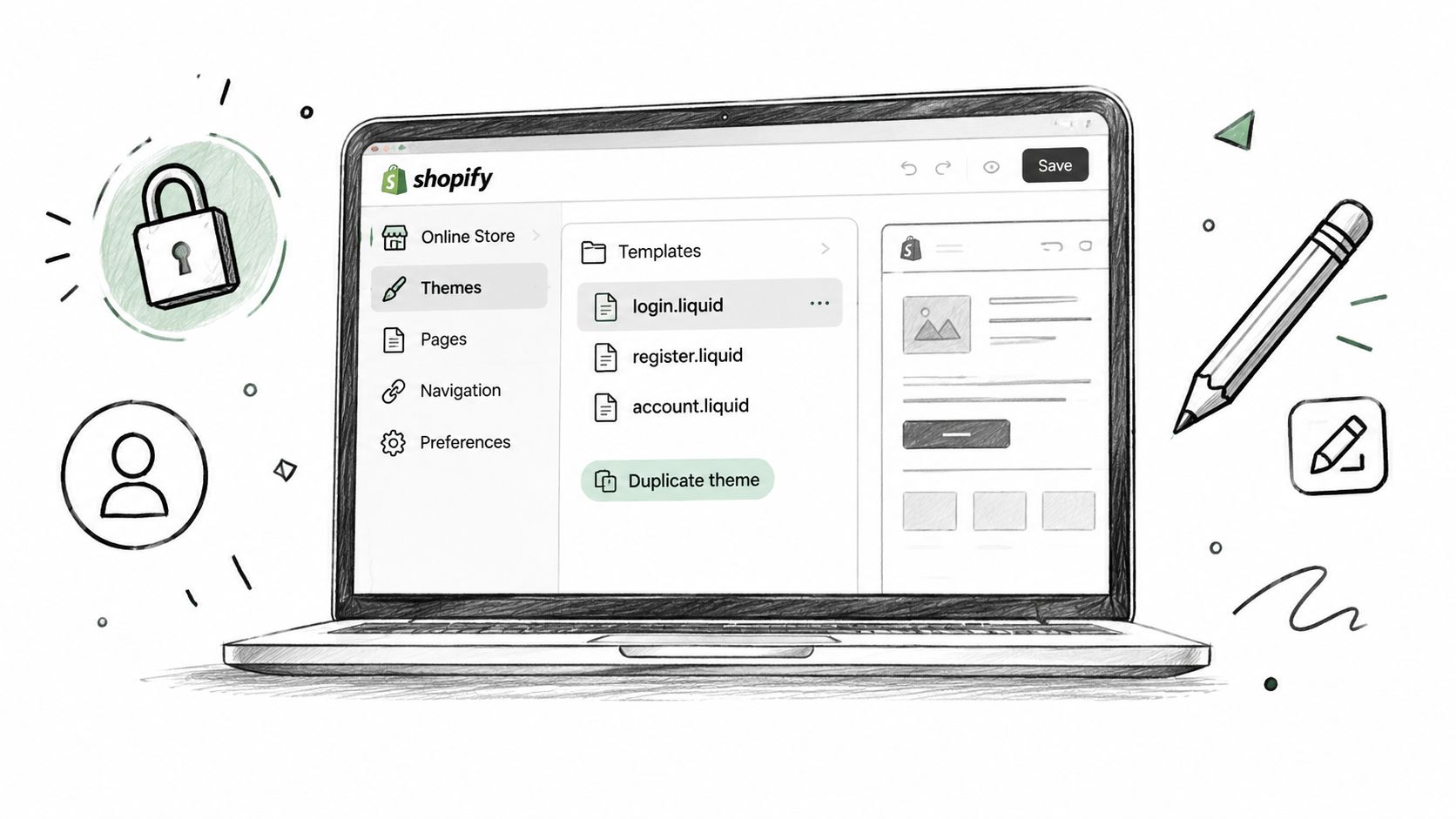
Make changes in a duplicate, unpublished theme first. That gives the team a safe place to inspect login, registration, and account templates without interrupting live checkout or active customer sessions. Depending on the account experience, review the classic Liquid templates and the newer customer-account JSON templates rather than assuming one template controls every route.
Build with theme settings, not isolated styling
Add the logo through a theme block or supported theme setting instead of hard-coding an image path. The block can then inherit responsive behavior and remain manageable when the merchant changes the storefront branding.
Use the theme's color tokens for buttons, links, borders, and focus states. Hard-coded color values often survive the first launch and fail during the next rebrand, leaving the portal with an outdated accent color or poor contrast. The same rule applies to typography. Pull from the existing theme settings where the account template allows it.
Copy matters as much as appearance. Replace generic labels such as “Login” with action-led language like “Sign in to manage your subscription.” The customer should understand why the page exists and what happens after authentication.

Remove storefront noise from the authentication route
Login pages usually need less navigation than a collection or editorial page. Check that newsletter blocks, promotional banners, social feeds, and large footer modules don't crowd the form or distract a customer who's trying to recover access.
Before publishing, compare a logged-out login page with a logged-in account page on desktop and mobile. Check the logo position, spacing, button treatment, error messages, and link styles. A customer shouldn't wonder whether they've entered a different company's website after authentication.
Choosing the Right Login Flow for Subscribers
A subscriber opens the portal from a phone, misses the verification code, then abandons the session before reaching subscription controls. That failure affects more than authentication. It can create a support ticket or make a customer question whether managing the subscription is worth the effort.
Choose the flow based on the subscriber relationship, device mix, account risk, and recovery capacity of the support team. Password-only access is familiar and easy to explain, but reused credentials increase exposure when customers use the same password elsewhere. Password plus two-factor authentication adds protection, while each extra prompt creates another point where a returning buyer may stop.
Passwordless access removes password memory and reset steps, which suits mobile shopping. Its failure points are different: delayed codes, expired links, inaccessible inboxes, and throttling. A flow that looks fast in a demo can still generate tickets when a customer changes phone numbers or opens a link in an email client that blocks the session.
Benchmarks show the difference. Password-only flows typically complete at 60% to 75% (authentication-friction data from MojoAuth), password plus SMS two-factor authentication at 50% to 65%, and passwordless flows at 85% to 95%. Treat these as directional ranges, not a forecast for a particular Shopify store. Instrument the store's own funnel before selecting a default.
Login Flow Tradeoffs for Subscribers
| Flow | Login Completion | Support Tickets / 1k Logins | Account Takeover Risk | Best For |
|---|---|---|---|---|
| Password-only | 60% to 75% | Measure from your support tags | Concentrates risk in reused credentials | Familiar returning-customer access |
| Password plus 2FA | 50% to 65% | Watch for device and phone-number issues | Adds a stronger verification layer | Higher-risk accounts and sensitive actions |
| Passwordless | 85% to 95% | Watch code delivery, expiration, and inbox access | Depends on delivery controls and recovery design | Mobile-first subscribers and low-reset journeys |
The blank ticket column is deliberate. Support volume varies with customer demographics, email deliverability, fraud controls, and the account actions available after login. Tag login failures separately from subscription questions, then compare those tags with successful landings on the native Shopify portal.
For many subscription stores, start with a simple Shopify-native flow on the merchant's domain. Add stronger verification for suspicious activity or sensitive actions instead of forcing every trusted subscriber through the highest-friction challenge. Apply rate limiting, bot detection, and anomalous-login monitoring where the risk justifies them. Test the fallback with real devices, email clients, and changed phone numbers before enabling another factor.
Designing Recovery and Fallback Paths
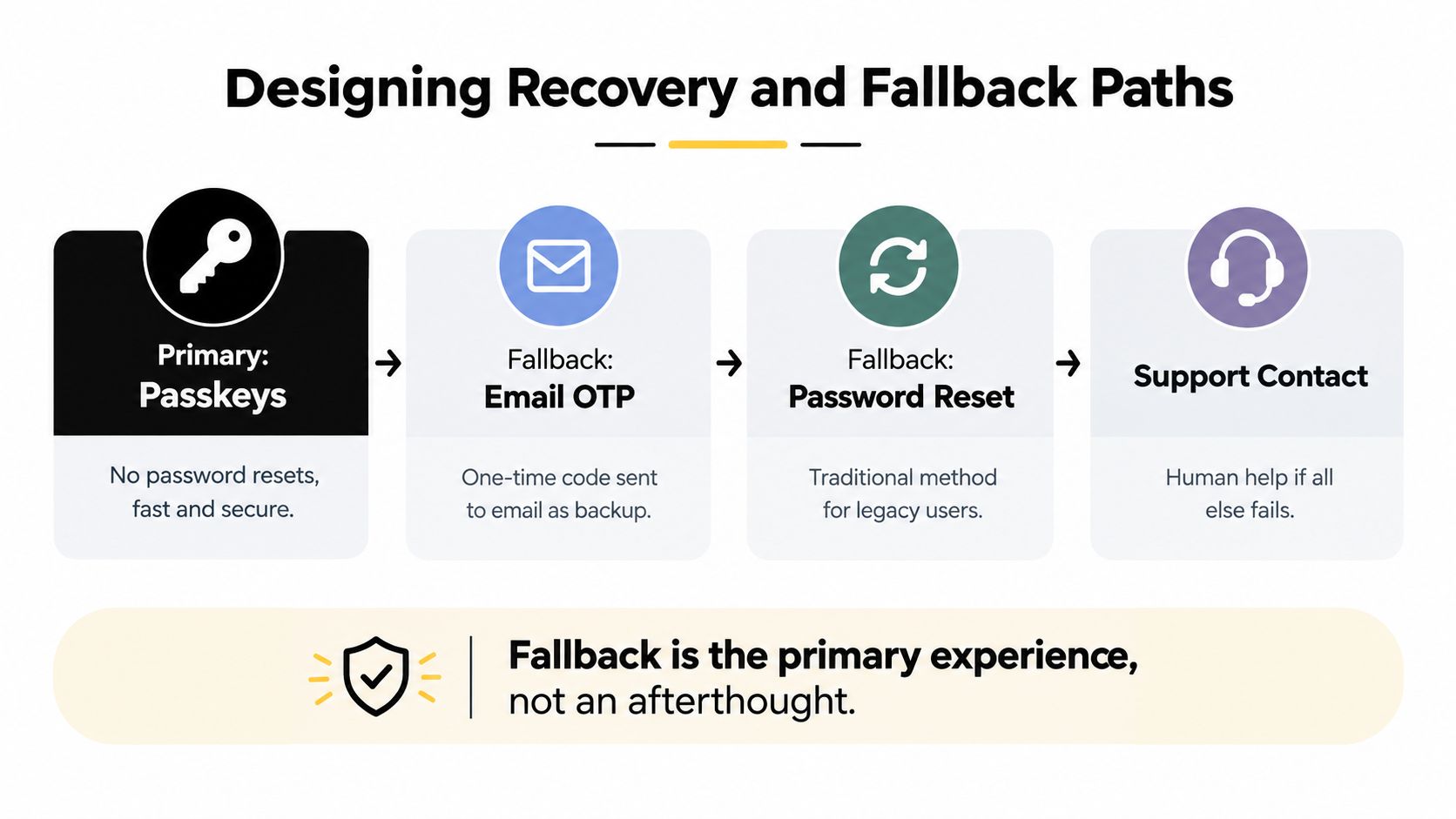
Recovery is part of the primary customer portal login experience. Customers don't evaluate the system only when authentication works. They remember the store when a phone is lost, an email code expires, a shared inbox is inaccessible, or a passkey exists on a device they no longer own.
A resilient hierarchy starts with passkeys for customers who can enroll them. Passkeys remove the password-reset dependency, but they still require clear enrollment instructions and a usable fallback. Current guidance recommends passkeys as the primary factor, with TOTP or push as backup and SMS reserved for account recovery, as described in this customer-portal authentication guide.
Make every fallback understandable
A customer should see the next safe option without opening a support ticket first. Keep recovery emails branded, concise, and consistent with the storefront header so legitimate messages are easier to recognize. Explain what to do if the code expires, the phone number is unavailable, or the email address belongs to a shared household inbox.
Use a layered path:
- Passkey: Offer the quickest route for an enrolled device.
- Authenticator or push backup: Give customers a non-SMS option when the primary device is unavailable.
- Email one-time code: Use a short-lived code for customers who can access the account email.
- Password recovery: Preserve a traditional route for legacy users, but make the reset instructions explicit.
- Support escalation: Ask support to verify ownership through documented account signals before changing access.
The recovery method should not weaken the account. Security guidance highlights credential stuffing, account takeover, and account-recovery abuse as common portal threats, with controls such as bot detection, rate limiting, login anomaly monitoring, access logging, and rapid credential reset recommended in response. Portal security guidance on credential-stuffing response frames the operational problem clearly: lower friction and stronger controls have to work together.
Account merging deserves its own test. A shopper may place an order as a guest and register later with the same email address. Confirm that the resulting account exposes the expected order and subscription history instead of creating a new, empty customer record. A failed recovery path at renewal can become a lost continuation, so treat it as a retention workflow rather than a help-center footnote.
Measuring Login Performance and Support Deflection
A customer can open the portal, request a code, close the tab, and still register as a pageview. That report says little about whether the login helped the customer manage a subscription. Track the path from intent to useful account access, then connect failures to support demand.
Start with stable events:
login_viewed: The login screen renders.credentials_submitted: The customer submits an identifier and password.otp_requested: The system requests a one-time code or link.otp_verified: The submitted code passes verification.portal_landed: The authenticated customer reaches the intended account or subscription page.support_handoff_clicked: The customer selects a support route from the login or recovery experience.
Attach properties for device class, authentication method, entry source, and session age. These fields separate a password problem from a mobile redirect failure or delayed code delivery. Never send passwords, recovery codes, or other sensitive credentials to analytics.
Use completion as the operating metric
Calculate completion as successful authentication divided by customers who reached the login screen. Use the store's own event data to choose changes. External benchmarks can provide context, but they should not override evidence from the native account surface on the merchant's domain.
For portal usage, report access by session, day, and portal. ServiceNow counts each access as a separate session across browsers and devices, with usage calculated over a 24-hour window (ServiceNow's customer self-service session documentation). Oracle includes unique logins, returning customers, login frequency, and login recency among useful portal engagement measures in its web metrics login documentation.
Pair the funnel with support tags. Track password-reset requests, expired-code contacts, locked-account tickets, and login handoffs on the same cadence as successful portal landings. A Looker or Metabase dashboard can show completion, repeat access, recovery abandonment, and support deflection without requiring a separate data-science project.
For Shopify event collection, use Customer Events where appropriate and keep event names stable. Agree on definitions before exporting them into a warehouse view. Teams combining storefront and subscription reporting can review a Shopify analytics app approach, while the measurement model should remain grounded in the merchant's customer journey. These signals show whether login friction is contributing to churn or creating avoidable support work.
Troubleshooting the Most Common Login Failures
Production failures usually look obvious to customers and confusing to operators. A page reloads forever, a reset message never arrives, or a passkey option disappears even though the browser supports it. Support agents need a symptom-to-fix map, not a general explanation of authentication.
The redirect loop after enabling native accounts
The customer enters the login route, the page reloads, and the cycle repeats. In browser storage, the return_url cookie remains set, which often points to a legacy /account redirect in theme.liquid that bypasses the customer-account template.
Single-line fix: remove the custom redirect and let Shopify serve /account natively.
Test the route from a clean browser session after making the change. Then follow a deep link from a subscription email to confirm that Shopify returns the customer to the intended account destination after authentication.
The reset email never reaches the inbox
The customer submits the recovery form and sees no message. The store may still be sending from a platform address because the storefront domain hasn't been selected as the primary customer email sender, which can make branded recovery messages harder for inboxes and customers to recognize.
Single-line fix: verify the branded domain under the customer email sender settings.
Check the full message path with a test customer, including the sender name, reply address, branding, and destination URL. Don't ask customers to search indefinitely for a message that may have been filtered or sent from an unfamiliar identity.
The passkey prompt never appears
The password field renders, but the browser never offers biometric or device-based authentication. The common culprit is a custom Liquid login snippet that replaced the default customer form and failed to render the passkey component.
Single-line fix: revert to the default customers/login.liquid section, then reapply branding through supported theme settings or blocks.
| Symptom | Root Cause | Fix |
|---|---|---|
Login reloads endlessly with a return_url cookie |
A legacy redirect bypasses the native account template | Remove the custom redirect and serve /account natively |
| Password reset email doesn't arrive | The branded customer email sender isn't configured as primary | Verify the branded domain under customer email sender settings |
| Passkey prompt never appears | A custom Liquid form omits the passkey component | Revert to the default customers/login.liquid section |
Practical rule: reproduce every login ticket in a clean browser, a returning browser, and a mobile webview before changing the authentication provider.
For subscription merchants, the portal should also expose the actions customers came to perform, including pausing, skipping, swapping, changing frequency, updating payment details, and canceling. RecurX provides a Shopify-native subscription portal on the merchant's domain for those self-service actions, which makes it one option to evaluate alongside other subscription applications.
If you want to connect a native Shopify customer portal login with subscription controls, RecurX provides subscriber self-service for actions such as pausing, skipping, swapping products, changing frequency, updating payment details, and canceling. Visit RecurX to review how its merchant-domain portal and subscription tooling can fit your store's account and retention workflow.
customer portal login · shopify portal · subscription portal · shopify accounts · branded login
Keep reading
- Quantity Price Breaks for Shopify SubscriptionsSet quantity price breaks on Shopify subscriptions without giving away margin. Compare tiers, Build-a-Box, cart rules, and AOV versus profit.
- Reduce Involuntary Churn on Shopify: 5 Recovery StepsReduce involuntary churn on Shopify with decline routing, card-update flows, retry timing, and measurement that avoids inflated recovery numbers.
- Reporting vs Analytics: When to Use Each in SubscriptionsReporting vs analytics for subscription stores: what each answers, which metrics belong in reports, and when to analyze churn, cohorts and LTV.
Start growing recurring revenue on Shopify
RecurX has a 14-day free trial and zero transaction fees on every plan. Install in minutes.
Start your free trial →