Shopify Subscription API: A Complete Integration Guide 2026
Learn how to use the Shopify Subscription API with GraphQL examples, secure authentication, and webhook handling in this 2026 guide.
Learn how to use the Shopify Subscription API with GraphQL examples, secure authentication, and webhook handling in this 2026 guide.
You've been asked to add native subscriptions to a live Shopify store. The merchant wants “Subscribe and save” on the product page, customers need to pause or swap deliveries, and operations wants failed payments and renewals reconciled automatically. The first implementation may look like a selling-plan task. In production, it becomes a distributed system involving product merchandising, checkout, contracts, payment methods, asynchronous calculations, webhooks, and data ownership.
The Shopify Subscription API provides the native primitives for that system. This guide focuses on the parts that usually cause trouble after the first demo works: separating Admin GraphQL from Storefront API responsibilities, treating contract edits as asynchronous checkout transactions, and planning migrations around app ownership rather than assuming that compatible GraphQL objects are portable.
The result should be a subscription integration that preserves Shopify's merchant and customer workflows, validates changes before committing them, and leaves a clear audit trail when existing subscriptions come from another app. RecurX is a useful reference point for this architecture because it operates through Shopify's native subscription model rather than replacing the storefront checkout with an unrelated billing layer. If the project also needs broader engineering capacity, a custom software development partner can help coordinate the app, data, and operational pieces around the Shopify integration.
Table of Contents
- Introduction to Shopify Subscription API
- Subscription API Architecture Essentials
- API Authentication and Scopes
- Creating and Managing Selling Plans
- Subscription Contract Lifecycle Workflows
- Webhook Handling and Event Patterns
- Subscription API Migration Considerations
- Quick Reference Cheat Sheet
- Cross Reference Matrix
- Glossary of Key Terms
- Related Resources and Index
Introduction to Shopify Subscription API
A merchant launches a subscription offer, checkout works, and the first orders come through. Then the harder questions start. Who owns the existing contracts after a migration, which app can edit them, and how do you change a billing date or line item without creating duplicate charges or broken customer flows?
Shopify introduced its Subscription APIs in October 2020 to support recurring and non-recurring purchase models beyond a one-time purchase flow. In the original Subscription APIs announcement, Shopify describes selling plans as alternative ways to purchase a product variant, including subscribe-and-save and prepaid options.
The practical value of the Shopify Subscription API is that subscriptions stay inside Shopify's product, checkout, and customer account experience. Customers choose a plan in the storefront, complete checkout through Shopify, and the app handles the configuration and lifecycle work around that native flow.
In production, I treat the implementation as five connected responsibilities:
- Merchandising: define selling plan groups, plans, policies, and product associations.
- Storefront selection: expose plan data and pass the selected plan into cart and checkout flows.
- Contract operations: handle recurring items, quantities, delivery, billing, and payment method changes, often through asynchronous contract edit patterns rather than direct assumptions about immediate state changes.
- Event processing: reconcile contract creation, updates, billing attempts, and failures.
- Migration control: determine which contracts the app owns and can access before moving customers from another subscription app.
That ownership model is where many builds fail. Selling-plan setup proves the offer is purchasable. It does not prove your app can safely modify inherited contracts or support operational changes after launch. RecurX is a useful reference point because it works within Shopify's native subscription model. If a team also needs broader implementation support, a custom software development partner can help coordinate the app, data, and operational work.
Subscription API Architecture Essentials
The architecture is easier to reason about when each object has one clear job. A SellingPlanGroup organizes related purchase choices. A SellingPlan describes one choice, such as a recurring interval or prepaid arrangement. The plan attaches to a product or variant and defines the policies Shopify should apply.
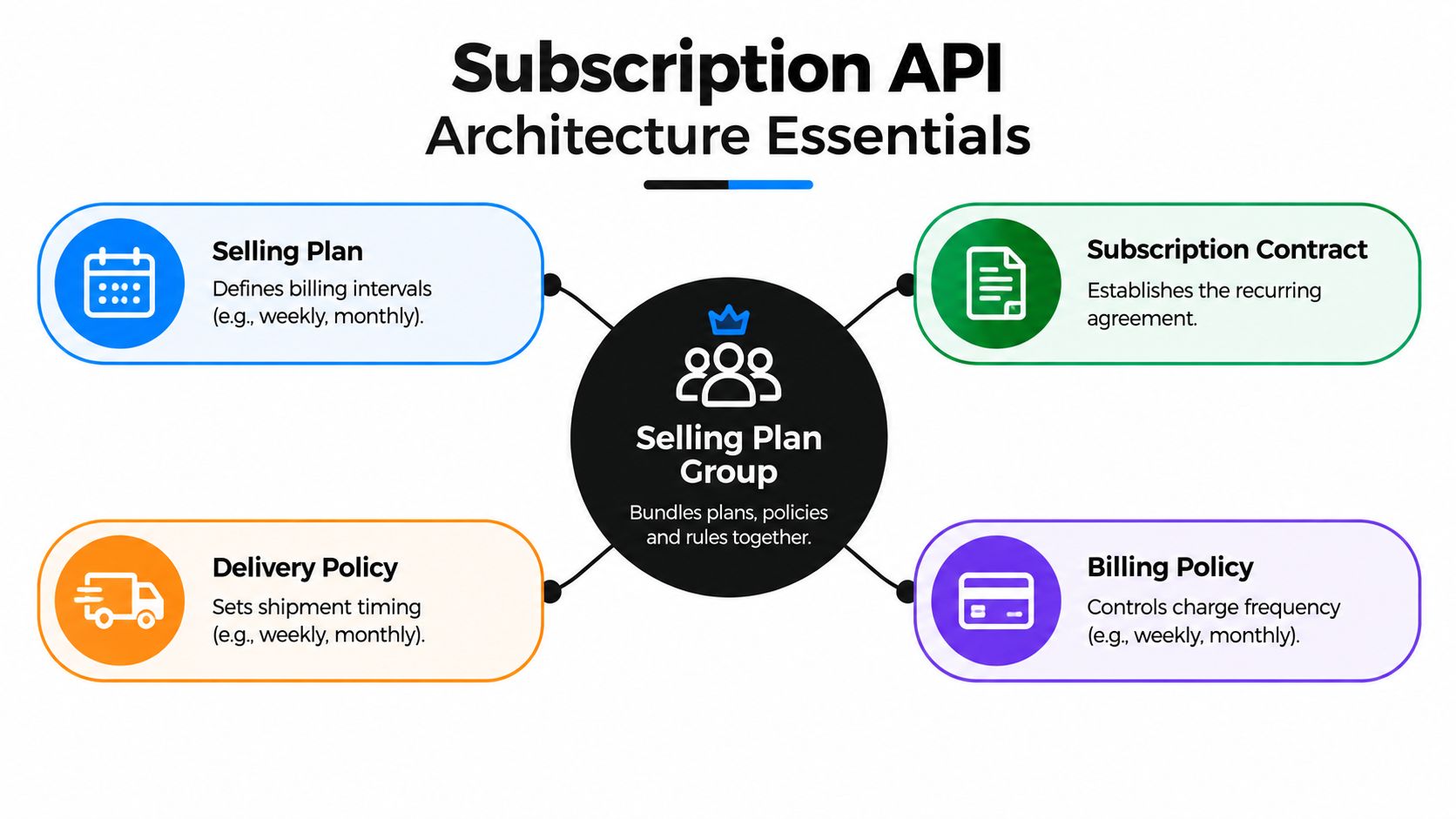
Shopify's foundational model gives each selling plan four operational policies:
- Billing policy: when and how the customer is charged.
- Delivery policy: when the product is delivered.
- Pricing policy: how the plan changes the product price.
- Inventory policy: when inventory is committed.
Those policies can vary independently. A plan could model weekly billing with monthly delivery, a recurring percentage discount, and inventory commitment at fulfillment rather than order creation. That separation is more expressive than storing one interval string and one discount value in an app database.
Admin GraphQL owns configuration
The Admin GraphQL API is where the app creates SellingPlanGroup and SellingPlan objects, configures policies, associates plans with products or variants, and later works with contracts and payment-method permissions. This is the control plane for merchant configuration.
The Storefront API is the purchase surface. It exposes selling-plan details such as delivery frequency, price adjustments, selling-plan IDs, and whether a plan creates recurring deliveries. The storefront then uses cartCreate with a variant ID and selling-plan ID to add the subscription line item.
That division keeps plan administration away from the customer-facing cart flow. It also avoids forcing an app to replace Shopify checkout. Shopify's stated architectural goal was to preserve native merchant, customer, and developer workflows while supporting purchase options beyond a one-time transaction.
Practical rule: Treat a selling plan as merchandising configuration, not as your complete subscription record.
After checkout, Shopify generates a subscription contract. The contract contains the recurring agreement and becomes the operational source for later billing and delivery behavior. Your app should maintain references to Shopify IDs, but it shouldn't treat its own subscription row as a substitute for Shopify's contract state.
For a deeper look at how native objects fit together, see this guide to Shopify integrations and API design. The main design decision is simple: configure plans through Admin GraphQL, select them through the Storefront workflow, and process post-purchase operations through contracts and events.
API Authentication and Scopes
A subscription app usually fails at the ownership boundary, not at OAuth. The merchant installs successfully, selling plans appear, then a contract edit fails because the app is trying to touch a subscription contract it does not own, or because the store never reapproved the latest scopes. That is why authentication for subscriptions needs to be designed around object ownership and async operations from day one, not treated as a one-time setup task.
Shopify splits subscription access across Admin GraphQL, contract permissions, customer payment method access, and storefront use. The scope set commonly includes write_products, read_customer_payment_methods, read_own_subscription_contracts, and write_own_subscription_contracts, as described in Shopify's selling-plan implementation documentation. The practical rule is simple. Ask only for the scopes tied to the actions your app performs, and map those scopes to specific mutations, reads, and background jobs before you ship.
Build the permission set deliberately
A working permissions review should connect each capability to both a scope and an ownership rule:
| Capability | Relevant permission or surface | Why it matters |
|---|---|---|
| Create or attach plans | write_products through Admin GraphQL |
Plan groups and plans must be associated with catalog objects |
| Read owned contracts | read_own_subscription_contracts |
Portal and operational views need the app's contract data |
| Edit owned contracts | write_own_subscription_contracts |
Customer changes require authorized contract mutations |
| Work with payment methods | read_customer_payment_methods |
Payment recovery and payment-method workflows need access |
| Add a plan to a cart | Storefront API access | The selected variant and selling-plan ID enter the cart together |
In practice, I also keep an install record with the shop, granted scopes, token status, API version, and whether the merchant has completed any required reauthorization. That turns support work from guesswork into a quick lookup.
Store tokens on the server. Keep merchant admin auth separate from customer account sessions. Embedded app session tokens help with app requests, but the server still has to validate the session and send the correct Shopify access token for each Admin API call.
Diagnose authorization failures
“Access denied” is usually a category of problems, not one problem:
- The app never requested the scope.
- The merchant has not reauthorized after a scope change.
- The operation targets a contract owned by another app.
- The app has not completed subscription access setup in the Partner Dashboard.
- The request is hitting the wrong API surface.
Async contract editing makes this stricter. A queued job may run minutes after the original user action, so the job must re-check ownership, token validity, and shop context before sending the mutation. Log the GraphQL operation, shop, API version, scope context, and user-facing error, but never store sensitive payment data. If your stack also supports marketplace-style payments, compare those patterns with backend payment setup for marketplaces, while keeping Shopify subscription authorization separate from broader payment orchestration.
Creating and Managing Selling Plans
Plan creation should be deterministic. A deployment, reinstall, or retry must find an existing plan rather than create another group with the same customer-facing choices.
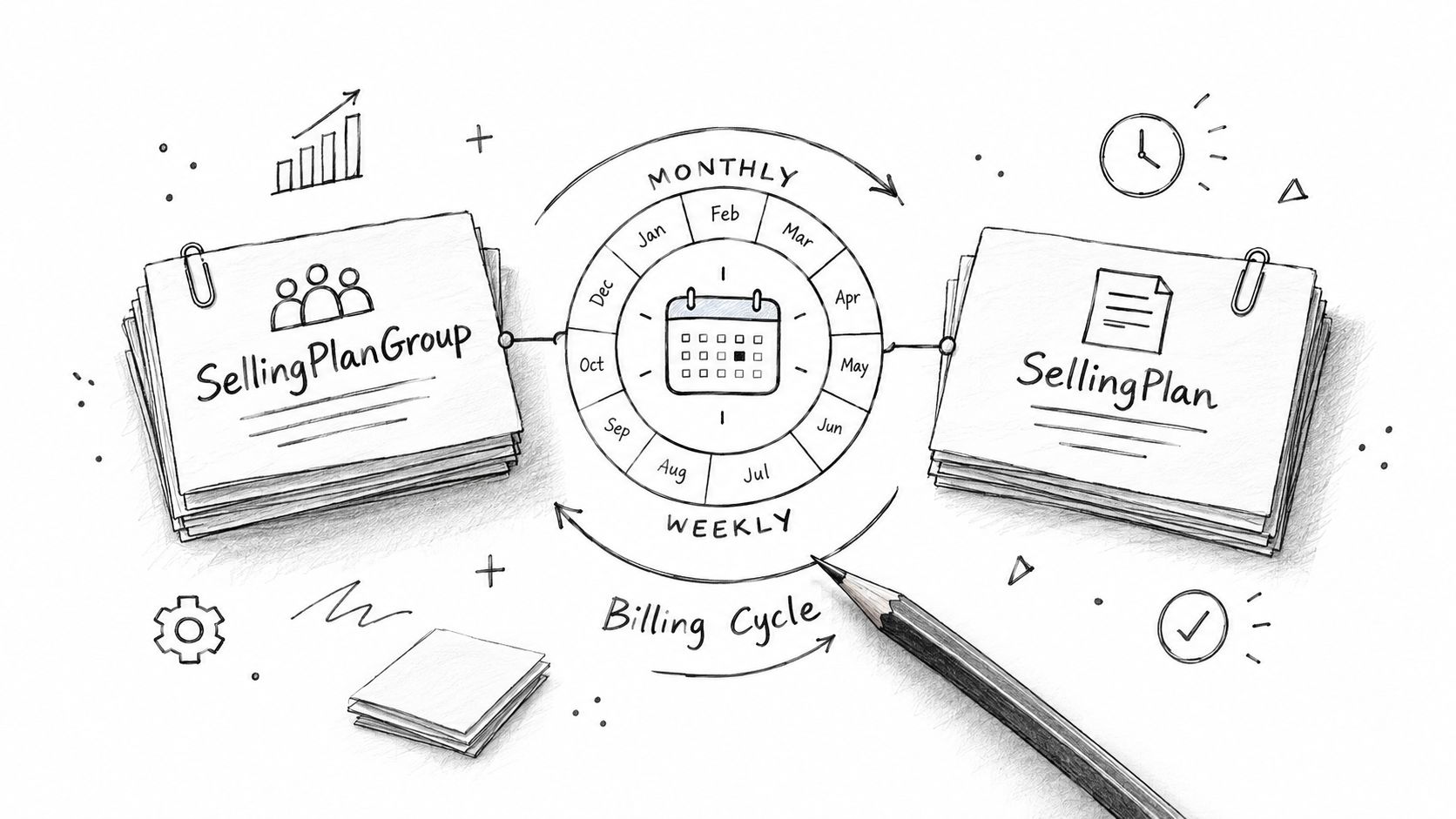
Begin with a catalog decision, not a mutation. Decide whether the merchant needs one group per product family or a shared group with several plans, then define the customer-visible names and the four policies. Keep internal plan keys in your database so a retry can identify the intended object even if a merchant later changes its display name.
Create the group and policies
A conceptual Admin GraphQL mutation may look like this:
mutation CreateSellingPlanGroup($input: SellingPlanGroupInput!) {
  sellingPlanGroupCreate(input: $input) {
    sellingPlanGroup {
      id
      name
      sellingPlans(first: 20) {
        nodes {
          id
          name
        }
      }
    }
    userErrors {
      field
      message
    }
  }
}
The input should define the group name, plans, billing policy, delivery policy, pricing adjustments, and inventory behavior supported by the selected API version. Don't rely on a successful HTTP response. GraphQL can return userErrors inside an otherwise successful request, so persist and inspect those fields before marking the plan active.
Use a stable idempotency key in your application layer, such as a combination of shop, product family, and internal plan version. Before creating a new group, query existing groups and compare the normalized policy definition. Display text alone isn't enough because two plans can share a name while behaving differently.
A production record should retain:
- Shopify selling-plan group ID.
- Shopify selling-plan IDs.
- Product and variant associations.
- A normalized policy fingerprint.
- The merchant-facing name and internal key.
- Creation and last-synchronization state.
- The API version used for the write.
The Shopify subscription checkout guide is useful when connecting those plan records to the customer-facing purchase flow. The checkout implementation must pass the selected selling-plan ID with the correct variant. A plan displayed in a widget but omitted from the cart is a merchandising bug, not a billing problem.
After the first write, query the result independently. Confirm that the plan is attached to the intended product or variant, that the storefront can read the plan, and that the policy values match the merchant's configuration. Test a one-time purchase alongside each recurring option so the product page doesn't accidentally force every buyer into a contract.
Later changes need version discipline. If a merchant changes a discount or interval, determine whether existing contracts should retain their original terms or whether the change applies only to new purchases. Selling-plan configuration and contract state are related, but they aren't interchangeable. Updating a plan doesn't automatically give you a safe process for rewriting every customer agreement.
Use a small reconciliation job to compare your internal catalog mapping with Shopify's current groups, plans, and associations. Pagination matters once a store has many products or plan variants. Record user errors, retry transient failures, and send permanent validation failures to an operational queue rather than repeatedly submitting the same invalid input.
Subscription Contract Lifecycle Workflows
A customer clicks “skip next order” in the portal, sees a success toast, and then contacts support because nothing changed. That failure usually comes from ownership confusion. In Shopify, a subscription contract edit is an asynchronous workflow with a hard commit boundary, not an immediate row update. The current model treats contract changes as a staged calculation through SubscriptionContractCalculation, as described in the subscription contracts documentation.
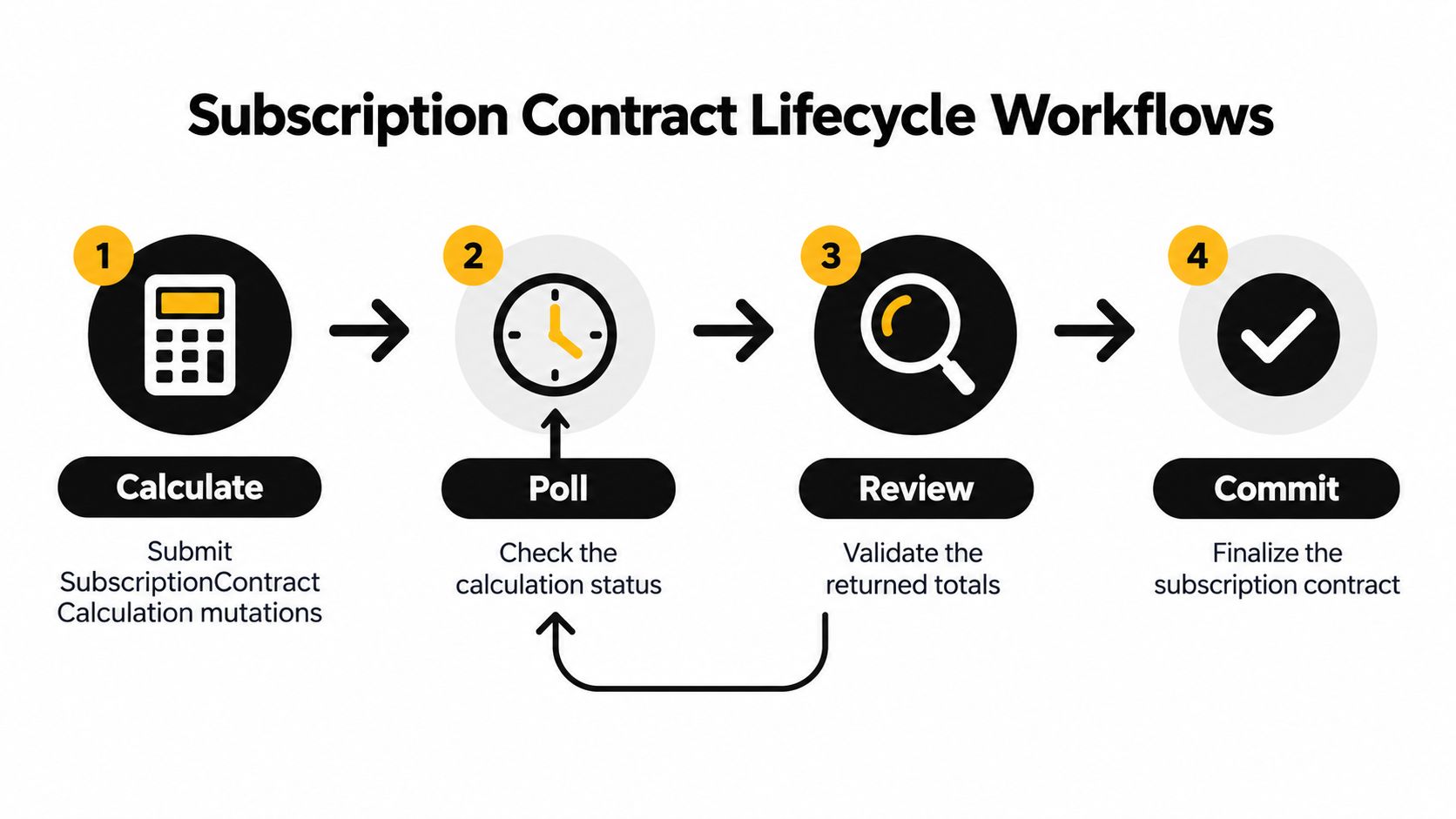
The workflow has four stages:
- Calculate: submit the full desired contract state through
SubscriptionContractCalculation. - Poll: check calculation status, or consume the success or failure webhook.
- Review: inspect projected totals, delivery options, warnings, and validation errors.
- Commit: apply the result only after Shopify reports a successful calculation.
That ownership model matters during migrations and day-to-day editing. Shopify owns the contract state. Your app owns the requested change, the user experience around pending work, and the audit trail that explains what was asked for, when, and by whom. Keep those responsibilities separate.
For portal actions such as skip, swap, quantity change, frequency change, or address update, create an internal operation record first. Store the contract ID, customer ID, requested mutation, correlation ID, status, and a snapshot of the source contract or version metadata you used to build the edit. This gives your workers and support team a stable record even if the browser closes or the customer retries the same action.
When the calculation is submitted, persist Shopify's calculation ID immediately and mark the operation as calculating. Store the entire desired state, not just the changed field. That sounds heavier, but partial intent records are where many contract editors break. A swap can affect price, delivery options, discounts, and billing alignment. A frequency change can trigger validation or updated totals. Full desired-state storage makes retries deterministic and keeps your commit step honest.
Polling should run from durable infrastructure, not from a customer session. A worker can resume after restart, and a webhook can complete the same operation path if you deduplicate by Shopify event identity or by your own operation key. If the calculation stays unresolved, show the customer a pending state instead of implying success. Teams that resubmit blindly often create overlapping edits and hard-to-debug support cases.
The difficult part is stale state.
A customer can leave a portal open, a merchant can update related settings, or another app can edit the same contract before commit. Before applying the calculation, compare the source state you used for the request with the current contract state. If they differ, rebuild the desired state from the latest contract and ask the customer to confirm any changed totals, shipping choices, or timing. This is the practical version of concurrency control in subscription apps.
Shopify's newer calculation flow replaced the older draft-style approach and pushes more validation into the calculation step, including checkout-related logic and Shopify Functions behavior. That makes contract edits safer, but it also means your UI has to surface warnings instead of hiding them behind a generic “updated successfully” message.
After commit, fetch the resulting contract, reconcile it with your local read model, and emit your own domain event. Shopify creates the contract after the original checkout and generates billing attempts from that contract later, so RecurX can connect Shopify events with payment recovery, analytics, notification, and portal records without treating cart state as the full lifecycle.
Webhook Handling and Event Patterns
Subscription webhooks are the system's timing mechanism. The checkout request tells you that a purchase was attempted. Contract and billing events tell you what Shopify accepted and what happened afterward.
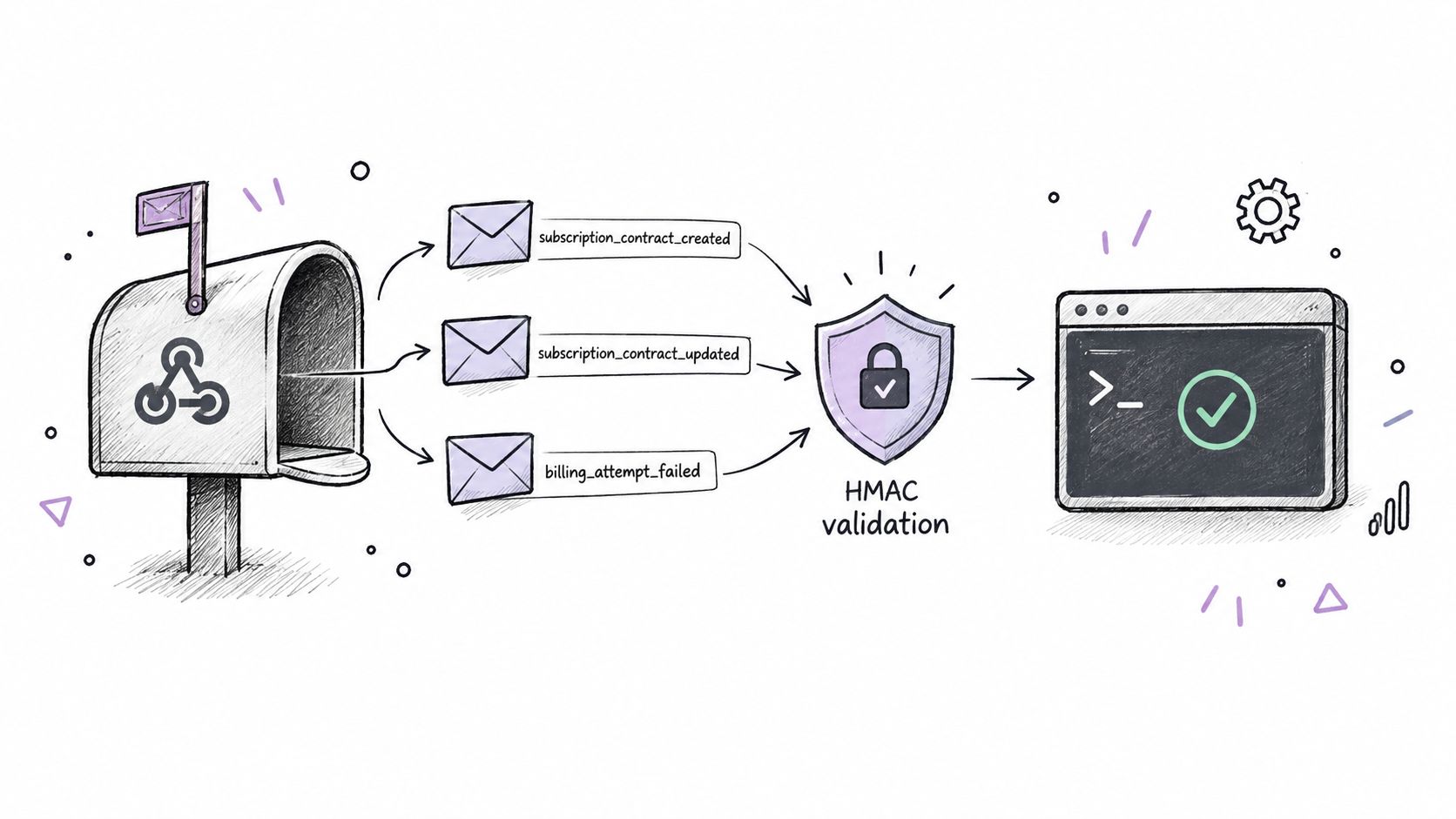
Register only the topics your application can process. A useful baseline includes contract-created events, contract-updated events, and failed billing attempts. The exact topic names and payload fields should be checked against the API version and Shopify's current webhook reference, because your handler must tolerate schema evolution.
Validate before processing
The HTTP endpoint should read the raw request body, validate Shopify's HMAC signature with the app secret, identify the shop from Shopify's delivery headers, and reject invalid or ambiguous deliveries before parsing business data. Don't reconstruct the signed body from parsed JSON. Whitespace and serialization changes can invalidate a correct delivery.
A Node.js-style handler has this shape:
import crypto from "node:crypto";

function isValidHmac(rawBody, receivedHmac, secret) {
  const digest = crypto
    .createHmac("sha256", secret)
    .update(rawBody, "utf8")
    .digest("base64");

  return crypto.timingSafeEqual(
    Buffer.from(digest),
    Buffer.from(receivedHmac || "")
  );
}

async function handleWebhook(request, shop, secret) {
  const rawBody = await request.text();
  const hmac = request.headers.get("x-shopify-hmac-sha256");

  if (!isValidHmac(rawBody, hmac, secret)) {
    return new Response("Invalid signature", { status: 401 });
  }

  const payload = JSON.parse(rawBody);
  await enqueueOnce({
    shop,
    eventId: request.headers.get("x-shopify-event-id"),
    topic: request.headers.get("x-shopify-topic"),
    payload
  });

  return new Response("Accepted", { status: 200 });
}
The endpoint should acknowledge a valid delivery quickly and put business processing on a queue. The worker can then update the contract read model, append an audit record, trigger payment recovery, and notify downstream systems. Store the event ID, topic, shop, payload hash, processing state, retry count, and last error.
Make retries harmless
Shopify may retry a delivery when your endpoint or worker fails. Your consumer needs an idempotency check before applying a state transition. If the event already reached a terminal state, acknowledge it without repeating customer notifications or payment-recovery actions.
Use bounded retries with increasing delays for transient failures. Route a repeatedly failing message to a poison-message queue with enough context for an operator to replay it after fixing the handler. Don't discard an event because the payload doesn't match your current assumptions. Preserve it, mark it unsupported, and alert the team.
The recent shift toward asynchronous contract calculations makes webhook design more important. Shopify can expose calculation success or failure asynchronously, so calculation IDs, correlation IDs, and contract IDs must be searchable across logs and database tables. A billing failure should update the subscription's payment state without erasing the contract's product or delivery state.
Failure-handling rule: Never infer a successful contract edit from a submitted mutation. Confirm the calculation result, commit status, and resulting contract event.
Subscription API Migration Considerations
A migration usually looks simple until the first merchant asks why the new app cannot see subscriptions that are clearly active in Shopify. The answer is ownership. Shopify ties a subscription contract to the app that created it, and read_own_subscription_contracts only returns contracts owned by that app. A newly installed app can inherit products and selling plans, but it cannot assume it can read or edit every existing contract in the shop.
That ownership boundary shapes the whole migration path.
The Shopify Community discussion on subscription contract ownership captures the practical consequence. Historical orders can show which selling plan was used on an initial checkout, but they do not reliably reconstruct later renewals, pauses, skips, or cancellations. In real projects, that is the point where teams discover that API compatibility and contract portability are different problems.
Treat migration data as three separate ledgers, not one blended export:
- Catalog dataset: products, variants, selling-plan groups, plans, and their current associations in Shopify.
- Owned-contract dataset: contracts the new app can query, calculate against, and manage directly.
- Historical dataset: orders, payment records, customer consent, delivery history, and legacy exports for subscriptions outside the ownership boundary.
This split keeps you honest. If a legacy export includes a current customer, product mapping, next billing date, and valid payment authorization, that customer may be a candidate for re-enrollment. If the only evidence is an old order tied to the original selling plan, treat it as incomplete and send it to review.
The riskiest part of cutover is duplicate billing. Pause or cancel billing in the legacy system first, record the effective timestamp, confirm the customer path where re-enrollment is required, then create the new native subscription and store the mapping between the legacy subscription ID and the new contract ID. If any step fails, stop there. Do not auto-retry a billing-sensitive action unless the ledger shows the previous attempt is safe to repeat.
Advanced migrations also need an async mindset. Contract changes may involve delayed calculation and commit flows, so the migration ledger should record requested edits, calculation status, commit result, operator actions, and the final contract state. That audit trail matters more than a perfect import count.
For merchants still deciding whether native Shopify subscriptions match their operating model, it helps to compare ecommerce platforms before committing to a migration design. If the store is proceeding, a Shopify subscription migration workflow with connectors or CSV import paths can reduce manual work, but it does not remove the need for customer consent, ownership-aware re-enrollment, and a defensible record of who owns the next billing event.
Quick Reference Cheat Sheet
Use this as a working checklist during implementation. The exact field names and mutation availability should be verified against the Shopify API version your app targets.
Admin GraphQL
| Task | Surface or operation | Practical input and behavior |
|---|---|---|
| Create plan group | sellingPlanGroupCreate |
Supply the group definition, plans, policies, and product associations. Inspect userErrors. |
| Read plan groups | Admin GraphQL query | Filter or paginate groups and retain Shopify IDs in your mapping table. |
| Attach plans | Product or variant mutation | Associate the intended selling-plan group with the catalog object. Verify the association afterward. |
| Read owned contracts | Subscription contract query | Use read_own_subscription_contracts; ownership limits the result set. |
| Calculate contract edit | SubscriptionContractCalculation workflow |
Submit the complete desired state and persist the calculation ID. |
| Commit contract edit | Calculation commit operation | Commit only a successful calculation and then reconcile the resulting contract. |
Storefront API
| Task | Surface or operation | Practical input and behavior |
|---|---|---|
| Display choices | Selling-plan data | Read delivery frequency, price adjustments, IDs, and recurring-delivery state. |
| Create subscription cart | cartCreate |
Pass the variant ID together with the selected selling-plan ID. |
| Verify purchase selection | Cart response and checkout events | Confirm the line carries the intended plan before relying on post-purchase events. |
Webhooks and scopes
| Area | What to retain | Operational advice |
|---|---|---|
| Contract creation | Contract ID, shop, customer, lines, and correlation data | Update the local read model only after signature validation. |
| Contract update | Event identity and changed contract state | Deduplicate before notifications or analytics updates. |
| Billing failure | Billing attempt context and recovery status | Start recovery workflows without changing unrelated contract fields. |
| Authentication | Token, shop, scopes, and installation state | Reauthorize after scope changes and log access-denied causes safely. |
| Calculation events | Calculation ID, operation ID, status, warnings, and errors | Support asynchronous completion and safe timeout handling. |
A reliable implementation treats these entries as state transitions, not isolated API calls. The app database should preserve enough identifiers to trace a storefront selection through cart creation, contract creation, calculation, commit, webhook delivery, and payment recovery.
Cross Reference Matrix
The matrix below maps the main operations to their responsibilities. Scopes are indicative of the documented access model, and your app may need additional permissions for adjacent Shopify features.
| Endpoint | Purpose | Scopes |
|---|---|---|
Admin GraphQL sellingPlanGroupCreate |
Create a group and its purchase options | write_products |
| Admin GraphQL product or variant association | Attach plans to catalog objects | write_products |
| Storefront API selling-plan query | Render available subscription choices | Storefront API access |
Storefront cartCreate |
Add a variant and selling-plan ID to a cart | Storefront API access |
| Admin GraphQL contract query | Read contracts owned by the app | read_own_subscription_contracts |
SubscriptionContractCalculation |
Calculate a create or edit request | write_own_subscription_contracts |
| Calculation status or webhook | Poll or receive asynchronous result | Contract access and webhook registration |
| Calculation commit | Apply a validated contract change | write_own_subscription_contracts |
| Customer payment-method API | Support authorized payment operations | read_customer_payment_methods |
| Contract-created webhook | Reconcile the initial subscription | Webhook registration |
| Contract-updated webhook | Refresh local contract state | Webhook registration |
| Billing-failure webhook | Start payment recovery handling | Webhook registration |
Use the Admin GraphQL API for configuration and contract operations. Use the Storefront API for plan discovery and cart formation. Use webhooks for lifecycle reconciliation, and keep a durable operation record for every asynchronous calculation.
Glossary of Key Terms
SellingPlan: A purchase option attached to a product or variant. It defines how billing, delivery, pricing, and inventory should behave.
SellingPlanGroup: A container for related selling plans that merchants can expose within one product experience.
Subscription contract: The operational agreement created after a subscription purchase. It carries recurring lines, quantities, prices, policies, payment details, and shipping or billing information.
SubscriptionContractCalculation: Shopify's asynchronous mechanism for calculating and validating a contract state before an edit is committed.
Billing policy: The rule describing charge timing and frequency.
Delivery policy: The rule describing shipment or fulfillment timing.
Calculation ID: The durable Shopify identifier your app uses to poll, reconcile, and commit a particular calculation.
Contract ownership: The rule that limits standard contract access to the app that created the contract.
Webhook HMAC validation: Verification that a webhook payload was signed by Shopify and wasn't altered before processing.
Idempotency: The property that lets a retry produce one effective state change rather than duplicate billing, notifications, or records.
Related Resources and Index
Use the Shopify Subscription API announcement, selling plans documentation, and subscription contracts documentation as your baseline references, then read them through an implementation lens. For migration work, ownership rules and async contract edits usually create the risk, especially when your cutover depends on calculation, polling, and commit steps staying traceable across systems.
The Shopify Community thread is useful for those ownership edge cases. I treat it as a prompt to verify app boundaries against my own contract ledger before migration starts.
RecurX provides Shopify-native tooling for selling plans, customer-portal changes, payment recovery, analytics, bundles, and migration workflows built around Shopify's subscription model. Visit RecurX to evaluate how its native architecture can support safer selling-plan setup, contract operations, and subscription migration.
shopify subscription api · shopify graphql · subscription api · shopify webhooks · subscription migration
Keep reading
- Recurring Revenue Billing PlaybookMaster recurring revenue billing for Shopify DTC. Explore pricing models, retention metrics, payment recovery, and global compliance strategies.
- Subscription vs One Time Purchase for ShopifyCompare subscription vs one time purchase models for Shopify. Analyze LTV, churn, and MRR impacts, plus how to implement recurring billing with RecurX.
- How to Sell Subscriptions Online on ShopifyLearn how to sell subscriptions online on Shopify. Build flexible plans, optimize checkout, recover failed payments, and boost retention with RecurX.
Start growing recurring revenue on Shopify
RecurX has a 14-day free trial and zero transaction fees on every plan. Install in minutes.
Start your free trial →