Strike Through Pricing That Actually Converts
Learn how to use strike through pricing on Shopify to lift conversions, stay compliant, and run accessible Subscribe & Save offers without losing trust.
Learn how to use strike through pricing on Shopify to lift conversions, stay compliant, and run accessible Subscribe & Save offers without losing trust.
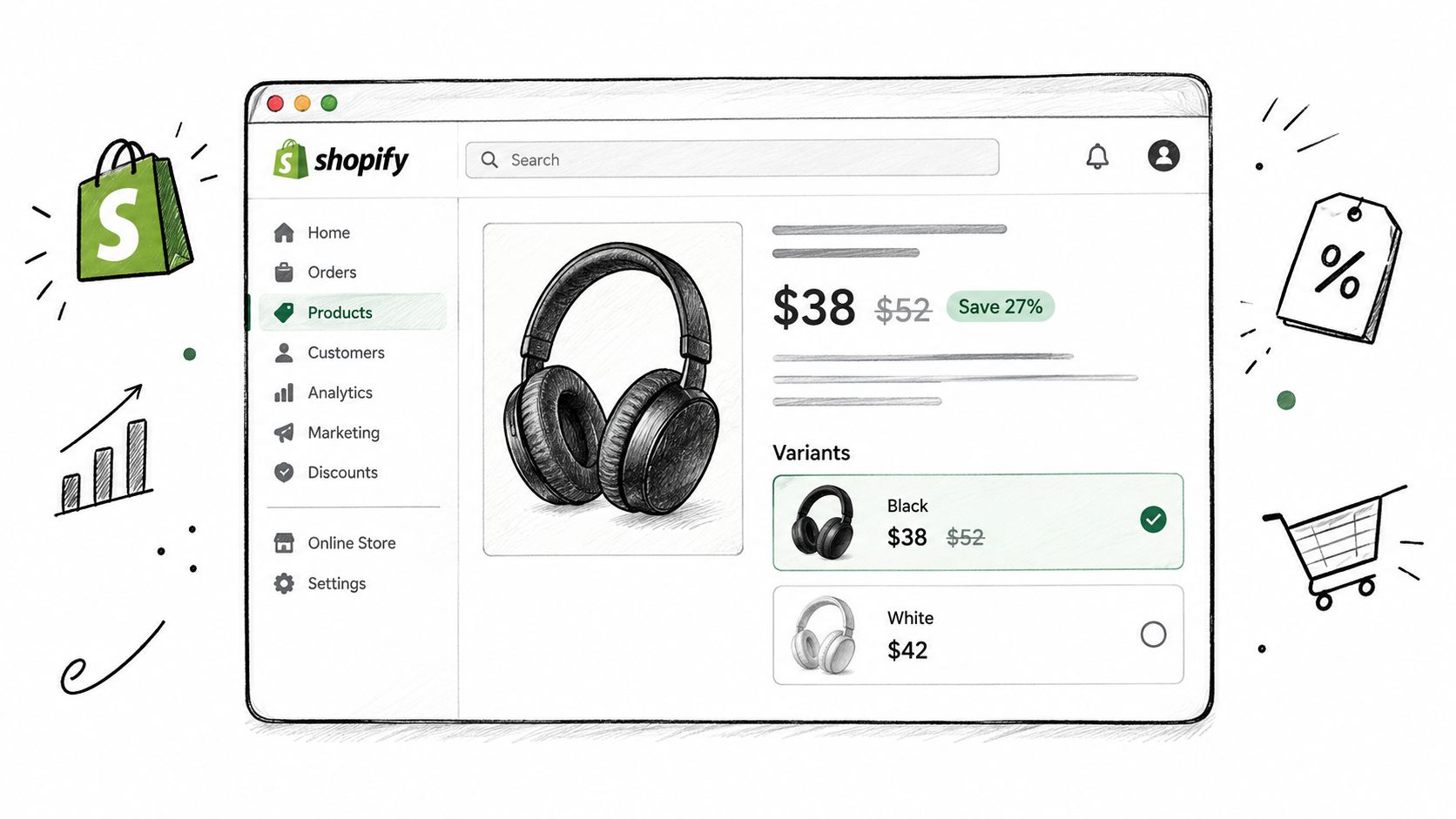
A Shopify merchant opens a product page and sees two different pricing stories. One variant shows a current price of $38 beside a crossed-out $52. Another shows $42 with no reference price at all. The product, customer, and traffic are similar, but the first offer immediately communicates a comparison while the second asks shoppers to judge the price in isolation.
That visual treatment is strike through pricing, usually created when Shopify's compare-at price is rendered beside the current price with a CSS line-through style. The crossed-out value works as a reference-price anchor, but only when shoppers can believe it reflects a genuine recent price. It also needs to remain understandable to screen readers, consistent across subscription renewals, and defensible under regional pricing rules.
The practical questions are straightforward. How does the anchor change perception? How should you connect Shopify's compare-at fields, theme variables, and selling-plan widgets? What happens when the same anchor appears on every subscription renewal? And how do you preserve clarity, accessibility, and legal credibility while still making the saving visible? Merchants comparing offer economics can also compare savings with Compass+ before choosing how aggressively to frame a discount.
Table of Contents
- The Discount Moment Every Shopper Notices
- Why a Crossed-Out Price Changes the Decision
- Setting Up Strike Through Pricing in Shopify
- Using Strike Through Pricing for Subscribe and Save
- Accessible Strike Through Pricing That Still Sells
- Staying Compliant With Reference Price Rules
- Your Strike Through Pricing Checklist
The Discount Moment Every Shopper Notices
A shopper lands on a Shopify product page, sees a current price beside a crossed-out amount, and understands the offer before reading the product copy. That display takes seconds to configure, but it carries a stronger message than a simple sale label: the customer is being shown a comparison between a reference point and the proposed transaction.
Start with the reference, not the line
A compare-at price should reflect a real and recent selling reference. A decorative number may make the current price look smaller for a moment, but it gives shoppers no reliable basis for judging the offer. Research on price-format framing describes a crossed-out price as a meaningful comparison point, rather than a visual flourish, in the Harvard Business School paper on price-format framing.
The distinction becomes practical on catalogs with many variants. If one size or flavor previously sold at the displayed reference and another did not, applying the same strike-through treatment to both creates an uneven offer. Customers may not explain the mismatch, yet the pricing history can still feel untrustworthy.
Treat every storefront surface as part of the offer
The reference price may appear on the product page, cart, checkout summary, confirmation email, and subscription renewal message. Omitting it from one surface can make the promotion feel improvised. Changing it without a clear pricing reason can also leave support teams explaining a discrepancy.
Document the source, display location, and eligibility rule for each surface before launch. Shopify's native compare-at value can handle standard product pricing, while selling-plan logic may require separate treatment for recurring offers. A subscription anchor that repeats at every renewal needs particular care. The customer should understand whether the crossed-out amount refers to the one-time price, the prior subscription price, or a genuine current reference.
Accessibility belongs in the same implementation brief. A line through text alone may not communicate the comparison to screen-reader users, and low contrast can make the old price disappear for sighted shoppers. Keep the current price, reference price, saving message, and renewal terms legible in the markup and visible interface. Merchants assessing offer economics can also compare savings with Compass+ before choosing how aggressively to frame a discount.
Why a Crossed-Out Price Changes the Decision
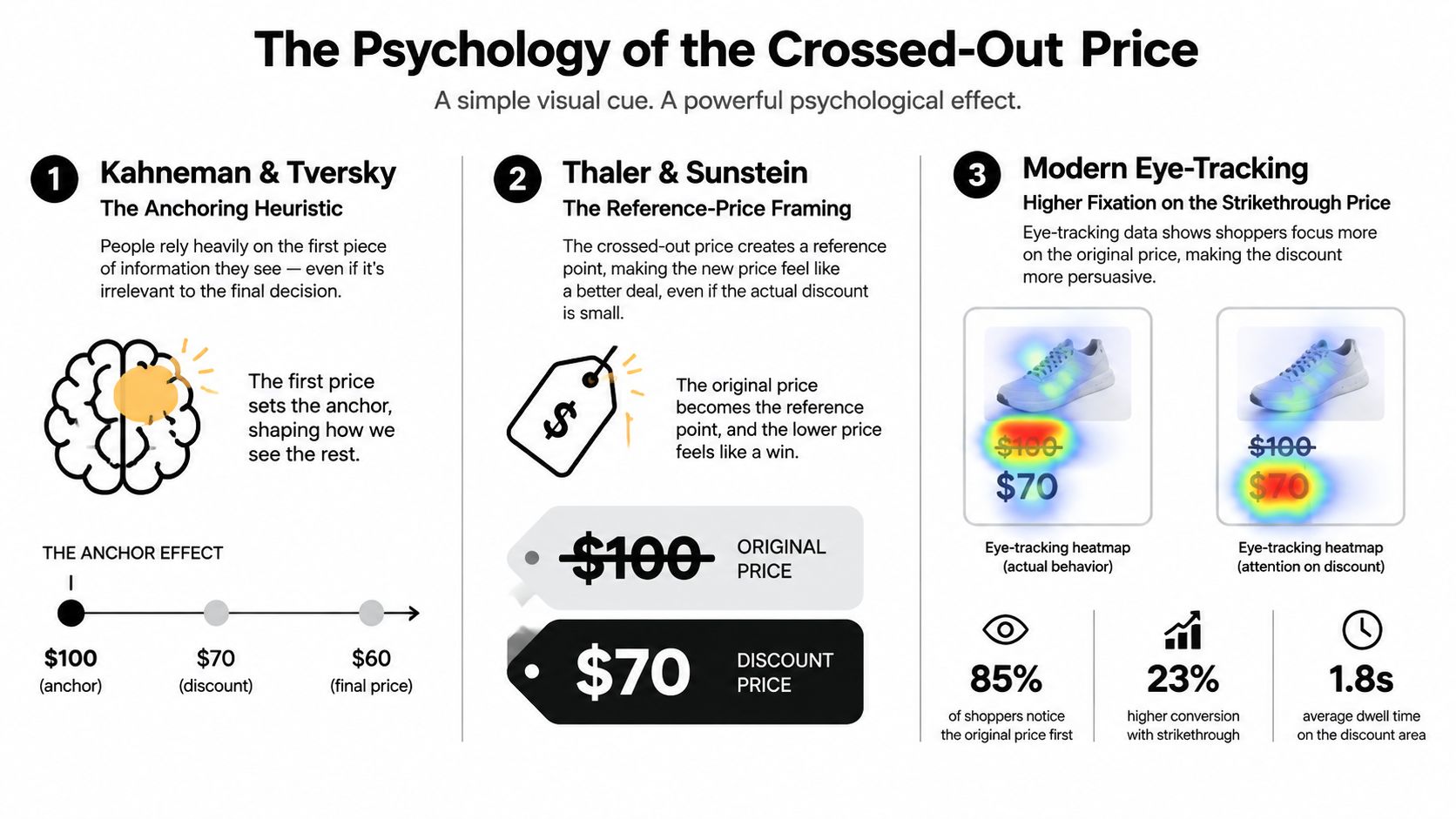
A shopper lands on a product page, sees the current price beside a crossed-out amount, and can judge the offer without recalling an earlier visit. The first number becomes a reference point. Research on price framing describes how that initial reference can shape the way shoppers interpret the amount they pay, as shown in the Harvard Business School research on price framing.
In ecommerce, the anchor is highly visible. It sits next to the required payment, often in the main price block rather than among shipping details or promotional copy. A credible reference reduces mental work because shoppers can compare the offer without calculating historical prices, opening another page, or remembering a prior order.
Credibility determines whether the signal survives
Peer-reviewed pricing research indicates that strikethrough prices can be more informative when shoppers are uncertain about quality and the discount appears credible for a high-quality seller (peer-reviewed pricing model on strikethrough prices). For a DTC team, the operating rule is simple: the anchor has to tell a believable story. An inflated reference may weaken the quality signal instead of strengthening the bargain.
Shoppers check that story against several informal references:
- Recent memory: They recall the price from a previous visit or order.
- Category context: They compare nearby products and competing storefronts.
- Brand positioning: A premium brand with constant, extreme markdowns can appear less premium.
- Checkout reality: They notice whether the saving changes after selecting a selling plan, bundle, or shipping condition.
A digital twin test reported that displaying a crossed-out price at the same final price increased product reaches from 3.0 to 5.5 out of 10 occasions, an 83% lift attributable to the anchor alone (digital twin test of strikethrough pricing). Treat that result as evidence for testing, not a forecast for every catalog. The winning variation may depend on product familiarity, traffic source, device, and how clearly the reference price is explained.
The useful test is whether a defensible reference price improves the decision without creating disappointment after purchase. Record the anchor, current price, product, device, traffic source, and refund or return behavior. A stronger first-order conversion rate is not a durable win if shoppers later feel misled, especially in subscription flows where the same comparison appears at renewal.
For merchants testing bundles or tiered discounts in Shopify, keep the reference logic consistent across each tier. A lower unit price can be persuasive, but the crossed-out amount must describe the same quantity, eligibility rule, and purchase condition as the live offer. In a subscription catalog, repeating an anchor at every renewal raises the trust cost of any mismatch. The theme can display the signal, but accurate pricing data and defensible rules determine whether it helps conversion.
Setting Up Strike Through Pricing in Shopify
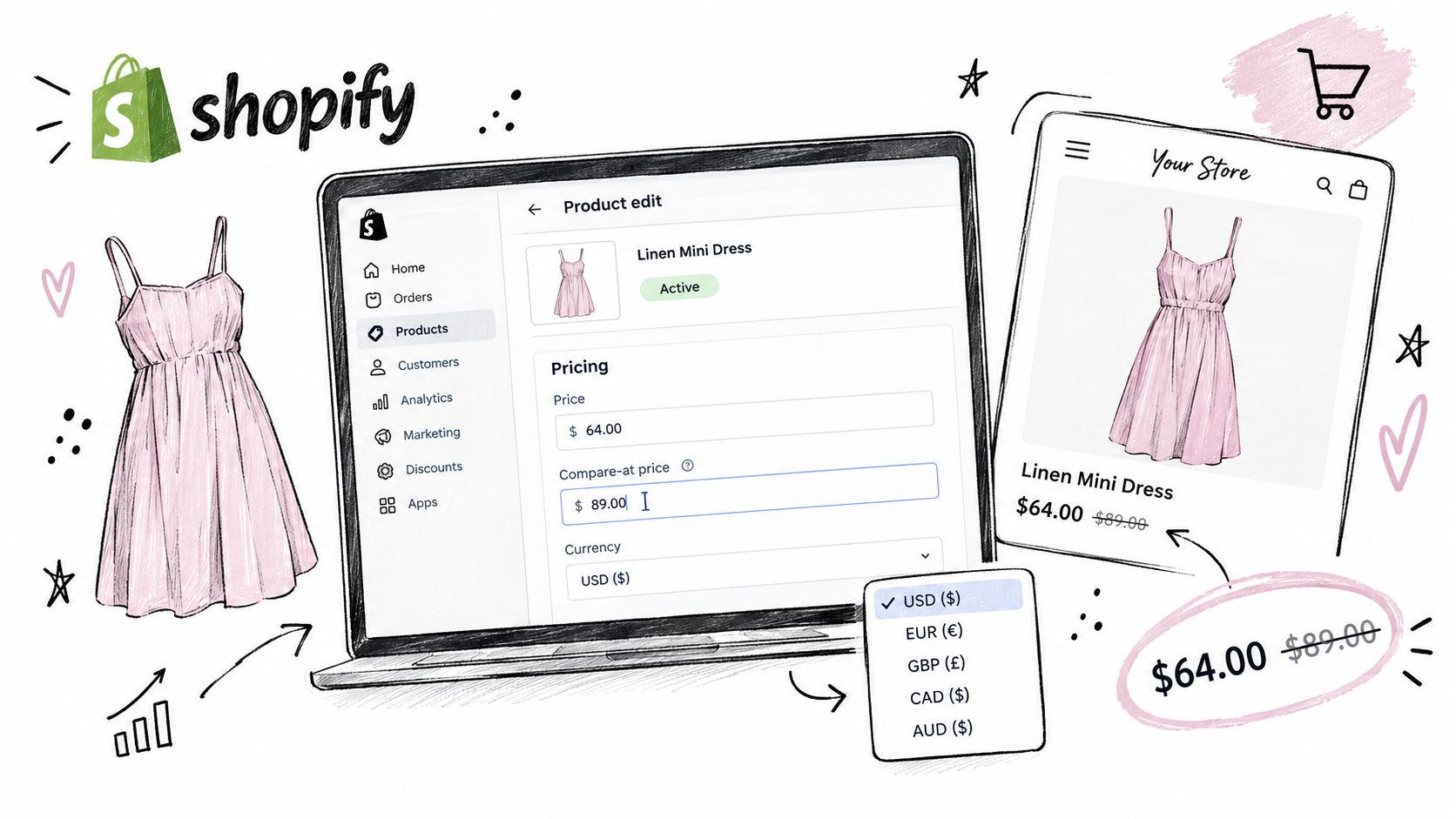
Begin in the product editor, not in the theme code. Open the product, select the relevant variant, and enter the intended compare-at price in the Pricing area alongside the current selling price. Check the currency and then preview the exact variant on the storefront, because a product can contain several price combinations and only some may qualify for the sale treatment.
Separate product pricing from selling-plan pricing
A standard Shopify theme typically reads the current price and compare-at price from the product or variant price object. In a Liquid-based theme, confirm that the product price snippet outputs both values and applies a sale-state class such as price--on-sale. In JSON-template themes, inspect the product information section and its price block instead of assuming the visual treatment is controlled by one price.liquid file.
The exact file name varies by theme. The operating principle doesn't: the current price must remain the primary value, while the compare-at value must be marked as a previous or reference amount in both presentation and semantics. If an app replaces the native price block, test the app's rendered markup rather than editing a theme file that may no longer control the visible price.
Practical rule: Treat the compare-at field as pricing data and the line-through as a presentation layer. Don't hardcode an anchor into a theme file.
For teams changing many catalog prices, a controlled bulk workflow is safer than manual edits across variants. Document the source and effective date of every reference update, then use a staging theme or preview environment before publishing. A bulk-price workflow can also help coordinate catalog changes with a Shopify bulk price change process, but it doesn't replace review of the historical price record.
Audit every place the shopper sees the amount
The product page is only the first rendering surface. Check the collection card, cart line item, checkout summary, post-purchase upsell, and order status page. Native product surfaces may read compare-at data directly, while subscription widgets and post-purchase components often calculate their own selling-plan prices.
Shopify Subscriptions and apps such as Recharge may place subscriber savings inside a selling-plan widget. That widget can show a recurring price and a comparison, but the comparison may not be the variant's standard compare-at value. Test one-time purchase, subscription selection, quantity changes, and variant changes separately.
A useful QA matrix includes:
- A full-price variant with no reference amount.
- A sale variant with a valid compare-at value.
- A subscription variant where the selling plan changes the final amount.
- A cart containing both one-time and recurring items.
- Mobile and desktop views with enlarged browser text.
The video below provides a visual reference for a Shopify pricing workflow.
Don't assume the checkout will reproduce every PDP styling decision. Confirm the actual order summary and notification copy, especially when the recurring amount is created by a selling plan rather than by changing the variant's base price.
Using Strike Through Pricing for Subscribe and Save
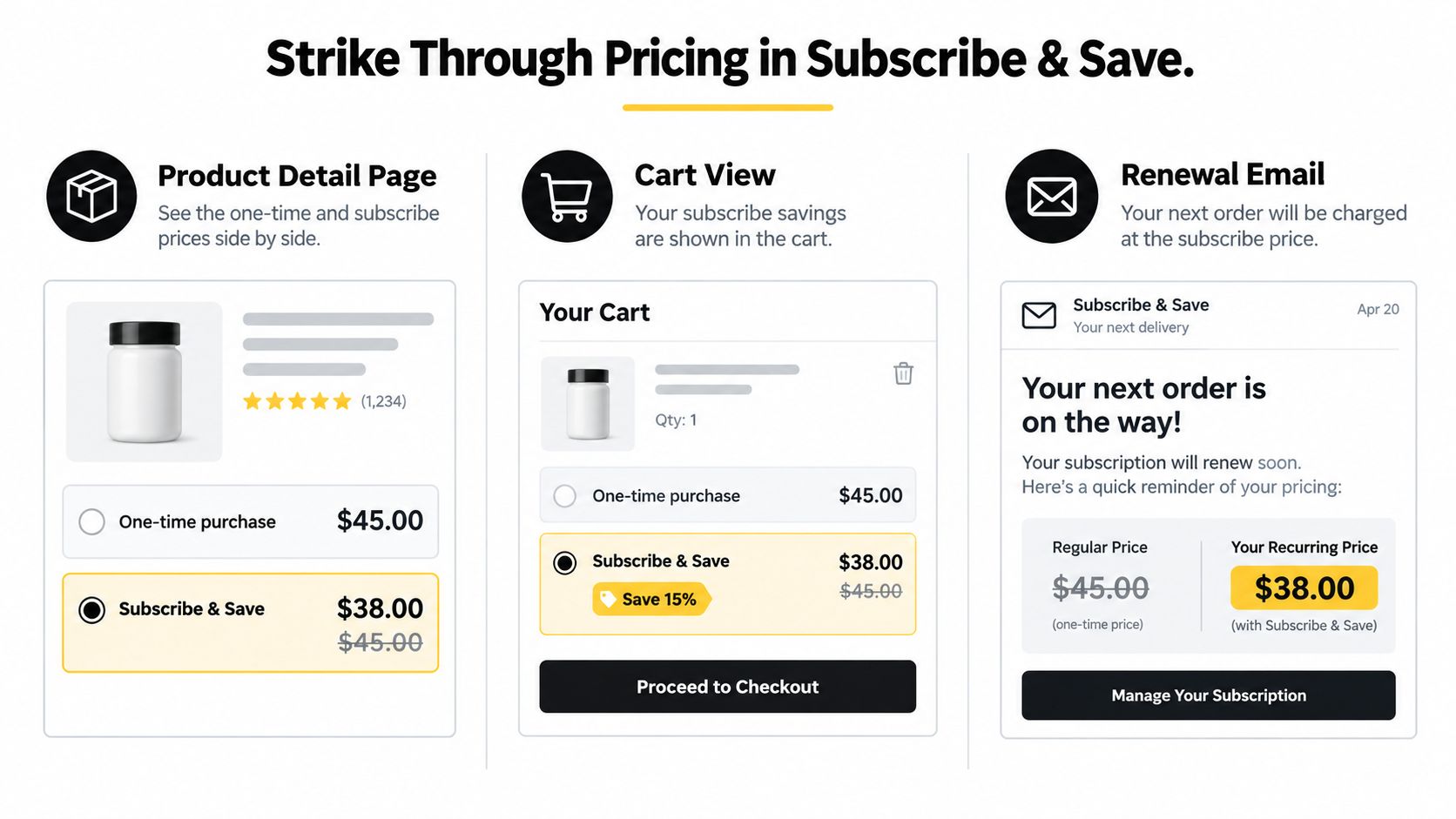
Subscription merchants often have two separate comparisons to manage. The first compares a product's current price with a genuine prior price. The second compares the one-time purchase with the lower recurring price offered through a selling plan. Combining those anchors can clarify value, but it can also overwhelm the customer or imply savings that won't remain true at renewal.
A clean structure begins with the one-time option. Show the regular purchase price as the baseline, then place the subscription price beside it with an explicit saving statement. The crossed-out amount should identify what the subscriber would otherwise pay, not an unrelated manufacturer reference or a synthetic figure assembled from several promotions.
Build the comparison around the selling plan
Native Shopify selling plans expose recurring purchase terms, while subscription apps such as Recharge, Skio, or RecurX may provide widget settings for subscriber price, percentage saved, billing interval, and renewal copy. The important implementation detail is that the widget must redraw the comparison from the selected plan. A product page anchor that stays fixed while the customer changes frequency or quantity creates a misleading or confusing experience.
Three patterns work well when the underlying values are real:
- One-time versus subscribe and save: Put the two options side by side, with the recurring amount clearly labeled by billing interval.
- Tiered subscriber discounts: If the plan grants deeper savings after a defined order milestone, show the new recurring amount only when the customer qualifies. Don't preview a later benefit as though it applies immediately.
- Build-a-Box comparison: Compare the bundle price with the sum or standard price of the included products only when that unbundled reference is documented and understandable.
The broader mechanics of recurring offers, including intervals and tiered plans, are covered in this subscription pricing strategy guide. The same rule applies here: an anchor must describe the transaction the customer is evaluating.
Renewals are a second conversion surface
The first order may have been won by a visible comparison, but the customer must accept the recurring value later. Renewal email copy should show the amount being charged, the billing date or cycle language, and the reference used to explain the saving. If the original price changes, the email shouldn't repeat an obsolete anchor.
Measure recurring attach rate alongside subscription save-rate. The first tells you whether shoppers choose the plan. The second tells you whether subscribers keep the plan or alter, pause, skip, or cancel it. A strong first-order offer with weak continuation can indicate that the anchor attracts bargain seekers without establishing durable product value.
For operational control, a Shopify-native subscription tool such as RecurX can manage selling plans, Build-a-Box configurations, customer self-service controls, renewal communications, and subscription analytics inside the merchant workflow. The pricing display still needs independent validation, because subscription infrastructure doesn't make an unsupported reference price legitimate.
Accessible Strike Through Pricing That Still Sells
Accessibility doesn't weaken a discount. It makes the comparison available to more shoppers and removes a source of avoidable confusion. A crossed-out number that depends on thin gray text, color alone, or visual placement can disappear for customers with low vision, color-vision differences, screen readers, or browser magnification enabled.
Use the sale price as the strongest visual value, but make the original price readable at the same scale. The contrast target for normal text is a minimum 4.5:1 ratio, and the old price shouldn't be reduced to a tiny label that forces customers to zoom. The line itself is supplementary. It can't be the only indication that the amount is a previous price.
Use semantics, not decoration
A theme can output a semantic del element for the former price and an explicit accessible label that states the relationship between the values. The exact Liquid implementation depends on the theme, but a pattern like this gives developers a clear starting point:
{% if product.compare_at_price > product.price %}
  <div class="price price--on-sale">
    <span class="price__current" aria-label="Sale price">
      {{ product.price | money }}
    </span>
    <del class="price__compare" aria-label="Original price {{ product.compare_at_price | money }}">
      {{ product.compare_at_price | money }}
    </del>
  </div>
{% else %}
  <span class="price__current">
    {{ product.price | money }}
  </span>
{% endif %}
Some stores need a combined label so a screen reader announces the comparison in one pass. Developers should test the result with the theme's actual currency formatting and with variants that update through JavaScript. If an app wraps the value in a generic span, a CSS fallback can preserve the visual cue:
.price__compare,
.compare-at-price {
  color: #333333;
  font-size: 1em;
  text-decoration-line: line-through;
  text-decoration-thickness: 0.12em;
  text-decoration-color: currentColor;
}
The CSS doesn't create accessibility by itself. It supports a semantic structure, readable contrast, and a line that remains visible when users magnify the page.
Accessible Strike-Through Pricing Specs
| Element | Required Pattern |
|---|---|
| Former price | Use semantic del or s, with an accessible label identifying it as the original or previous price |
| Current price | Keep it visually prominent and label it as the sale or current price where needed |
| Contrast | Maintain at least a 4.5:1 contrast ratio between price text and its background |
| Color usage | Never communicate the discount through color alone |
| Typography | Keep the crossed-out value no smaller than the headline sale price |
| Dynamic updates | Update labels and values when the selected variant or selling plan changes |
| QA | Test keyboard access, screen-reader output, zoom, mobile width, and a Lighthouse accessibility audit |
A discount that survives a screen reader and a contrast audit is easier for every customer to understand, including the customer who contacts support after checkout.
Staying Compliant With Reference Price Rules
A crossed-out price can render perfectly and still create legal risk. The question is whether the reference number reflects a genuine selling history. Keep records showing how long the higher price was offered, whether customers could buy at it, and whether it represented the normal price rather than a temporary fiction.
In the European Union, a promotional struck-through reference price must be the lowest price in the previous 30 days. The requirement prevents merchants from raising a price immediately before a sale and presenting that increase as a discount. Price-framing research also shows why the reference affects perceived value, but the commercial claim still needs evidence.
Translate regional rules into Shopify checks
UK merchants need to review both the reference price and the complete presentation of the offer. Current legal coverage discusses the former blanket sales-ratio approach associated with the CMA and the DMCCA's focus on whether a misleading reference price could change a consumer's transactional decision. Preserve the underlying records rather than relying on an internal ratio.
Germany has faced close scrutiny over the historical price used for a discount. Legal analysis of a 2025 Federal Court ruling describes a requirement to reference the lowest price charged in the prior 30 days. Marketplace standards are also becoming more structured. Coverage of changing reference-price standards describes Amazon's 2026 rule changes, including “List Price” and “Typical Price” concepts based on recent purchase history and price medians (legal analysis of discount advertising and reference prices).
For Shopify, turn those obligations into checks before publishing:
- History: Export variant price history and identify the lowest relevant price within the applicable regional window.
- Evidence: Confirm that customers could purchase at the reference price. A value entered in Shopify without a real selling opportunity is weak support.
- Market: Check localized storefronts, currencies, feeds, and ads for mismatched comparison values.
- Subscriptions: Verify that subscriber savings use a genuine price. Do not create an artificial anchor by stacking a subscription discount on top of another reduction.
- Language: Make “was,” “now,” “save,” and percentage claims match the records and local requirements.
- Channels: Compare the PDP, collection, cart, checkout, email, and marketplace listing.
- Renewals: Review every subscription renewal surface. A crossed-out price that repeats at each renewal should describe the recurring charge accurately, not only the first-order promotion.
- Review: Send the pricing record and proposed copy to qualified regional legal counsel when the campaign carries material risk.
The Emma Sleep reference-pricing dispute also shows why one sales-share heuristic cannot establish genuineness. Duration, sales volume, consumer understanding, and the overall presentation may all affect the assessment. Preserve the complete price path, including subscription changes and regional variants, rather than one isolated figure (analysis of the CMA and Emma reference-pricing case).
Your Strike Through Pricing Checklist
A merchant can turn the implementation into one focused operating pass. Assign the pricing history and copy to the commerce lead, the rendering and semantic markup to the developer, and the regional review to the compliance owner.
Pricing and offer setup
- Audit compare-at fields: Find variants with missing, stale, inconsistent, or unsupported references.
- Use believable references: Select the appropriate recent historical price for each region and product state.
- Separate offer types: Keep one-time, subscription, bundle, and milestone discounts distinct.
- Test the decision: Compare the visible offer with a clean control while monitoring downstream customer behavior.
Subscription and lifecycle
- Redraw selling-plan values: Update the crossed-out comparison when the customer changes frequency, quantity, or eligibility.
- Repeat the logic at renewal: Ensure renewal emails and account pages explain the amount that will recur.
- Watch both metrics: Review recurring attach rate beside subscription save-rate, not first-order conversion alone.
Accessibility and storefront QA
- Check every surface: Review PDP, collection, cart, checkout, post-purchase, order status, and renewal messaging.
- Preserve semantics: Use
delors, descriptive labels, and dynamic updates for variant and plan changes. - Go-live blocker, contrast: Confirm the crossed-out price exceeds the 4.5:1 contrast requirement.
- Go-live blocker, labeling: Confirm every crossed-out value has a valid
aria-label. - Go-live blocker, evidence: Match every displayed reference to a documented prior selling price within the required regional window.
Compliance review
- Export the history: Keep a dated price record with variant, market, currency, and selling-plan context.
- Audit regional storefronts: Verify that the same claim remains accurate across localized channels.
- Review stacking: Remove language that implies savings from a price customers never paid.
- Request legal review: Escalate unusual promotions, marketplace references, or ambiguous regional claims before launch.
Strike through pricing converts best when the line communicates a truth the customer can verify, understand, and accept again at renewal. RecurX provides Shopify-native subscription plans, Build-a-Box flows, customer account controls, renewal messaging, payment recovery, and recurring analytics that can support this workflow. Visit RecurX to evaluate how its subscription infrastructure can help you connect recurring offers with clearer pricing operations, then audit every anchor before your next campaign goes live.
strike through pricing · shopify subscriptions · compare at price · subscription discounts · ecommerce pricing
Keep reading
- Quantity Price Breaks for Shopify SubscriptionsSet quantity price breaks on Shopify subscriptions without giving away margin. Compare tiers, Build-a-Box, cart rules, and AOV versus profit.
- Reduce Involuntary Churn on Shopify: 5 Recovery StepsReduce involuntary churn on Shopify with decline routing, card-update flows, retry timing, and measurement that avoids inflated recovery numbers.
- Reporting vs Analytics: When to Use Each in SubscriptionsReporting vs analytics for subscription stores: what each answers, which metrics belong in reports, and when to analyze churn, cohorts and LTV.
Start growing recurring revenue on Shopify
RecurX has a 14-day free trial and zero transaction fees on every plan. Install in minutes.
Start your free trial →